Showing posts with label in. Show all posts
Showing posts with label in. Show all posts
Sunday, May 10, 2015
Text Effects Put Images In Text With Corel Draw PowerClip
Corel Draws PowerClip makes it really quick and easy to place Images within Text.


 Set the Font Size to 150 from the Font Size List.





Read more »
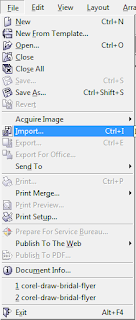
- Import your Image - Go to the Menu Bar and select File > Import. Browse to locate your Image in the Import Window, and select the Import button.
- Detailed information about the selected Image will be on the right side of the cursor. Click anywhere on the canvas to place the Image. Resize the Image if necessary.
- Put some Text on the page - Select the Text Tool from the Toolbox located on the left of the screen. Click on the page and type the Text. Double click over the Text to select it, then go to the Property Bar and choose a strong bold Font from the Font List. Visit my blog post for more information on finding really awesome Free Fonts for download. For this tutorial, I used the Impact Font.

- Place the Text on the part of the Image that you would like to clip.
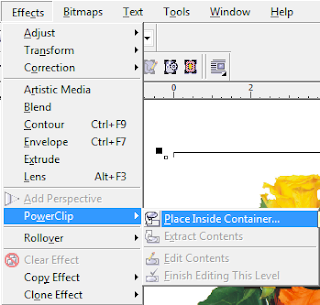
- Select the Image - Go to Effects > PowerClip > Place Inside Container. The cursor will change to a really thick black arrow. Move it over the Text and click.

- Just like that, the Image will be placed inside the Text. A very cool and yet simple effect.
- Give it a Stroke by right clicking over any color on the Color Palette to the right.
- Add a Drop Shadow. Theres lots of things that you can do with this tool. Have fun!
Have a suggestion for Super Cool Text Effects? Leave a comment below.

Friday, May 8, 2015
How To Rotate An Object in Inkscape Free Rotate Specific Degrees and 90 Degree Increments
Free Rotate An Object.png) Select the Object that you wish to Rotate. Select the Object that you wish to Rotate.  8 Black Arrows will appear around the Object when it is selected. These are Resizing Handles. 8 Black Arrows will appear around the Object when it is selected. These are Resizing Handles.Clicking on the Object again will change the Resizing Handles to Rotation and Skew Arrows. The Rotation Arrows are at the 4 Corners of the Object. Move the cursor over any one of them, hold the mouse button down, and turn the mouse in a Clockwise or Counter-clockwise direction to Free Rotate. Rotate Object To A Specified Degree | |
  Go to the Menu Bar and select Object > Transform. 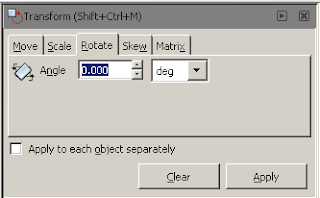 This will open the Transform Window which has 5 Tabs, namely Move, Scale, Rotate, Skew, and Matrix. Select the Rotate Tab. Where you see Angle, you will type in the Degrees you would like the Object to be Rotated. Keep in mind that to Rotate the Object Clockwise, you will have to enter a Negative Number (e.g. -30). To Rotate the Object Counter-clockwise you will have to enter a Positive Number (e.g. 30). Click on the Apply Button when finished. | |
Rotate Object in 90 Degree Increments Select the Object you wish to Rotate. Select the Object you wish to Rotate. Go to the Menu Bar and select Object > Rotate 90 Deg CW. This will move your Object forward in a Clockwise Direction at 90 Degree Increments each time you use it.      To Rotate in a Counter-clockwise Direction go to Object > Rotate 90 Deg CCW. To Rotate in a Counter-clockwise Direction go to Object > Rotate 90 Deg CCW. This will move your Object backward in a Counter-clockwise Direction at 90 Degree Increments each time you use it. |
Computer Courses Free Classes in Urdu
I make this blog for online information and education of Computers & Computer courses
- I am teaching Computer courses since 2003 in different institute Affiliated with S.B.T.E, S.D.C & P.C.I in Karachi Pakistan
- Now you can learn Computer courses online in urdu with onlinecompteacher
- I am teaching online with the help of my videos tutorials and other staff like animation presentations,images,PDF files & my e-book
- So conform your admission in my online Computer course free classes in Urdu
Wednesday, February 18, 2015
Google’s autonomous car gets a ‘B’ in driving test Not great but better than most of us

Still, this latest “exposé” is not nearly as damning as some are framing it to be. To me, the interesting thing about self-driving cars is not the amount of trust that people are willing to put in self-driven vehicles, but rather the amount of trust that they are willing to put in human-driven vehicles. Most people’s reaction to driving algorithms involves questions such as, “What if there was a bug?” or, “What if you got hacked?” Such questions are best answered with a counter-question: What if your taxi driver had a seizure? What if your bus driver panicked in an unexpected situation? What if the trucker coming from the other direction simply fell asleep at the wheel?
Bear in mind that some maddeningly large portion of human drivers also don’t know how to deal with roundabouts, rail crossings, and similar situations, but that they have too much ego and self-interest to admit this fact and avoid a particular intersection. We accredit these people to drive because, a) the economy must continue to function even if most people are uncoordinated and easily distracted, and b) because we understand that licensing someone to drive is about telling whether or not they are good enough to drive. Every tiny mistake, from a missed shoulder check to an improper turning angle, could easily result in a death, so the point is not whether a driver could hypothetically make a fatal mistake, but how likely such a mistake is to occur.
 |
| Autopilot in planes, while less complex, has improved the safety of air travel. |
Additionally, most drivers can’t be usefully
trained how to react to things like aquaplaning or brake failure, and even if they have been trained they’ll often panic and take the wrong action. Self-driving vehicles, by contrast, can be given vicarious training on the level of a population — new research on how to handle ice can be distributed and perfectly internalized by every auto-car on the road, regardless of age. I can’t even get my grandpa to yield to buses! There seems to be something deeply welded into the human psyche, an impulse to be less fearful of dangers we understand. I can understand and empathize with my grandpa’s crusty stubbornness with regard to transit vehicles, and thus his dangerous driving is less distressing to me than the exact same behavior unconsciously executed by some faceless software construct.
When people point to the early-stage limitations of self-driving software as an attack on its chance of success, they are also making a second, more strident statement: that self-driving vehicles don’t just have problems, but that those problems are in fact more dangerous than the problems with human drivers. I don’t have to cite a glut of horrifying driving statistics to point out how absurd such an idea is, do I? The extreme fallibility (and physical limitations) of human drivers are in fact pushing self-driving technology forward, as industry sees a chance to reduce liability; if you don’t trust the public-safety motivations of government overseers, then trust the profit incentives pushing corporations like Walmart away from accident-prone mammalian car-pilots.
 |
| A self-driving Prius much like the one that took the Nevada road test |
Imperfection in a self-driving system is fixable — a self-driving mistake that leads to a fatality can be used to prevent all such mistakes from happening again in the future. As such, bugs in software ought to distress us far less than similar or identical bugs in human ability. The safety of a road with even one human driver is dictated by the worst moment of the worst human driver in the area, while the safety of a totally self-driven roadway is dictated by the pinnacle of human mastery of software and multi-variable kinetics.
This test shows not that self-driving cars are as bad as a middling driver, but that they are as good as one. That’s better than any highway-driving population on Earth could ever hope to collectively deliver. Remember: it’s not about the car being better than you. It’s about you being worse than the car.
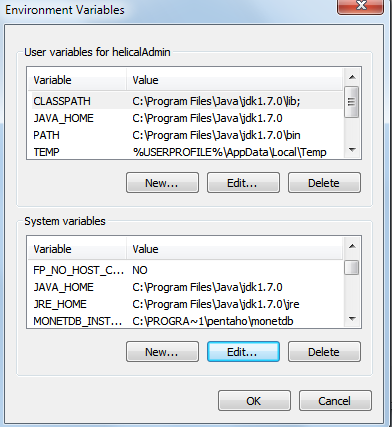
path classpath java home jre home settings for pentaho community edition in windows 64 bit OS
* set as it is in the image(User variables) do not concentrate on system variables
CLASSPATH,JAVA_HOME,PATH
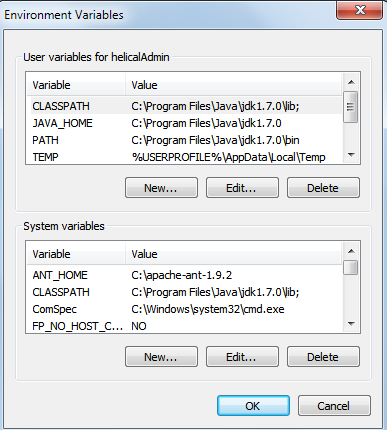
System variables
JAVA_HOME, JRE_HOME for pentaho community installation.
Thanks,
Sadakar
Monday, February 16, 2015
The Top 5 Sexiest Female Programmers in the World
Earlier I use to think that females are not good at programming and males are dominating the programming world. But after doing research on the internet I realized that I was wrong. This is myth that females are not good programmer. How one can forget about the first female programmer Ada Lovelace?
So I thought that I should prepare a list of top female programmers all over the world and share it with others. Below I am listing out the top 5 sexiest female programmers who are a great combination of beauty with brains.
Also Read: List of Biggest and Popular Programming Contests
Also Read: The Top 10 Highest Earning Websites in the World
.JPG "The Top 5 Sexiest Female Programmers in the World (Jade Raymond)")
.jpg "The Top 5 Sexiest Female Programmers in the World (Sara Haider)")


Also Read: The Top 4 Websites to Create Android Apps Online for Free
Also Read: Top 5 Programming Languages That Are In Demand By Employers

If you feel anything missing or wrong in above article then you can mention it in the comment section. Please do share if you have liked the above article.
Source:
http://www.techtricksworld.com/2013/08/5-famous-female-programmers.html
http://www.trickslab.net/2013/07/Sexiest-Coders.html
So I thought that I should prepare a list of top female programmers all over the world and share it with others. Below I am listing out the top 5 sexiest female programmers who are a great combination of beauty with brains.
Also Read: List of Biggest and Popular Programming Contests
Also Read: The Top 10 Highest Earning Websites in the World
Jade Raymond
Jade Raymond completed her graduation from St. Georges School of Montreal and Marianopolis College. She received a Bachelor of Science degree from McGill University in 1998, where she majored in computer science. She started her career as a programmer for Sony. Jade is the producer of a famous game Assassins Creed. Currently she is working as a managing director of Ubisoft Publisher.Sara Haider
Sara Haider is another sexy & famous female programmer. She completed her education from University of Waterloo. She worked for Google for a considerable amount of time. She was involved in the development of Vine app for android. Currently she is working as a software engineer at Twitter.Corrine Yu
Probably Corrine Yu comes at first position in world’s female game programmers list. She is a professional programmer and coder too. She has given her contribution in development of various famous games like Brothers in arms, Borderlands, Zombie, Unreal Engine 3. She made a great contribution in developing Halo 4, which became very popular video game of year 2012. Apart from game programming she won national award in 2009 for Nuclear Physics research.Amanda Wixted
Amanda Wixted is known all over the world as one of the most effective and efficient mobile developers as well as a good game programmer. Amanda has given her contribution in the development of the popular game Farmville. Currently she is consulting and managing few companies and she started also a company Turf geography club.Also Read: The Top 4 Websites to Create Android Apps Online for Free
Also Read: Top 5 Programming Languages That Are In Demand By Employers
Tracy Chou
Tracy Chou holds Bachelor’s degree in Electrical Engineering as well as Master’s degrees in Computer Science from the Stanford University. She worked for many big companies like Google, Facebook, Quora. Currently she is working as a software engineer for Pinterest.If you feel anything missing or wrong in above article then you can mention it in the comment section. Please do share if you have liked the above article.
Source:
http://www.techtricksworld.com/2013/08/5-famous-female-programmers.html
http://www.trickslab.net/2013/07/Sexiest-Coders.html
C Program to reverse all the strings stored in an array

#include<iostream.h>
#include<conio.h>
#include<string.h>
#include<stdio.h>
void main()
{
clrscr();
char a[3][50];
int i,j,k,len;
cout<<"Enter 3 strings:
";
for(i=0;i<3;i++)
{
gets(a[i]);
}
cout<<"
The list of orignal strings:
" ;
for(i=0;i<3;i++)
{
cout<<a[i]<<"
";
}
cout<<"
The list of changed string:
";
for(i=0;i<3;i++)
{
len=strlen(a[i]);
for(j=0,k=len-1;k>=0;j++,k--)
{
cout<<a[i][k];
}
cout<<"
";
}
getch();
}
Sunday, February 15, 2015
Top 5 Programming Languages That Are In Demand By Employers
With the entire buzz about learning to code and how programming is the new superpower, it become imperative to know at least one of the programming languages so as to gain a leeway over others. Even if you are not a novice, and already have some knowledge of programming than also it is quite fruitful to know which language is having the maximum traction in the tech world.
Also Read: Top IT Certification Programs for Beginners in 2014
Also Read: List of Biggest and Popular Programming Contests
Are you a developer looking to polish your coding skills? Or you must be a novice caught in midst of the current wave of learn-to-code, looking for a language skill that can provide you reliable employment in the New Year. With so many programming languages out there it can be daunting task for even a seasoned professional to decide which one is the best for making a career. Here are listed 5 programming languages that will remain as a top employable skill for a long time to come.
Java
Easily one of the most important programming languages of the modern computing era, Java is a higher level language that was designed by James Gosling of Sun Microsystems, and released in 1995. The biggest benefit of Java has been its “Write once, run anywhere,” (WORA), meaning that the code written once can be used multiple times on multiple platforms. This is the reason that Java is the first preference for developing most enterprise applications.
Today, Java is one of the most popular languages, having around 10 million developers, creating client-server web applications. Even after being around for more than 15 years, and emergence of many other languages, Java is yet to witness any decline in its popularity, a part of which can be credited to its secure features. Java also happens to be one of the most well paid programming skills, with a Java developer earning an average annual base salary of $95,000.
SQL
Structured Query Language is a specialized programming language that was designed for managing data in relational database management systems (RDBMS). It is a fourth generation language, originally developed by IBM in early 1970s and has since undergone multiple changes over the course of time. The average salary of a person trained in SQL is around $90,000 and the top employers include big names like Microsoft, Dell, Disney, Amazon, UnitedHealth Group, Amazon amongst others.
C
C is one of the oldest programming languages still in wide usage and still continues to remain the most popular, according to the Tiobe Programming Community Index. A number of other new languages such as C#, Java, Python, PHP and Perl have borrowed concepts from C. The powerful, stable and easy availability of its libraries make C a reliable choice to fall back upon.
It also serves as the introduction to the world of programming, as learning C makes it easier to learn other languages. The average salary of a candidate with expert skills in C is around $93,000. Most C programmers spend their time creating highly complex applications such as video games, and high-frequency trading apps.
Also Read: 6 Tools to make JavaScript Development a Cakewalk
Also Read: 6 FAQs on Graphic Designing as a Career
Python
Python is a high level language, created by Guide van Rossum as a successor to ABC language. It was designed keeping in mind the human readability limitations, which is the reason that it doesn’t take as much code to execute a particular function as it does in other programming languages. It is an object-oriented language that developers can put to use in many different ways.
The streamlined syntax makes it easier for newbie programmers to pick up the concepts, and also encourages them to take it up as a career. With internet explosion, use of Python has picked up pace for creation of web based apps. Currently it powers some of the most popular websites of the world, which includes names like Instagram.com, and Pinterest.com, amongst others. Python developers can expect to earn anything in the range of $83,000 annually.
PHP
PHP (Hypertext Processor) is a server side scripting language popular in web development. Easy to learn, PHP powers more than 244 million websites, including the top content management systems WordPress, Joomla, Drupal amongst others. The relatively young language has found favor owing to its ability of being easily embeddable within the codes of HTML. Learning PHP is indispensable for someone who is looking to make a full time career out of web development. There are a huge number of employment opportunities for individual with skills in PHP programming.
Learning to code in 2014 should be one of your resolutions for the New Year.
Author Bio:
Saurabh Tyagi took to writing at a tender age of ten, when he submitted his first essay for the school magazine. He is also a hobbyist programmer, going as far as pursuing multiple courses in the popular programming languages.
Saturday, February 14, 2015
New Mobile Product Sales Dashboard 3 Example in Pentaho CDE
Hi Guys,
Here is the new dashboard work out in Pentaho CDE.
High lights of the dashboard:
1) Bar Chart with Trend Line
2) Stacked Bar chart with Trend lines + Line Chart.
3) Submit Button for input controls after selection.
4) Export charts to jpg images.
5) Reload with default inputs
6) Navigation (Home button) to Parent Dashboard(if we assume this as one of the child dashobards).
7) Mobile/iPad/laptop/Desktop comparability.
laptop View:


Share a sample data of yours ...!!! Ill give you the meaning of it.
References :
1) http://www.webdetails.pt/ccc2/
2) http://www.webdetails.pt/ctools/ccc.html
Thank you.
Sadakar
BI developer (Japser/Petnaho/Talend ETL).
Here is the new dashboard work out in Pentaho CDE.
High lights of the dashboard:
1) Bar Chart with Trend Line
2) Stacked Bar chart with Trend lines + Line Chart.
3) Submit Button for input controls after selection.
4) Export charts to jpg images.
5) Reload with default inputs
6) Navigation (Home button) to Parent Dashboard(if we assume this as one of the child dashobards).
7) Mobile/iPad/laptop/Desktop comparability.
laptop View:
Mobile View:
Share a sample data of yours ...!!! Ill give you the meaning of it.
References :
1) http://www.webdetails.pt/ccc2/
2) http://www.webdetails.pt/ctools/ccc.html
Thank you.
Sadakar
BI developer (Japser/Petnaho/Talend ETL).
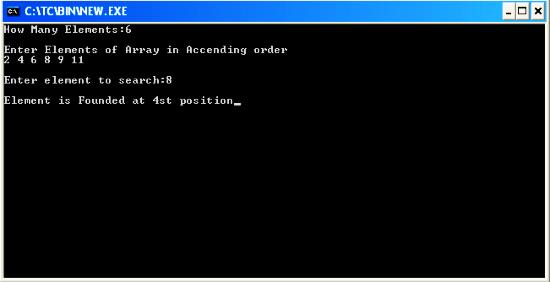
C Program to explain Binary search in Array
#include<conio.h>
#include<iostream.h>
void main()
{
int search(int [],int,int);
clrscr();
int n,i,a[100],e=-3,res;
cout<<"How Many Elements:";
cin>>n;
cout<<"
Enter Elements of Array in Accending order
";
for(i=0;i<n;++i)
{
cin>>a[i];
}
cout<<"
Enter element to search:";
cin>>e;
res=search(a,n,e);
if(res!=0)
cout<<"
Element is Founded at "<<res+1<<"st position";
else
cout<<"
Element is not found....!!!";
getch();
}
int search(int a[],int n,int e)
{
int f,l,m;
f=0;
l=n-1;
while(f<=l)
{
m=(f+l)/2;
if(e==a[m])
return(m);
else
if(e>a[m])
f=m+1;
else
l=m-1;
}
return 0;
}
Friday, February 13, 2015
HowTo Logout in Fedora 18
Step 1:
Read more »
open terminal
Step 2:
type the following and press enter
gnome-session-quit
Any chart responsive code in PreExecution in Pntaho CDE
function f(){
var myself = this;
// Set initial width to match the placeholder
myself.chartDefinition.width = myself.placeholder().width();
// Attach the resize handler only on the first execution of the chart component
if (!this.resizeHandlerAttached){
// Ensure render is only triggered after resize events have stopped
var debouncedResize = _.debounce(function(){
// Show chart again.
myself.placeholder().children().css(visibility,visible);
// Change chart width
myself.chartDefinition.width = myself.placeholder().width();
myself.render( myself.query.lastResults() );
}, 200);
// Attach resize handler
$(window).resize(function(){
// Only trigger resize if the container has changed width
if ( myself.chartDefinition.width != myself.placeholder().width()){
// Temporarily hide chart so that overflow does not happen
myself.placeholder().children().css(visibility,hidden);
// Trigger the resize with debounce
debouncedResize();
}
});
this.resizeHandlerAttached = true;
}
}
Thursday, February 12, 2015
HowTo Install Google Chrome in Fedora 18
This is for fresh installed Fedora 18 64bit using Live CD
1. go to https://www.google.com/chrome
2. click on the download chrome button

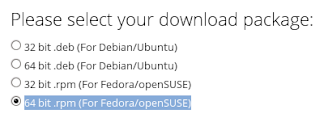
3. select the correct architecture for your installation (mine is 64 bit .rpm (For Fedora/openSUSE))
4. click on the accept and install button and wait for download to finish
5. open terminal
6. su -
7. yum install -y /home/**user**/Downloads/google-chrome-stable_current_x86_64.rpm
8. wait for download to complete and install itself (35mb+ download)
Drill down from one dashboard to another dashboard in Pentaho CDE Simple Example Not included any parameters
Hi Guys,
This post will teach you how you can drill down from one dashboard to another dashboard in pentaho CDE. This workout has done by one of my colleagues who is a fast learner.
You need to focus on 2 things in this post:
1) Connecting to JDBC datasource
2) Drill down from one dashboard to another dashboard.
NOTE :
Ill update you in next post about drill down from one dashboard to another dashboard using custom parameters concept.(Next work out).
Versions & Tools used for this post:
Pentaho C-Tools(CDE,CDA,CDF) 13.09 stable.
PostgreSQL DB - (foodmart database - which is one of jasperserver default databases)
Pentaho BA server 4.8 stable.
SOURCE CODE OF THE EXAMPLE
Download the example using below link
https://drive.google.com/file/d/0BymV_QP4TGBEZ0p1cnpydDJGeDQ/edit?usp=sharing
Deployment procedure:
1) Down load the .rar file from the link(File-Download in the google drive)
2) Unzip it and place it in "pentaho-solutions" folder.
3) Refresh or clear the cache of the pentaho browser(find upper left - Browser)
4) If you are unable to find the folder name , you need to create an index.xml file (Eg: you can find it inside any folder. copy and paste it inside your working folder and change the name of it).
5) No need to restart the pentaho server.
NOTE: Edit data base connections as per your requirement also you may need to change the query if you use any other database than foodmart
Dashboard 1:
1) Layout section
* Design your lay out for dashboard1
2) Components section
* You will be placing 1 bar chart where you will click on bars for drilling down to another dashboard.
We will come back to this section again after designing Dashboard 1 and Dashboard 2
3) Data Sources section
* Click on Data source Icon on right top conrner.
* From the left .. click on SQL queries -> Click on sql over sqljdbc
* Give the name and all the properties as shown in below image.

NOTE:
PostgreSQL server default details :
Driver: org.postgresql.Driver
UserName : postgres
Password : postgres
URL: jdbc:postgresql://localhost:6062/foodmart where 6062 is the port number which I used for postgres and foodmart is the database.
Note that default port number for postgresSQL is 5432 .
* Write a query which will suits for bars in the chart
* For eg:
SELECT
c.country,
c.state_province ,
c.city,
SUM(sf.store_sales)
FROM
customer c,
sales_fact_1997 sf
WHERE c.customer_id=sf.customer_id
GROUP BY
c.country,
c.state_province,
c.city
ORDER BY
c.country,c.state_province,c.city
* See the preview of the dashboard
* Out put will looks like below.

Dashboard 2 :
* Repeat the same steps as followed in Dashboard 1
* Take any component to display on the second dashboard.
* I have taken table component in this example and the output will looks like below mentioned image.
*

We have done with 2 dashboards individually.
Now, Its the time for us to some trick on Dashboard 1 so that when we click on Dashboard 1 , it will have to take you to Dashboard2
Steps:
1) Lets go back to Dashboard 1
2) Go to the Chart component and in the properties give clickable as True
3) In the clickAction you need to give the URL of second dashboard in java script.
Eg:
function q(s,c,v)
{
window.location = http://localhost:8085/pentaho/content/pentaho-cdf-dd/Render?solution=CDE-+Exploring&path=%2FDevelopement%2FDashboard+Drill+down&file=drill_down_to_table.wcdf;
}
Thats it you have done with drill down. Save the dashboard 1 and see the preview and then click on any bar appearing , you will navigate to the 2nd dashboard.
NOTE :
This post is only giving the idea of how to drill down from one dash board to another dashboard.
This post doesnt work with any parameters. The use custom parameter with drill down from 1 dashboard to another dashboard will come in next post from my end.
URL generating problem / Path problem for Second Dashboard
How to generate the URL for 2nd dashboard ( not only for this but also works for every dashboard).?
* Right click on 2nd Dashboard and click on "Open In New Tab" the with the URL the 2nd dashboard will open in fresh tab.
* Copy that URL and paste in drill down function.
* For eg : Just reference : Find the images below


References :
1) http://forums.pentaho.com/showthread.php?152634-Drill-down-from-bar-chart-to-another-dashboard
2) http://forums.pentaho.com/showthread.php?82999-Drill-Down-in-DashBoards
Sadakar
("Learning never exhausts the mind")
This post will teach you how you can drill down from one dashboard to another dashboard in pentaho CDE. This workout has done by one of my colleagues who is a fast learner.
You need to focus on 2 things in this post:
1) Connecting to JDBC datasource
2) Drill down from one dashboard to another dashboard.
NOTE :
Ill update you in next post about drill down from one dashboard to another dashboard using custom parameters concept.(Next work out).
Versions & Tools used for this post:
Pentaho C-Tools(CDE,CDA,CDF) 13.09 stable.
PostgreSQL DB - (foodmart database - which is one of jasperserver default databases)
Pentaho BA server 4.8 stable.
SOURCE CODE OF THE EXAMPLE
Download the example using below link
https://drive.google.com/file/d/0BymV_QP4TGBEZ0p1cnpydDJGeDQ/edit?usp=sharing
Deployment procedure:
1) Down load the .rar file from the link(File-Download in the google drive)
2) Unzip it and place it in "pentaho-solutions" folder.
3) Refresh or clear the cache of the pentaho browser(find upper left - Browser)
4) If you are unable to find the folder name , you need to create an index.xml file (Eg: you can find it inside any folder. copy and paste it inside your working folder and change the name of it).
5) No need to restart the pentaho server.
NOTE: Edit data base connections as per your requirement also you may need to change the query if you use any other database than foodmart
Dashboard 1:
1) Layout section
* Design your lay out for dashboard1
2) Components section
* You will be placing 1 bar chart where you will click on bars for drilling down to another dashboard.
We will come back to this section again after designing Dashboard 1 and Dashboard 2
3) Data Sources section
* Click on Data source Icon on right top conrner.
* From the left .. click on SQL queries -> Click on sql over sqljdbc
* Give the name and all the properties as shown in below image.
NOTE:
PostgreSQL server default details :
Driver: org.postgresql.Driver
UserName : postgres
Password : postgres
URL: jdbc:postgresql://localhost:6062/foodmart where 6062 is the port number which I used for postgres and foodmart is the database.
Note that default port number for postgresSQL is 5432 .
* Write a query which will suits for bars in the chart
* For eg:
SELECT
c.country,
c.state_province ,
c.city,
SUM(sf.store_sales)
FROM
customer c,
sales_fact_1997 sf
WHERE c.customer_id=sf.customer_id
GROUP BY
c.country,
c.state_province,
c.city
ORDER BY
c.country,c.state_province,c.city
* See the preview of the dashboard
* Out put will looks like below.
Dashboard 2 :
* Repeat the same steps as followed in Dashboard 1
* Take any component to display on the second dashboard.
* I have taken table component in this example and the output will looks like below mentioned image.
*
We have done with 2 dashboards individually.
Now, Its the time for us to some trick on Dashboard 1 so that when we click on Dashboard 1 , it will have to take you to Dashboard2
Steps:
1) Lets go back to Dashboard 1
2) Go to the Chart component and in the properties give clickable as True
3) In the clickAction you need to give the URL of second dashboard in java script.
Eg:
function q(s,c,v)
{
window.location = http://localhost:8085/pentaho/content/pentaho-cdf-dd/Render?solution=CDE-+Exploring&path=%2FDevelopement%2FDashboard+Drill+down&file=drill_down_to_table.wcdf;
}
Thats it you have done with drill down. Save the dashboard 1 and see the preview and then click on any bar appearing , you will navigate to the 2nd dashboard.
NOTE :
This post is only giving the idea of how to drill down from one dash board to another dashboard.
This post doesnt work with any parameters. The use custom parameter with drill down from 1 dashboard to another dashboard will come in next post from my end.
URL generating problem / Path problem for Second Dashboard
How to generate the URL for 2nd dashboard ( not only for this but also works for every dashboard).?
* Right click on 2nd Dashboard and click on "Open In New Tab" the with the URL the 2nd dashboard will open in fresh tab.
* Copy that URL and paste in drill down function.
* For eg : Just reference : Find the images below
References :
1) http://forums.pentaho.com/showthread.php?152634-Drill-down-from-bar-chart-to-another-dashboard
2) http://forums.pentaho.com/showthread.php?82999-Drill-Down-in-DashBoards
Sadakar
("Learning never exhausts the mind")
Subscribe to:
Posts (Atom)