Showing posts with label images. Show all posts
Showing posts with label images. Show all posts
Sunday, May 10, 2015
Text Effects Put Images In Text With Corel Draw PowerClip
Corel Draws PowerClip makes it really quick and easy to place Images within Text.


 Set the Font Size to 150 from the Font Size List.





Read more »
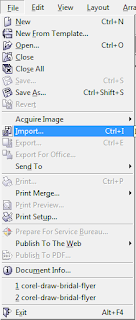
- Import your Image - Go to the Menu Bar and select File > Import. Browse to locate your Image in the Import Window, and select the Import button.
- Detailed information about the selected Image will be on the right side of the cursor. Click anywhere on the canvas to place the Image. Resize the Image if necessary.
- Put some Text on the page - Select the Text Tool from the Toolbox located on the left of the screen. Click on the page and type the Text. Double click over the Text to select it, then go to the Property Bar and choose a strong bold Font from the Font List. Visit my blog post for more information on finding really awesome Free Fonts for download. For this tutorial, I used the Impact Font.

- Place the Text on the part of the Image that you would like to clip.
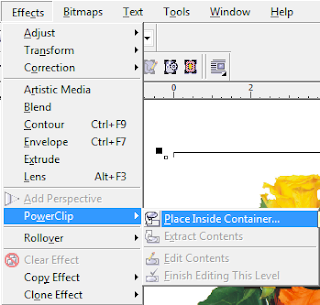
- Select the Image - Go to Effects > PowerClip > Place Inside Container. The cursor will change to a really thick black arrow. Move it over the Text and click.

- Just like that, the Image will be placed inside the Text. A very cool and yet simple effect.
- Give it a Stroke by right clicking over any color on the Color Palette to the right.
- Add a Drop Shadow. Theres lots of things that you can do with this tool. Have fun!
Have a suggestion for Super Cool Text Effects? Leave a comment below.

Wednesday, February 18, 2015
Hide Data Behind Images

Steganography is the art and science of hiding messages, Images, Data etc. in such a way that no one, apart from the sender and intended recipient, suspects the existence of the Data- security through obscurity. By using this small and neat trick you can hide whatever data you want behind any image of your choice without reducing its quality, In the following tutorial I will show you how you can hide data behind images without using any exotic software.(Good old Winrar or Winzip is sufficient)
1. Create a folder in your C drive and name it as "hide"(Using Root Directory will make this a bit easier).
2.Now you can put anything and everything you want to hide in this folder. Text files,images,executables (ANYTHING).Also, put the image behind which you want to hide the files in the same directory, say "image.jpg".
3.After putting everything you want to hide in the "hide" folder, Right click on it, and click "Add to Hide.rar" or "Add to archive". Our goal is to create a .rar file of the "Hide" folder.
Now you should see the "hide.rar"created in the same directory along with the folder.
4. Now we need to open up command prompt and change the working root directory to your current directory and type the following commands.(First change directory then create the output file).(Remember "C" is capital in "C:\")
►cd C:\
►Copy /b image.jpg + hide.rar output.jpg
Here "image.jpg" is the image behind which you want to hide the rar file.
"hide.rar" is the file containing the files to be hidden.
"output.jpg" is the output file that we want. It contains the hidden files, but looks like an image
After executing the following command, we will see an extra image called "output.jpg" created in the same directory.(Note that its size is size of image.jpg +size of hide.rar)
Now you can delete all the files except "output.jpg". If you double click the file, it opens a normal image. But you can see the hidden files by opening the file with winrar.(Right Click->Open With->Choose WinRar.)
Thats It! Now you can send this image to anyone, what others will see is just a regular image but if the recipient knows, s/he will be able to access any secret information privately.This tutorial can be used for any type of files like mp3,wmv,txt etc. since anything can be put into a Rar file.
Although you may want to keep the files to be hidden as small as possible since it wouldnt be very subtle if you try hiding a 15 Gb setup file for the game Crysis 3 behind a 5Kb smiley picture.
Subscribe to:
Posts (Atom)