Showing posts with label a. Show all posts
Showing posts with label a. Show all posts
Wednesday, February 18, 2015
Google’s autonomous car gets a ‘B’ in driving test Not great but better than most of us

Still, this latest “exposé” is not nearly as damning as some are framing it to be. To me, the interesting thing about self-driving cars is not the amount of trust that people are willing to put in self-driven vehicles, but rather the amount of trust that they are willing to put in human-driven vehicles. Most people’s reaction to driving algorithms involves questions such as, “What if there was a bug?” or, “What if you got hacked?” Such questions are best answered with a counter-question: What if your taxi driver had a seizure? What if your bus driver panicked in an unexpected situation? What if the trucker coming from the other direction simply fell asleep at the wheel?
Bear in mind that some maddeningly large portion of human drivers also don’t know how to deal with roundabouts, rail crossings, and similar situations, but that they have too much ego and self-interest to admit this fact and avoid a particular intersection. We accredit these people to drive because, a) the economy must continue to function even if most people are uncoordinated and easily distracted, and b) because we understand that licensing someone to drive is about telling whether or not they are good enough to drive. Every tiny mistake, from a missed shoulder check to an improper turning angle, could easily result in a death, so the point is not whether a driver could hypothetically make a fatal mistake, but how likely such a mistake is to occur.
 |
| Autopilot in planes, while less complex, has improved the safety of air travel. |
Additionally, most drivers can’t be usefully
trained how to react to things like aquaplaning or brake failure, and even if they have been trained they’ll often panic and take the wrong action. Self-driving vehicles, by contrast, can be given vicarious training on the level of a population — new research on how to handle ice can be distributed and perfectly internalized by every auto-car on the road, regardless of age. I can’t even get my grandpa to yield to buses! There seems to be something deeply welded into the human psyche, an impulse to be less fearful of dangers we understand. I can understand and empathize with my grandpa’s crusty stubbornness with regard to transit vehicles, and thus his dangerous driving is less distressing to me than the exact same behavior unconsciously executed by some faceless software construct.
When people point to the early-stage limitations of self-driving software as an attack on its chance of success, they are also making a second, more strident statement: that self-driving vehicles don’t just have problems, but that those problems are in fact more dangerous than the problems with human drivers. I don’t have to cite a glut of horrifying driving statistics to point out how absurd such an idea is, do I? The extreme fallibility (and physical limitations) of human drivers are in fact pushing self-driving technology forward, as industry sees a chance to reduce liability; if you don’t trust the public-safety motivations of government overseers, then trust the profit incentives pushing corporations like Walmart away from accident-prone mammalian car-pilots.
 |
| A self-driving Prius much like the one that took the Nevada road test |
Imperfection in a self-driving system is fixable — a self-driving mistake that leads to a fatality can be used to prevent all such mistakes from happening again in the future. As such, bugs in software ought to distress us far less than similar or identical bugs in human ability. The safety of a road with even one human driver is dictated by the worst moment of the worst human driver in the area, while the safety of a totally self-driven roadway is dictated by the pinnacle of human mastery of software and multi-variable kinetics.
This test shows not that self-driving cars are as bad as a middling driver, but that they are as good as one. That’s better than any highway-driving population on Earth could ever hope to collectively deliver. Remember: it’s not about the car being better than you. It’s about you being worse than the car.

Tuesday, February 17, 2015
C Program to convert a lowercase alphabet to uppercase or vice versa
#include<iostream.h>
#include<conio.h>
void main()
{
clrscr();
char ch;
cout<<"Enter any Alphabet:";
cin>>ch;
if(ch>=a&&ch<=z)
{
cout<<"
You have entered a lowercase alphabet";
ch=ch-32;
cout<<"
The uppercase alphabet is "<<ch;
}
else
{
cout<<"
You have entered an Uppercase alphabet";
ch=ch+32;
cout<<"
The lowercase alphabet is "<<ch;
}
getch();
}
#include<conio.h>
void main()
{
clrscr();
char ch;
cout<<"Enter any Alphabet:";
cin>>ch;
if(ch>=a&&ch<=z)
{
cout<<"
You have entered a lowercase alphabet";
ch=ch-32;
cout<<"
The uppercase alphabet is "<<ch;
}
else
{
cout<<"
You have entered an Uppercase alphabet";
ch=ch+32;
cout<<"
The lowercase alphabet is "<<ch;
}
getch();
}
Wednesday, February 11, 2015
My First Java Program Print a Message Hello World
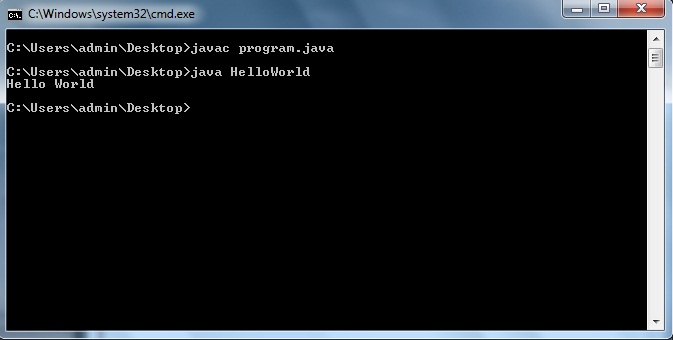
class HelloWorld
{
public static void main(String...s)
{
System.out.println("Hello World");
}
}
C Program to find divisers of a number
#include<iostream.h>
#include<conio.h>
void main()
{
clrscr();
long int n,i;
cout<<"Enter the number: ";
cin>>n;
cout<<endl<<"Divisers of "<<n<<" are ";
for(i=1;i<=n;++i)
{
if(n%i==0)
cout<<" "<<i;
}
getch();
}
Tuesday, February 10, 2015
C program to find largest number of a list of numbers entered through keyboard
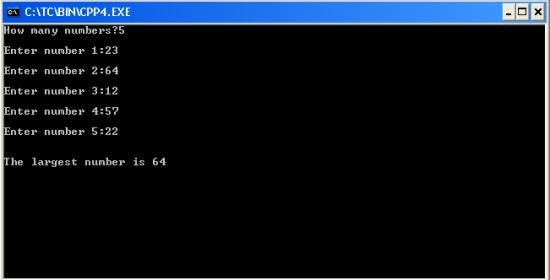
#include<iostream.h>
#include<conio.h>
void main()
{
clrscr(); //to clear the screen
int i,n,x,large=0;
cout<<"How many numbers?";
cin>>n;
for(i=0;i<n;++i)
{
cout<<"
Enter number "<<i+1<<":";
cin>>x;
if(x>large)
large=x;
}
cout<<"
The largest number is "<<large;
getch();
}
Thursday, February 5, 2015
Flash Sound Tutorial How to Add Sound to Flash Movies Importing Audio Files into a Flash Documents Library
In this beginners Flash sound tutorial, were going to talk about the basics of how to add sound in Flash. Adding sound to your Flash projects can make them a little more interesting. You can use audio files to add voice over narrations, background music and sound effects, for example. One way of being able to work with sound using Flash is by importing the sound files into your Flash document. Some of the audio formats that Flash gives you the ability to import include, but are not limited to:
In the next article, were going to learn how to add imported audio files to a Flash documents timeline. That article is also going to talk about the difference between the Flash Event Sound and the Flash Stream Sound options - two options for synchronizing sound in Flash.
NEXT: Adding Sound to Flash Movie Timeline and Choosing Flash Sync Sound Options - Flash Event Sound vs Flash Stream Sound
Read more »
- MP3
- WAV
- AIFF
NOTE: Working with audio in Flash can take up a lot of resources. You might want to consider working with MP3 files over WAV and AIFF files since MP3 files are compressed and will take up less disk space. Also, if you wont be using the entire audio file, you might want to create a shorter version of the audio file using an audio editing application, and use that shortened version instead. This will help save more disk space.
To be able to add sound to the timeline of your Flash movie, import the audio file into your Flash document first. Heres how:
To be able to add sound to the timeline of your Flash movie, import the audio file into your Flash document first. Heres how:
- From the main menu, choose File > Import > Import to Library

- When the Import to Library dialog box comes up, navigate to the folder that contains the audio file, select the file, and click on Open

- Once Flash finishes importing the file, you should be able to see it in the Flash documents library

In the next article, were going to learn how to add imported audio files to a Flash documents timeline. That article is also going to talk about the difference between the Flash Event Sound and the Flash Stream Sound options - two options for synchronizing sound in Flash.
NEXT: Adding Sound to Flash Movie Timeline and Choosing Flash Sync Sound Options - Flash Event Sound vs Flash Stream Sound
Creating a Flex AIR text editor Part 50
In this tutorial we will start turning our snippet structure plan to life.
The first thing well need to do is get rid of everything that, according to the previous tutorials plan, is not needed.
Firstly go to the SnippetWindow.mxml file, remove all things related to XML and the code that is responsible for applying changes. In the setValues() function, add 2 parameters - conn1 and conn2. Those will be the connection objects for category and snippet databases. Declare snippetConnection and categoryConnection variables that will receive these parameters values and store them.
Now go to the main mxml file. Here, remove the rewriteSQL() and snippetChange() functions completely.
Add a connection2 variable next to connection, as well as snippetData and categoryData objects:
In the init() function, remove the line which listens to the Event.CHANGE event for the snippetWindow object.
In the part where we declare database object and set up connections, add and open connection2 as well:
Now update the doSnippet() function to pass connection and connection2 values as parameters with the setValues() function. In the snippetTreeChange event, remove the line which inserts the text:
Now, be careful and pay attention on the next part. After both connections are open, the onOpen() function is called. Here we create the snippets table:
NOTE: IF YOU FOLLOWED THE STEPS OF THE PREVIOUS TUTORIALS, YOU WILL NEED TO DELETE THE SNIPPETS TABLE TO RESET THE SETTINGS.
To do that, change the code aboves statements text to "DROP TABLE snippets" and run the code once. Then change it back to what it is shown here.
When the snippets table is created, we proceed to create the category table:
When this is created, we select the items from the snippets table.
When we receive those, we set the snippetData variables value to the data received. Then we also select all categories:
When we receive that, we set categoryData property value to the received data. Then we call a function called createSnippetXML:
Here, we will first create a temporary piece of code which changes categoryData and snippetData to pre-defined array of objects (because our databases are empty and this is necessary for debugging).
Then we check if there are any objects in any database at all. If there is at least one item in any of the databases, then create root tags for the snippetXML object.
After that we loop through the categories to add them and their content.
Later we loop through the snippets one more time to add items that do not belong to any category:
It displays everything correctly now.
Thats all for today.
Full code of the main file:
Thanks for reading!
Read more »
The first thing well need to do is get rid of everything that, according to the previous tutorials plan, is not needed.
Firstly go to the SnippetWindow.mxml file, remove all things related to XML and the code that is responsible for applying changes. In the setValues() function, add 2 parameters - conn1 and conn2. Those will be the connection objects for category and snippet databases. Declare snippetConnection and categoryConnection variables that will receive these parameters values and store them.
<?xml version="1.0" encoding="utf-8"?>
<mx:Window xmlns:fx="http://ns.adobe.com/mxml/2009"
xmlns:s="library://ns.adobe.com/flex/spark"
xmlns:mx="library://ns.adobe.com/flex/mx"
title="Snippet management" type="utility" width="500" height="730"
creationComplete="init();" showStatusBar="false" alwaysInFront="true" resizable="false" backgroundColor="#dddddd">

<fx:Script>
<![CDATA[
import flash.data.SQLConnection;
import flash.events.Event;

[Bindable]
public var treeData:XMLList;
private var snippetConnection:SQLConnection;
private var categoryConnection:SQLConnection;

private function init():void{
this.addEventListener(Event.CLOSING, onClose);
}

private function onClose(evt:Event):void {
this.visible = false;
evt.preventDefault();
}

public function setValues(xmlData:XMLList, conn1:SQLConnection, conn2:SQLConnection, createNewOnStart:Boolean = false, newText:String = ""):void {
snippetConnection = conn1;
categoryConnection = conn2;
treeData = xmlData.copy();
newTextInput.text = newText;
newNameInput.text = "New snippet name here";
if (newText=="") {
newTextInput.text = "New snippet text here";
}
}

private function addSnippet(name:String, text:String):void{

}

private function addCategory(name:String):void{

}
]]>
</fx:Script>

<s:VGroup paddingLeft="5" paddingRight="5" paddingTop="5" paddingBottom="5">
<s:Label text="Snippet creation and management: " />
<s:TextInput id="newNameInput" text="New snippet name" width="490" />
<s:TextArea id="newTextInput" width="490" height="200" text="Snippet text" />
<s:HGroup>
<s:Button label="Add snippet" click="addSnippet(newNameInput.text, newTextInput.text);" />
<s:Button label="Save changes" enabled="false" />
<s:Button label="Delete snippet"  enabled="false" />
</s:HGroup>

<s:Label text="" />

<s:Label text="Category creation and management: " />
<s:TextInput id="newCategoryInput" text="New category name" width="490" />
<s:HGroup>
<s:Button label="Add category" click="addCategory(newCategoryInput.text);"/>
<s:Button label="Save changes" enabled="false"/>
<s:Button label="Delete category with its contents" enabled="false"/>
</s:HGroup>

<s:Label text="" />

<mx:Tree id="snippetManageTree" dataProvider="{treeData}" width="490" height="300" showRoot="false" labelField="@label"/>
</s:VGroup>

</mx:Window>
Now go to the main mxml file. Here, remove the rewriteSQL() and snippetChange() functions completely.
Add a connection2 variable next to connection, as well as snippetData and categoryData objects:
public var connection:SQLConnection;
public var connection2:SQLConnection;

private var snippetData:Array;
private var categoryData:Array;
In the init() function, remove the line which listens to the Event.CHANGE event for the snippetWindow object.
In the part where we declare database object and set up connections, add and open connection2 as well:
// Database management
var dbFile:File = File.applicationStorageDirectory.resolvePath("database.db");
connection = new SQLConnection();
connection2 = new SQLConnection();
connection2.open(dbFile, SQLMode.CREATE);
connection.addEventListener(SQLEvent.OPEN, onOpen);
connection.openAsync(dbFile, SQLMode.CREATE);
Now update the doSnippet() function to pass connection and connection2 values as parameters with the setValues() function. In the snippetTreeChange event, remove the line which inserts the text:
private function snippetTreeChange(evt:Event):void {
if (evt.currentTarget.selectedItem.@isBranch == false) {
// TODO: get data from database and insert it
evt.currentTarget.selectedIndex = -1;
}
}

private function doSnippet(createNew:Boolean = false, newText:String = ""):void{
snippetWindow.open();
snippetWindow.activate();
snippetWindow.visible = true;
snippetWindow.setValues(snippetXML, connection, connection2, createNew, newText);
}
Now, be careful and pay attention on the next part. After both connections are open, the onOpen() function is called. Here we create the snippets table:
private function onOpen(evt:SQLEvent):void {
// create snippets table
var stat:SQLStatement = new SQLStatement();
stat.sqlConnection = connection;
stat.text = "CREATE TABLE IF NOT EXISTS snippets (id INTEGER PRIMARY KEY AUTOINCREMENT, snippetName TEXT, snippetText TEXT, categoryID INTEGER, snippetPosition INTEGER)";
stat.execute( -1, new Responder(onCreateSnippets));
}
NOTE: IF YOU FOLLOWED THE STEPS OF THE PREVIOUS TUTORIALS, YOU WILL NEED TO DELETE THE SNIPPETS TABLE TO RESET THE SETTINGS.
To do that, change the code aboves statements text to "DROP TABLE snippets" and run the code once. Then change it back to what it is shown here.
When the snippets table is created, we proceed to create the category table:
private function onCreateSnippets(evt:SQLResult):void {
// create category table
var stat:SQLStatement = new SQLStatement();
stat.sqlConnection = connection2;
stat.text = "CREATE TABLE IF NOT EXISTS categories (id INTEGER PRIMARY KEY AUTOINCREMENT, categoryName TEXT, categoryPosition INTEGER)";
stat.execute( -1, new Responder(onCreateCategory));
}
When this is created, we select the items from the snippets table.
private function onCreateCategory(evt:SQLResult):void {
// select snippets
var stat:SQLStatement = new SQLStatement();
stat.sqlConnection = connection;
stat.text = "SELECT id, snippetName, categoryID, snippetPosition FROM snippets ORDER BY id";
stat.execute( -1, new Responder(onSelectedSnippets));
}
When we receive those, we set the snippetData variables value to the data received. Then we also select all categories:
private function onSelectedSnippets(evt:SQLResult):void {
// save selected snippets to a variable
snippetData = evt.data;

// select categories
var stat:SQLStatement = new SQLStatement();
stat.sqlConnection = connection2;
stat.text = "SELECT id, categoryName, categoryPosition FROM categories ORDER BY id";
stat.execute( -1, new Responder(onSelectedCategories));
}
When we receive that, we set categoryData property value to the received data. Then we call a function called createSnippetXML:
private function onSelectedCategories(evt:SQLResult):void {
// save selected categories to a variable
categoryData = evt.data;

// call function to start creating the XML
createSnippetXML();
}
Here, we will first create a temporary piece of code which changes categoryData and snippetData to pre-defined array of objects (because our databases are empty and this is necessary for debugging).
Then we check if there are any objects in any database at all. If there is at least one item in any of the databases, then create root tags for the snippetXML object.
After that we loop through the categories to add them and their content.
Later we loop through the snippets one more time to add items that do not belong to any category:
private function createSnippetXML():void {
// temporary:
categoryData = [
{ id:0, categoryName:"Cat1", categoryPosition:1 },
{ id:1, categoryName:"Cat2", categoryPosition:0 },
]

snippetData = [
{ id:0, snippetName: "Snip1", snippetPosition: 0, categoryID: 0 },
{ id:1, snippetName: "Snip2", snippetPosition: 1, categoryID: 0 },
{ id:2, snippetName: "Snip3", snippetPosition: 1, categoryID: 1 },
{ id:3, snippetName: "Snip4", snippetPosition: 0, categoryID: 1 },
{ id:4, snippetName: "Snip5", snippetPosition: 0, categoryID: -1 },
{ id:5, snippetName: "Snip6", snippetPosition: 1, categoryID: -1 },
]

snippetXML = new XMLList();

// add root tags if there are any items in any database
if (snippetData || categoryData) {
snippetXML = new XMLList(<root></root>);
}

// loop through categories to add them and their content
if (categoryData) {
for (var i:int = 0; i < categoryData.length; i++) {
var aCategory:XML = <category/>
aCategory.@id = categoryData[i].id;
aCategory.@label = categoryData[i].categoryName;
aCategory.@isBranch = true;
snippetXML[0].appendChild(aCategory);
for (var u:int = 0; u < snippetData.length; u++) {
if (snippetData[u].categoryID == categoryData[i].id) {
var aSnippet:XML = <snippet/>;
aSnippet.@id = snippetData[u].id;
aSnippet.@label = snippetData[u].snippetName;
aSnippet.@categoryID = snippetData[u].categoryID;
aCategory.appendChild(aSnippet);
}
}
}
// look for snippets located in root tags (not in a category)
for (var t:int = 0; t < snippetData.length; t++) {
if (snippetData[t].categoryID == -1) {
var aRootSnippet:XML = <snippet/>;
aRootSnippet.@id = snippetData[t].id;
aRootSnippet.@label = snippetData[t].snippetName;
aRootSnippet.@categoryID = snippetData[t].categoryID;
snippetXML[0].appendChild(aRootSnippet);
}
}
}
}
It displays everything correctly now.
Thats all for today.
Full code of the main file:
<?xml version="1.0" encoding="utf-8"?>
<s:WindowedApplication xmlns:fx="http://ns.adobe.com/mxml/2009"
                       xmlns:s="library://ns.adobe.com/flex/spark"
                       xmlns:mx="library://ns.adobe.com/flex/mx"
   xmlns:custom="*"
   creationComplete="init();" title="Kirpad" showStatusBar="{pref_status}"
   minWidth="400" minHeight="200" height="700" width="900">

<s:menu>
<mx:FlexNativeMenu dataProvider="{windowMenu}" showRoot="false" labelField="@label" keyEquivalentField="@key" itemClick="menuSelect(event);" />
</s:menu>

<fx:Script>
<![CDATA[
import flash.data.SQLConnection;
import flash.events.KeyboardEvent;
import flash.events.Event;
import flash.events.MouseEvent;
import flash.events.NativeWindowBoundsEvent;
import flash.filesystem.File;
import flash.filesystem.FileStream;
import flash.net.SharedObject;
import flashx.textLayout.accessibility.TextAccImpl;
import flashx.textLayout.edit.EditManager;
import flashx.textLayout.edit.TextScrap;
import mx.collections.ArrayCollection;
import mx.controls.Alert;
import mx.controls.TextArea;
import mx.events.FlexNativeMenuEvent;
import flashx.textLayout.elements.TextFlow;
import flashx.textLayout.elements.Configuration;
import flash.system.System;
import flash.desktop.Clipboard;
import flash.desktop.ClipboardFormats;
import flash.ui.Mouse;
import mx.events.CloseEvent;
import flash.ui.ContextMenu;
import flash.ui.ContextMenuItem;
import flash.events.ContextMenuEvent;
import mx.events.ResizeEvent;
import mx.core.FlexGlobals;
import mx.printing.FlexPrintJob;
import mx.printing.FlexPrintJobScaleType;
import flashx.undo.UndoManager;
import flashx.textLayout.operations.UndoOperation;
import flash.data.SQLConnection;
import flash.events.SQLEvent;
import flash.data.SQLStatement;
import flash.data.SQLResult;
import flash.data.SQLMode;
import flash.net.Responder;
import XML;
import XMLList;

private var preferences:SharedObject = SharedObject.getLocal("kirpadPreferences");
[Bindable]
private var pref_wrap:Boolean = true;
[Bindable]
private var pref_status:Boolean = true;
[Bindable]
private var pref_toolbar:Boolean = true;
[Bindable]
private var pref_sidepane:Boolean = true;
[Bindable]
private var pref_linecount:Boolean = true;
[Bindable]
public var pref_fontsettings:Object = new Object();

private var initHeight:Number;
private var heightFixed:Boolean = false;

private var statusMessage:String;
[Bindable]
private var textHeight:Number;
[Bindable]
private var textWidth:Number;
[Bindable]
private var textY:Number;
[Bindable]
private var textX:Number;
[Bindable]
private var tabY:Number;
[Bindable]
private var sidePaneY:Number;
[Bindable]
private var sidePaneX:Number;
[Bindable]
private var sidePaneHeight:Number;
[Bindable]
private var sidePaneWidth:Number = 180;
[Bindable]
private var sideContentWidth:Number = 170;
[Bindable]
private var tabWidth:Number;
[Bindable]
private var lineCountWidth:Number = 40;
[Bindable]
private var lineNumbers:String = "1";
[Bindable]
private var lineDisplayedNum:int = 1;

[Bindable]
private var tabSelectedIndex:int = 0;

[Bindable]
private var canUndo:Boolean = false;
[Bindable]
private var canRedo:Boolean = false;

private var previousTextInOperation:String = "";
private var currentTextInOperation:String = "";

private var previousIndex:int = 0;
private var rightclickTabIndex:int = 0;
private var untitledNum:int = 0;
private var tabsToClose:int = 0;
private var closeAfterConfirm:Boolean = false;

public var fontWindow:FontWindow = new FontWindow();
public var snippetWindow:SnippetWindow = new SnippetWindow();

private var undoManager:UndoManager;
private var editManager:EditManager;

private var saveWait:Boolean = false;
private var saveAsQueue:Array = [];

public var connection:SQLConnection;
public var connection2:SQLConnection;

private var snippetData:Array;
private var categoryData:Array;

[Bindable]
private var snippetXML:XMLList;

private function init():void {
// Create a listener for every frame
addEventListener(Event.ENTER_FRAME, everyFrame);

// Set initHeight to the initial height value on start
initHeight = height;

// Set preferences if loaded for the first time
if (preferences.data.firsttime == null) {
preferences.data.firsttime = true;
preferences.data.wrap = false;
preferences.data.status = true;
preferences.data.toolbar = true;
preferences.data.sidepane = true;
preferences.data.linecount = true;
preferences.data.fontsettings = {fontfamily:"Lucida Console", fontsize:14, fontstyle:"normal", fontweight:"normal", fontcolor:0x000000, bgcolor:0xffffff};
preferences.flush();
}

// Set preferences loaded from local storage
pref_wrap = preferences.data.wrap;
pref_status = preferences.data.status;
pref_toolbar = preferences.data.toolbar;
pref_sidepane = preferences.data.sidepane;
pref_fontsettings = preferences.data.fontsettings;
pref_linecount = preferences.data.linecount;

// Allow insertion of tabs
var textFlow:TextFlow = textArea.textFlow;
var config:Configuration = Configuration(textFlow.configuration);
config.manageTabKey = true;

// Set status message
statusMessage = "[ " + new Date().toLocaleTimeString() + " ] Kirpad initialized";
updateStatus();

// Close all sub-windows if main window is closed
addEventListener(Event.CLOSING, onClose);

// Add listener for the event that is dispatched when new font settings are applied
fontWindow.addEventListener(Event.CHANGE, fontChange);

// Update real fonts with the data from the settings values
updateFonts();

// Create a listener for resizing
addEventListener(NativeWindowBoundsEvent.RESIZE, onResize);

// Context menu declaration for the tabbar control
var cm_close:ContextMenuItem = new ContextMenuItem("Close tab");
cm_close.addEventListener(ContextMenuEvent.MENU_ITEM_SELECT, tabContextClose);
var cm_closeother:ContextMenuItem = new ContextMenuItem("Close other tabs");
cm_closeother.addEventListener(ContextMenuEvent.MENU_ITEM_SELECT, tabContextCloseOther);
var cm_save:ContextMenuItem = new ContextMenuItem("Save");
cm_save.addEventListener(ContextMenuEvent.MENU_ITEM_SELECT, tabContextSave);
var cm_duplicate:ContextMenuItem = new ContextMenuItem("Duplicate");
cm_duplicate.addEventListener(ContextMenuEvent.MENU_ITEM_SELECT, tabContextDuplicate);

var cm:ContextMenu = new ContextMenu();
cm.items = [cm_close, cm_closeother, cm_save, cm_duplicate];
cm.hideBuiltInItems();
tabBar.contextMenu = cm;
tabBar.addEventListener(MouseEvent.RIGHT_MOUSE_DOWN, tabRightClick);

// Context menu declaration for the tab management list control
sideList.contextMenu = cm;
sideList.addEventListener(MouseEvent.RIGHT_MOUSE_DOWN, listRightClick);

// Listen to keyboard
addEventListener(KeyboardEvent.KEY_DOWN, onKeyDown);

// Undo management
undoManager = new UndoManager();
editManager = new EditManager(undoManager);
textArea.textFlow.interactionManager = editManager;

// Select first tab
tabChange();

// Database management
var dbFile:File = File.applicationStorageDirectory.resolvePath("database.db");
connection = new SQLConnection();
connection2 = new SQLConnection();
connection2.open(dbFile, SQLMode.CREATE);
connection.addEventListener(SQLEvent.OPEN, onOpen);
connection.openAsync(dbFile, SQLMode.CREATE);
}

private function menuSelect(evt:FlexNativeMenuEvent):void {
(evt.item.@label == "New")?(doNew()):(void);
(evt.item.@label == "Open")?(doOpen()):(void);
(evt.item.@label == "Save")?(doSave(tabSelectedIndex)):(void);
(evt.item.@label == "Save As")?(doSaveAs(textArea.text, tabSelectedIndex)):(void);
(evt.item.@label == "Save All")?(doSaveAll()):(void);
(evt.item.@label == "Word wrap")?(pref_wrap = !pref_wrap):(void);
(evt.item.@label == "Cut")?(doCut()):(void);
(evt.item.@label == "Copy")?(doCopy()):(void);
(evt.item.@label == "Paste")?(doPaste()):(void);
(evt.item.@label == "Select all")?(doSelectall()):(void);
(evt.item.@label == "Status bar")?(pref_status = !pref_status):(void);
(evt.item.@label == "Tool bar")?(pref_toolbar = !pref_toolbar):(void);
(evt.item.@label == "Side pane")?(pref_sidepane = !pref_sidepane):(void);
(evt.item.@label == "Line count")?(pref_linecount = !pref_linecount):(void);
(evt.item.@label == "Font...")?(doFont()):(void);
(evt.item.@label == "Print")?(doPrint()):(void);
(evt.item.@label == "Undo")?(doUndo()):(void);
(evt.item.@label == "Redo")?(doRedo()):(void);
savePreferences();
updateStatus();
if (pref_wrap) {
pref_linecount = false;
}
updateTextSize();
countLines();
}

private function savePreferences():void {
preferences.data.wrap = pref_wrap;
preferences.data.status = pref_status;
preferences.data.toolbar = pref_toolbar;
preferences.data.fontsettings = pref_fontsettings;
preferences.data.sidepane = pref_sidepane;
preferences.data.linecount = pref_linecount;
preferences.flush();
}

private function doCut():void {
var selectedText:String = textArea.text.substring(textArea.selectionActivePosition, textArea.selectionAnchorPosition);
System.setClipboard(selectedText);
insertText("");
}

private function doCopy():void {
var selectedText:String = textArea.text.substring(textArea.selectionActivePosition, textArea.selectionAnchorPosition);
System.setClipboard(selectedText);
}

private function doPaste():void{
var myClip:Clipboard = Clipboard.generalClipboard;
var pastedText:String = myClip.getData(ClipboardFormats.TEXT_FORMAT) as String;
insertText(pastedText);
}

private function doSelectall():void {
textArea.selectAll();
}

private function insertText(str:String):void {
editManager.insertText(str);
}

private function cursorFix():void{
Mouse.cursor = "ibeam";
}

private function everyFrame(evt:Event):void {
if (!heightFixed && height==initHeight) {
height = initHeight - 20;
if (height != initHeight) {
heightFixed = true;
updateTextSize();
}
}
updateLineScroll();
if (sideList.selectedIndices.length==0) {
sideList.selectedIndex = tabSelectedIndex;
}
}

private function onResize(evt:ResizeEvent):void {
updateTextSize();
}

private function updateTextSize():void {
tabY = (toolBar.visible)?(toolBar.height):(0);
textX = (pref_linecount)?(lineCountWidth):(0);
var statusHeight:Number = (pref_status)?(statusBar.height):(0);
textWidth = (pref_sidepane)?(width - sidePaneWidth - textX):(width - textX);
tabWidth = textWidth + textX;
var tabbarScrollHeight:Number = (tabData.length * 170 > tabWidth)?(15):(0);
textY = tabBar.height + tabY + tabbarScrollHeight;
textHeight = height - textY - statusHeight;
focusManager.setFocus(textArea);
sidePaneHeight = textHeight + tabBar.height + tabbarScrollHeight;
sidePaneY = textY - tabBar.height - tabbarScrollHeight;
sidePaneX = width - sidePaneWidth;
}

private function updateStatus():void {
var str:String = new String();
str = (pref_wrap)?("Word wrapping on"):(caretPosition());
status = str + "	" + statusMessage;
}

private function caretPosition():String {
var pos:int = textArea.selectionActivePosition;
var str:String = textArea.text.substring(0, pos);
var lines:Array = str.split("
");
var line:int = lines.length;
var col:int = lines[lines.length - 1].length + 1;

return "Ln " + line + ", Col " + col;
}

private function doFont():void{
fontWindow.open();
fontWindow.activate();
fontWindow.visible = true;
fontWindow.setValues(pref_fontsettings.fontsize, pref_fontsettings.fontfamily, pref_fontsettings.fontstyle, pref_fontsettings.fontweight, pref_fontsettings.fontcolor, pref_fontsettings.bgcolor);
}

private function onClose(evt:Event):void {
if(!closeAfterConfirm){
evt.preventDefault();
var allWindows:Array = NativeApplication.nativeApplication.openedWindows;
for (var i:int = 1; i < allWindows.length; i++)
{
allWindows[i].close();
}

// Check if there are any unsaved tabs
var needSaving:Boolean = false;
tabsToClose = 0;

for (var u:int = 0; u < tabData.length; u++) {
if (tabData[u].saved == false) {
needSaving = true;
tabsToClose++;
}
}

// If there are unsaved tabs, dont close window yet, set closeAfterConfirm to true and close all tabs
if (needSaving) {
closeAfterConfirm = true;
for (var t:int = 0; t < tabData.length; t++) {
closeTab(t);
}
}
if (!needSaving) {
FlexGlobals.topLevelApplication.close();
}
}
}

private function fontChange(evt:Event):void{
pref_fontsettings.fontfamily = fontWindow.fontCombo.selectedItem.fontName;
pref_fontsettings.fontsize = fontWindow.sizeStepper.value;

if (fontWindow.styleCombo.selectedIndex == 0) {
pref_fontsettings.fontstyle = "normal";
pref_fontsettings.fontweight = "normal";
}
if (fontWindow.styleCombo.selectedIndex == 1) {
pref_fontsettings.fontstyle = "italic";
pref_fontsettings.fontweight = "normal";
}
if (fontWindow.styleCombo.selectedIndex == 2) {
pref_fontsettings.fontstyle = "normal";
pref_fontsettings.fontweight = "bold";
}
if (fontWindow.styleCombo.selectedIndex == 3) {
pref_fontsettings.fontstyle = "italic";
pref_fontsettings.fontweight = "bold";
}

pref_fontsettings.fontcolor = fontWindow.colorPicker.selectedColor;
pref_fontsettings.bgcolor = fontWindow.bgColorPicker.selectedColor;

savePreferences();
updateFonts();
}

private function updateFonts():void{
textArea.setStyle("fontFamily", pref_fontsettings.fontfamily);
textArea.setStyle("fontSize", pref_fontsettings.fontsize);
textArea.setStyle("fontStyle", pref_fontsettings.fontstyle);
textArea.setStyle("fontWeight", pref_fontsettings.fontweight);
textArea.setStyle("color", pref_fontsettings.fontcolor);
textArea.setStyle("contentBackgroundColor", pref_fontsettings.bgcolor);

lineCount.setStyle("fontFamily", pref_fontsettings.fontfamily);
lineCount.setStyle("fontSize", pref_fontsettings.fontsize);
lineCount.setStyle("fontStyle", pref_fontsettings.fontstyle);
lineCount.setStyle("fontWeight", pref_fontsettings.fontweight);
lineCount.setStyle("color", pref_fontsettings.fontcolor);
lineCount.setStyle("contentBackgroundColor", pref_fontsettings.bgcolor);
}

private function onTabClose(evt:Event):void {
var tabWidth:Number = tabBar.width / tabData.length;
var cIndex:int = Math.floor(tabBar.mouseX / tabWidth);
tabSelectedIndex = cIndex;
tabChange();
closeTab(tabSelectedIndex);
}

private function onListClose(evt:Event):void {
tabSelectedIndex = sideList.selectedIndex;
tabChange();
closeTab(tabSelectedIndex);
}

private function closeTab(index:int):void {
if (tabData[index].saved) {
removeTab(index);
} else
if (!tabData[index].saved) {
Alert.show("Save " + tabData[index].title + " before closing?", "Confirmation", Alert.YES | Alert.NO, null, confirmClose);
}
function confirmClose(evt:CloseEvent):void {
tabsToClose--;
if (evt.detail == Alert.YES) {
tabSelectedIndex = index;
tabChange();
removeTab(index, true);
doSave(index, false);
}else {
removeTab(index);
}
}
}

private function removeTab(index:int, waitForSave:Boolean = false):void {
if(!closeAfterConfirm){
// if this is the last tab, create a new empty tab
if (tabData.length == 1) {
tabData.addItem( { title:"Untitled", textData:"", saved:false, location:""} );
}
statusMessage = "[ " + new Date().toLocaleTimeString() + " ] Tab closed: " + tabData[index].title;
updateStatus();
tabData.removeItemAt(index);
tabSelectedIndex = tabBar.selectedIndex;
previousIndex = tabSelectedIndex;
textArea.text = tabData[tabSelectedIndex].textData;
textArea.selectRange(tabData[tabSelectedIndex].selectedAnchor, tabData[tabSelectedIndex].selectedActive);
}
if (closeAfterConfirm && tabsToClose == 0 && waitForSave == false) {
FlexGlobals.topLevelApplication.close();
}
if (waitForSave) {
saveWait = true;
}
countLines();
updateTextSize();
undoManager.clearAll();
textChange();
}

private function doNew():void {
statusMessage = "[ " + new Date().toLocaleTimeString() + " ] New tab created";
updateStatus();
untitledNum++;
tabData.addItem( { title:"Untitled("+untitledNum+")", textData:"", saved:false, location:""} );
tabSelectedIndex = tabData.length - 1;
tabChange();
updateTextSize();
}

public function tabChange(from:String = "none", ind:int = 0, createOperation:Boolean = true):void {
if (from == "tabbar") {
tabSelectedIndex = tabBar.selectedIndex;
}
if (from == "sidelist") {
tabSelectedIndex = sideList.selectedIndex;
}
if (from == "operation") {
tabSelectedIndex = ind;
}
tabData[previousIndex].textData = textArea.text;
tabData[previousIndex].selectedActive = textArea.selectionActivePosition;
tabData[previousIndex].selectedAnchor = textArea.selectionAnchorPosition;
if (createOperation) {
var operation:TabOperation = new TabOperation(previousIndex, tabSelectedIndex, undoManager);
undoManager.pushUndo(operation);
}
previousIndex = tabSelectedIndex;
textArea.text = tabData[tabSelectedIndex].textData;
textArea.selectRange(tabData[tabSelectedIndex].selectedAnchor, tabData[tabSelectedIndex].selectedActive);
updateStatus();
countLines();
textChange();
var savedSymbol:String = (tabData[tabSelectedIndex].saved)?(""):("*");
title = "Kirpad - " + tabData[tabSelectedIndex].title + savedSymbol;
}

private function tabContextClose(evt:ContextMenuEvent):void{
closeTab(rightclickTabIndex);
}

private function tabContextCloseOther(evt:ContextMenuEvent):void {
var len:int = tabData.length;
for (var i:int = 0; i < len; i++) {
if (i != rightclickTabIndex && tabData[i].saved) {
closeTab(i);
}
}

len = tabData.length;
for (var u:int = 0; u < len; u++) {
if (u != rightclickTabIndex) {
closeTab(u);
}
}
}

private function tabContextSave(evt:ContextMenuEvent):void {
tabSelectedIndex = rightclickTabIndex;
tabChange();
doSave(rightclickTabIndex);
}

private function tabContextDuplicate(evt:ContextMenuEvent):void {
tabSelectedIndex = rightclickTabIndex;
tabChange();
statusMessage = "[ " + new Date().toLocaleTimeString() + " ] " + tabData[rightclickTabIndex].title + " duplicated";
updateStatus();
tabData.addItem( { title:"Copy of " + tabData[rightclickTabIndex].title, textData: tabData[rightclickTabIndex].textData, saved:false, location:""} );
tabSelectedIndex = tabData.length - 1;
tabChange();
updateTextSize();
}

private function tabRightClick(evt:MouseEvent):void {
var tabWidth:Number = tabBar.width / tabData.length;
var rcIndex:int = Math.floor(tabBar.mouseX / tabWidth);
rightclickTabIndex = rcIndex;
}

private function listRightClick(evt:MouseEvent):void {
var tabHeight:Number = 20;
var rcIndex:int = Math.floor((sideList.mouseY + sideList.scroller.verticalScrollBar.value) / tabHeight);
rightclickTabIndex = rcIndex;
}

private function onKeyDown(evt:KeyboardEvent):void{
if (evt.ctrlKey) {
// Ctrl+TAB - next tab
if (evt.keyCode == 9 && !evt.shiftKey) {
if (tabData.length - tabSelectedIndex > 1) {
tabSelectedIndex++;
tabChange();
}
}
// Ctrl+Shift+TAB - previous tab
if (evt.keyCode == 9 && evt.shiftKey) {
if (tabSelectedIndex > 0) {
tabSelectedIndex--;
tabChange();
}
}
// Ctrl+number (1-8) - go to numbered tab
if (evt.keyCode >= 49 && evt.keyCode <= 56) {
var num:int = evt.keyCode - 48;
if (tabData.length > num - 1) {
tabSelectedIndex = num - 1;
tabChange();
}
}
// Ctrl+9 - go to last tab
if (evt.keyCode == 57) {
tabSelectedIndex = tabData.length - 1;
tabChange();
}
}
}

private function closeSidePane():void{
pref_sidepane = !pref_sidepane
savePreferences();
updateTextSize();
}

private function countLines():void {
if (pref_linecount && !pref_wrap) {
var totalLines:int = textArea.text.split("
").length;
if (totalLines != lineDisplayedNum) {
updateTextSize();
updateLineCount(totalLines, totalLines-lineDisplayedNum, lineDisplayedNum);
lineDisplayedNum = totalLines;
}
}
}

private function updateLineCount(total:int, difference:int, current:int):void {
if (difference > 0) {
for (var i:int = current + 1; i < (total+1); i++) {
lineNumbers += "
" + (i);
}
}
if (difference < 0) {
var charsInTheEnd:int = 0;
for (var u:int = 0; u < -difference; u++) {
charsInTheEnd += ((current - u).toString().length + 1);
}
lineNumbers = lineCount.text.substring(0, lineCount.text.length - charsInTheEnd);
}
}

private function updateLineScroll():void{
lineCount.scroller.verticalScrollBar.value = textArea.scroller.verticalScrollBar.value;
}

private function doPrint():void {
var printJob:FlexPrintJob = new FlexPrintJob();
if (!printJob.start()) return;
tempText.visible = true;
tempText.setStyle("lineBreak", "toFit");
tempText.text = textArea.text;
tempText.width = printJob.pageWidth;
tempText.heightInLines = NaN;
tempText.setStyle("horizontalScrollPolicy", "off");
tempText.setStyle("verticalScrollPolicy", "off");
printJob.printAsBitmap = false;
printJob.addObject(tempText, "matchWidth");
printJob.send();
tempText.visible = false;
}

private function textChange():void{
canUndo = undoManager.canUndo();
canRedo = undoManager.canRedo();
focusManager.setFocus(textArea);
}

private function doUndo():void {
undoManager.undo();
textChange();
}

private function doRedo():void {
undoManager.redo();
textChange();
}

private function doOpen():void {
var file:File = new File();
file.browseForOpen("Open document", [new FileFilter("Text documents", "*.txt"), new FileFilter("All files", "*")]);
file.addEventListener(Event.SELECT, fileLoad);

function fileLoad(evt:Event):void {
loadFile(file);
}
}

private function loadFile(file:File):void {
if(fileDuplicateCheck(file.nativePath)){
var stream:FileStream = new FileStream();
stream.open(file, FileMode.READ);
var str:String = stream.readUTFBytes(stream.bytesAvailable);
stream.close();
str = str.replace(File.lineEnding, "
");
statusMessage = "[ " + new Date().toLocaleTimeString() + " ] " + file.name + " opened";
updateStatus();
tabData.addItem( { title:file.name, textData: str, saved:true, location:file.nativePath } );
tabSelectedIndex = tabData.length - 1;
tabChange();
updateTextSize();
}else {
Alert.show("File " + file.name + " is already open","Error");
}
}

private function fileDuplicateCheck(loc:String):Boolean {
var toReturn:Boolean = true;
for (var i:int = 0; i < tabData.length; i++) {
if (tabData[i].location == loc) {
toReturn = false;
tabSelectedIndex = i;
tabChange();
break;
}
}
return toReturn;
}

private function saveUpdate():void {
if (tabData[tabSelectedIndex].saved) {
tabData[tabSelectedIndex].saved = false;

tabBar.dataProvider = new ArrayCollection([]);
tabBar.dataProvider = tabData;
tabBar.selectedIndex = tabSelectedIndex;

sideList.dataProvider = tabData;
var savedSymbol:String = (tabData[tabSelectedIndex].saved)?(""):("*");
title = "Kirpad - " + tabData[tabSelectedIndex].title + savedSymbol;
}
}

private function doSave(ind:int, updateIndexNeeded:Boolean = true):void {
if(!tabData[ind].saved){
if (tabData[ind].location != "") {
saveFile(textArea.text, tabData[ind].location, updateIndexNeeded);
statusMessage = "[ " + new Date().toLocaleTimeString() + " ] " + tabData[ind].title + " saved";
updateStatus();
tabData[ind].saved = true;
}else{
doSaveAs(textArea.text, ind, updateIndexNeeded);
}
}
}

private function doSaveAll():void {
saveAsQueue = [];
for (var i:int = 0; i < tabData.length; i++) {
saveAsQueue.push(i);
}
doSaveQueue();
}

private function doSaveQueue():void {
if (saveAsQueue.length > 0) {
var ind:int = saveAsQueue[0];
saveAsQueue.splice(0, 1);
tabSelectedIndex = ind;
tabChange();
doSave(ind);
}
}

private function refreshData():void {
tabBar.dataProvider = new ArrayCollection([]);
tabBar.dataProvider = tabData;
tabBar.selectedIndex = tabSelectedIndex;

sideList.dataProvider = tabData;
}

private function doSaveAs(text:String, ind:int, updateIndexNeeded:Boolean = true):void {
var file:File = new File();
file.browseForSave("Save " + tabData[ind].title);
file.addEventListener(Event.SELECT, fileSave);
file.addEventListener(Event.CANCEL, fileCancel);

function fileSave(evt:Event):void {
if (file.name.length > 0) {
// See if user entered extension for the file (for example .txt)
// If not, add .txt by default
var extReg:RegExp = /.([a-z0-9]{2,})/i;
if (extReg.test(file.name)) {
saveFile(text, file.nativePath, updateIndexNeeded);
tabData[ind].location = file.nativePath;
tabData[ind].title = file.name;
tabData[ind].saved = true;
}else{
saveFile(text, file.nativePath + ".txt", updateIndexNeeded);
tabData[ind].location = file.nativePath + ".txt";
tabData[ind].title = file.name + ".txt";
tabData[ind].saved = true;
}
}else{
Alert.show("You need to enter a name for your file.", "Error");
}
}

function fileCancel(evt:Event):void {
doSaveQueue();
}
}

private function saveFile(text:String, location:String, updateIndexNeeded:Boolean = true):void {
var file:File = new File(location);
var stream:FileStream = new FileStream();
stream.open(file, FileMode.WRITE);
var str:String = text;
str = str.replace(/
/g, File.lineEnding);
stream.writeUTFBytes(str);
stream.close();
if (closeAfterConfirm && tabsToClose == 0 && saveWait) {
FlexGlobals.topLevelApplication.close();
}
saveWait = false;
if (updateIndexNeeded) {
refreshData();
}
doSaveQueue();
 }

private function updateDirectoryPath():void{
directoryLabel.text = fileList.directory.nativePath;
}

private function fileListLoad():void{
var file:File = new File(fileList.selectedPath);
loadFile(file);
}

private function onOpen(evt:SQLEvent):void {
// create snippets table
var stat:SQLStatement = new SQLStatement();
stat.sqlConnection = connection;
stat.text = "CREATE TABLE IF NOT EXISTS snippets (id INTEGER PRIMARY KEY AUTOINCREMENT, snippetName TEXT, snippetText TEXT, categoryID INTEGER, snippetPosition INTEGER)";
stat.execute( -1, new Responder(onCreateSnippets));
}

private function onCreateSnippets(evt:SQLResult):void {
// create category table
var stat:SQLStatement = new SQLStatement();
stat.sqlConnection = connection2;
stat.text = "CREATE TABLE IF NOT EXISTS categories (id INTEGER PRIMARY KEY AUTOINCREMENT, categoryName TEXT, categoryPosition INTEGER)";
stat.execute( -1, new Responder(onCreateCategory));
}

private function onCreateCategory(evt:SQLResult):void {
// select snippets
var stat:SQLStatement = new SQLStatement();
stat.sqlConnection = connection;
stat.text = "SELECT id, snippetName, categoryID, snippetPosition FROM snippets ORDER BY id";
stat.execute( -1, new Responder(onSelectedSnippets));
}

private function onSelectedSnippets(evt:SQLResult):void {
// save selected snippets to a variable
snippetData = evt.data;

// select categories
var stat:SQLStatement = new SQLStatement();
stat.sqlConnection = connection2;
stat.text = "SELECT id, categoryName, categoryPosition FROM categories ORDER BY id";
stat.execute( -1, new Responder(onSelectedCategories));
}

private function onSelectedCategories(evt:SQLResult):void {
// save selected categories to a variable
categoryData = evt.data;

// call function to start creating the XML
createSnippetXML();
}

private function createSnippetXML():void {
// temporary:
categoryData = [
{ id:0, categoryName:"Cat1", categoryPosition:1 },
{ id:1, categoryName:"Cat2", categoryPosition:0 },
]

snippetData = [
{ id:0, snippetName: "Snip1", snippetPosition: 0, categoryID: 0 },
{ id:1, snippetName: "Snip2", snippetPosition: 1, categoryID: 0 },
{ id:2, snippetName: "Snip3", snippetPosition: 1, categoryID: 1 },
{ id:3, snippetName: "Snip4", snippetPosition: 0, categoryID: 1 },
{ id:4, snippetName: "Snip5", snippetPosition: 0, categoryID: -1 },
{ id:5, snippetName: "Snip6", snippetPosition: 1, categoryID: -1 },
]

snippetXML = new XMLList();

// add root tags if there are any items in any database
if (snippetData || categoryData) {
snippetXML = new XMLList(<root></root>);
}

// loop through categories to add them and their content
if (categoryData) {
for (var i:int = 0; i < categoryData.length; i++) {
var aCategory:XML = <category/>
aCategory.@id = categoryData[i].id;
aCategory.@label = categoryData[i].categoryName;
aCategory.@isBranch = true;
snippetXML[0].appendChild(aCategory);
for (var u:int = 0; u < snippetData.length; u++) {
if (snippetData[u].categoryID == categoryData[i].id) {
var aSnippet:XML = <snippet/>;
aSnippet.@id = snippetData[u].id;
aSnippet.@label = snippetData[u].snippetName;
aSnippet.@categoryID = snippetData[u].categoryID;
aCategory.appendChild(aSnippet);
}
}
}
// look for snippets located in root tags (not in a category)
for (var t:int = 0; t < snippetData.length; t++) {
if (snippetData[t].categoryID == -1) {
var aRootSnippet:XML = <snippet/>;
aRootSnippet.@id = snippetData[t].id;
aRootSnippet.@label = snippetData[t].snippetName;
aRootSnippet.@categoryID = snippetData[t].categoryID;
snippetXML[0].appendChild(aRootSnippet);
}
}
}
}

private function snippetTreeChange(evt:Event):void {
if (evt.currentTarget.selectedItem.@isBranch == false) {
// TODO: get data from database and insert it
evt.currentTarget.selectedIndex = -1;
}
}

private function doSnippet(createNew:Boolean = false, newText:String = ""):void{
snippetWindow.open();
snippetWindow.activate();
snippetWindow.visible = true;
snippetWindow.setValues(snippetXML, connection, connection2, createNew, newText);
}

]]>
</fx:Script>

<fx:Declarations>
<fx:XML id="windowMenu">
<root>
<menuitem label="File">
<menuitem label="New" key="n" controlKey="true" />
<menuitem label="Open" key="o" controlKey="true" />
<menuitem label="Save" key="s" controlKey="true" />
<menuitem label="Save As" key="s" controlKey="true" shiftKey="true" />
<menuitem label="Save All" key="s" controlKey="true" altKey="true" />
<menuitem type="separator"/>
<menuitem label="Print" key="p" controlKey="true" />
</menuitem>
<menuitem label="Edit">
<menuitem label="Undo" key="z" controlKey="true" enabled="{canUndo}" />
<menuitem label="Redo" key="y" controlKey="true" enabled="{canRedo}" />
<menuitem type="separator"/>
<menuitem label="Cut" key="x" controlKey="true" />
<menuitem label="Copy" key="c" controlKey="true" />
<menuitem label="Paste" key="v" controlKey="true" />
<menuitem type="separator"/>
<menuitem label="Select all" key="a" controlKey="true" />
</menuitem>
<menuitem label="Settings">
<menuitem label="Word wrap" type="check" toggled="{pref_wrap}" />
<menuitem label="Font..."/>
</menuitem>
<menuitem label="View">
<menuitem label="Tool bar" type="check" toggled="{pref_toolbar}" />
<menuitem label="Status bar" type="check" toggled="{pref_status}" />
<menuitem label="Line count" type="check" toggled="{pref_linecount}" />
<menuitem label="Side pane" type="check" toggled="{pref_sidepane}" />
</menuitem>
</root>
</fx:XML>
<mx:ArrayCollection id="tabData">
<fx:Object title="Untitled" textData="" saved="false" seletedActive="0" selectedAnchor="0" location="" />
</mx:ArrayCollection>
<mx:ArrayCollection id="sidePaneData">
<fx:Object icon="@Embed(../lib/page.png)" tip="Tab management" />
<fx:Object icon="@Embed(../lib/folder_magnify.png)" tip="File browsing" />
<fx:Object icon="@Embed(../lib/book.png)" tip="Snippets" />
</mx:ArrayCollection>
<mx:ArrayCollection id="sidePaneTabHeadings">
<fx:String>Tab management</fx:String>
<fx:String>File browsing</fx:String>
<fx:String>Snippets</fx:String>
</mx:ArrayCollection>
</fx:Declarations>

<s:Group width="100%" height="100%">
<s:TextArea id="textArea" width="{textWidth}" height="{textHeight}" y="{textY}" x="{textX}" lineBreak="{(pref_wrap)?(toFit):(explicit)}"  click="cursorFix(); updateStatus();" change="updateStatus(); countLines(); textChange(); saveUpdate();" keyDown="updateStatus();" borderVisible="false" focusThickness="0" />
<s:Scroller horizontalScrollPolicy="auto" verticalScrollPolicy="off" width="{tabWidth}" y="{tabY}">
<s:Group>
<custom:CustomTabBar id="tabBar" dataProvider="{tabData}" itemRenderer="CustomTab" height="22" tabClose="onTabClose(event);" change="tabChange(tabbar);" selectedIndex="{tabSelectedIndex}" labelField="saved">
<custom:layout>
<s:HorizontalLayout gap="-1" columnWidth="170" variableColumnWidth="false"/>
</custom:layout>
</custom:CustomTabBar>
</s:Group>
</s:Scroller>
<s:TextArea id="lineCount" width="{lineCountWidth}" text="{lineNumbers}" visible="{pref_linecount}" height="{textHeight}" y="{textY}" editable="false" selectable="false" mouseEnabled="false" textAlign="right" verticalScrollPolicy="off" horizontalScrollPolicy="off" />
<mx:HBox id="toolBar" width="100%" backgroundColor="#dddddd" height="30" visible="{pref_toolbar}" paddingTop="2" paddingLeft="3">
<custom:IconButton icon="@Embed(../lib/page.png)" toolTip="New document" click="doNew();" />
<custom:IconButton icon="@Embed(../lib/folder_page.png)" toolTip="Open" click="doOpen();" />
<custom:IconButton icon="@Embed(../lib/disk.png)" toolTip="Save" click="doSave(tabSelectedIndex);" />
<custom:IconButton icon="@Embed(../lib/disk_multiple.png)" toolTip="Save all" click="doSaveAll();" />
<custom:IconButton icon="@Embed(../lib/printer.png)" toolTip="Print" click="doPrint();" />
<s:Label text="|" fontSize="18" color="#bbbbbb" paddingTop="4" />
<custom:IconButton icon="@Embed(../lib/arrow_undo.png)" toolTip="Undo" enabled="{canUndo}" click="doUndo();" />
<custom:IconButton icon="@Embed(../lib/arrow_redo.png)" toolTip="Redo" enabled="{canRedo}" click="doRedo();" />
<s:Label text="|" fontSize="18" color="#bbbbbb" paddingTop="4" />
<custom:IconButton icon="@Embed(../lib/cut.png)" toolTip="Cut" click="doCut();" />
<custom:IconButton icon="@Embed(../lib/page_white_copy.png)" toolTip="Copy" click="doCopy();" />
<custom:IconButton icon="@Embed(../lib/paste_plain.png)" toolTip="Paste" click="doPaste();" />
</mx:HBox>
<mx:Box id="sidePane" width="{sidePaneWidth}" y="{sidePaneY}" x="{sidePaneX}" height="{sidePaneHeight}" backgroundColor="#dddddd" visible="{pref_sidepane}" paddingTop="5" paddingLeft="5" horizontalScrollPolicy="off">
<s:Group>
<s:Label text="{sidePaneTabHeadings.getItemAt(sidePaneButtons.selectedIndex)}" width="{sidePaneWidth}" top="1" />
<custom:IconButton icon="@Embed(../lib/bullet_go.png)" toolTip="Hide side pane" click="closeSidePane();" top="-4" right="12"/>
</s:Group>
<mx:ToggleButtonBar id="sidePaneButtons" dataProvider="{sidePaneData}" iconField="icon" width="{sidePaneWidth-10}" toolTipField="tip" />
<mx:ViewStack id="sidePaneStack" height="100%" selectedIndex="{sidePaneButtons.selectedIndex}">
<s:NavigatorContent id="tabs">
<custom:CustomList id="sideList" dataProvider="{tabData}" width="{sideContentWidth}" height="100%" itemRenderer="CustomListItem" selectedIndex="{tabSelectedIndex}" change="tabChange(sidelist);" tabClose="onListClose(event);" />
</s:NavigatorContent>
<s:NavigatorContent id="files">
<s:VGroup height="100%">
<s:HGroup width="100%">
<custom:IconButton icon="@Embed(../lib/arrow_up.png)" toolTip="Up" click="fileList.navigateUp();" enabled="{fileList.canNavigateUp}"/>
<s:Label width="140" id="directoryLabel" paddingTop="6" />
</s:HGroup>
<mx:FileSystemList width="{sidePaneWidth-10}" height="100%" id="fileList" directory="{File.desktopDirectory}" directoryChange="updateDirectoryPath();" creationComplete="updateDirectoryPath();" fileChoose="fileListLoad();" />
</s:VGroup>
</s:NavigatorContent>
<s:NavigatorContent id="snippets">
<s:VGroup height="100%" width="100%">
<mx:Tree height="100%" width="100%" id="snippetTree" showRoot="false" labelField="@label" dataProvider="{snippetXML}" change="snippetTreeChange(event);" />
<s:Button width="100%" label="New snippet" click="doSnippet(true, textArea.text.substring(textArea.selectionActivePosition, textArea.selectionAnchorPosition));" />
<s:Button width="100%" label="Manage snippets" click="doSnippet();" />
</s:VGroup>
</s:NavigatorContent>
</mx:ViewStack>
</mx:Box>
</s:Group>
<s:TextArea id="tempText" borderVisible="false" visible="false"/>

</s:WindowedApplication>
Thanks for reading!
Wednesday, February 4, 2015
Creating a Pentomino game using AS3 Part 38
Today we will add the ability to browse through the solutions.
Firstly declare a new variable - currentSol. Set its value to 0 by default. This variable represents the id of the solution that is currently displayed.
Open the project in Flash and go to fifth frame (the solutions screen). Add two buttons shaped like arrows with ids btn_prev and btn_next. Add a dynamic text field with id tSol, it will display which solutions is currently is shown.
Go to level_solver.as again and in the solve() function add CLICK event listeners for btn_prev and btn_next. Set handlers to goPrev and goNext functions:
The functions decrease/increase currentSol values and call updateCurrentInfo() function.
The same function is called in nextCycle():
The function updates what is displayed in the tSol text field, disables/enables arrow buttons when needed, draws the preview image:
Update the drawPreview() function so that cells are colored depending on the shape type:
Now we can browse through the solutions!
Full level_solver.as code:
Thanks for reading!
Read more »
Firstly declare a new variable - currentSol. Set its value to 0 by default. This variable represents the id of the solution that is currently displayed.
private var currentSol:int = 0;
Open the project in Flash and go to fifth frame (the solutions screen). Add two buttons shaped like arrows with ids btn_prev and btn_next. Add a dynamic text field with id tSol, it will display which solutions is currently is shown.
Go to level_solver.as again and in the solve() function add CLICK event listeners for btn_prev and btn_next. Set handlers to goPrev and goNext functions:
btn_prev.addEventListener(MouseEvent.CLICK, goPrev);
btn_next.addEventListener(MouseEvent.CLICK, goNext);
The functions decrease/increase currentSol values and call updateCurrentInfo() function.
private function goPrev(evt:MouseEvent):void {
currentSol--;
updateCurrentInfo();
}

private function goNext(evt:MouseEvent):void {
currentSol++;
updateCurrentInfo();
}
The same function is called in nextCycle():
private function nextCycle():void {
cycleNum++;
updateCurrentInfo();
if (cycleNum == givenShapes.length) {
removeEventListener(Event.ENTER_FRAME, onFrame);
// display info
tInfo.text = Finished solving " + levelName + "
Attempts:  + attempts + "
Solutions: " + solutions.length;
}
}
The function updates what is displayed in the tSol text field, disables/enables arrow buttons when needed, draws the preview image:
private function updateCurrentInfo():void {
var sol:int = (solutions.length > 0)?(currentSol + 1):(0);
tSol.text = sol + "/" + solutions.length;
if (sol <= 1) {
btn_prev.alpha = 0.5;
btn_prev.mouseEnabled = false;
}else {
btn_prev.alpha = 1;
btn_prev.mouseEnabled = true;
}
if (sol == solutions.length) {
btn_next.alpha = 0.5;
btn_next.mouseEnabled = false;
}else {
btn_next.alpha = 1;
btn_next.mouseEnabled = true;
}
if (solutions.length > 0) drawPreview(levelPreview, solutions[currentSol]);
}
Update the drawPreview() function so that cells are colored depending on the shape type:
private function drawPreview(levelPreview:MovieClip, mapGrid:Array):void {
var columns:int = mapGrid[0].length;
var rows:int = mapGrid.length;
var frameWidth:int = levelPreview.width;
var frameHeight:int = levelPreview.height;
var padding:int = 5;
var fitWidth:int = levelPreview.width - (padding * 2);
var fitHeight:int = levelPreview.height - (padding * 2);
var gridStartX:int;
var gridStartY:int;

// calculate width of a cell:
var gridCellWidth:int = Math.round(fitWidth / columns);

var width:int = columns * gridCellWidth;
var height:int = rows * gridCellWidth;

// calculate side margin
gridStartX = (frameWidth - width) / 2;

if (height < fitHeight) {
gridStartY = (fitHeight - height) / 2;
}
if (height >= fitHeight) {
gridCellWidth = Math.round(fitHeight / rows);
height = rows * gridCellWidth;
width = columns * gridCellWidth;
gridStartY = (frameHeight - height) / 2;
gridStartX = (frameWidth - width) / 2;
}

// draw map
levelPreview.shape.x = gridStartX;
levelPreview.shape.y = gridStartY;
levelPreview.shape.graphics.clear();
var i:int;
var u:int;

for (i = 0; i < rows; i++) {
for (u = 0; u < columns; u++) {
if (mapGrid[i][u] == 1) drawCell(u, i, 0xffffff, 1, 0x999999, gridCellWidth, levelPreview.shape);
if (mapGrid[i][u] == 2) drawCell(u, i, 0xff66cc, 1, 0x000000, gridCellWidth, levelPreview.shape);
if (mapGrid[i][u] == 3) drawCell(u, i, 0x00FF66, 1, 0x000000, gridCellWidth, levelPreview.shape);
if (mapGrid[i][u] == 4) drawCell(u, i, 0x99ff00, 1, 0x000000, gridCellWidth, levelPreview.shape);
if (mapGrid[i][u] == 5) drawCell(u, i, 0x00ccff, 1, 0x000000, gridCellWidth, levelPreview.shape);
if (mapGrid[i][u] == 6) drawCell(u, i, 0xffcc66, 1, 0x000000, gridCellWidth, levelPreview.shape);
if (mapGrid[i][u] == 7) drawCell(u, i, 0x66cc33, 1, 0x000000, gridCellWidth, levelPreview.shape);
if (mapGrid[i][u] == 8) drawCell(u, i, 0x9900ff, 1, 0x000000, gridCellWidth, levelPreview.shape);
if (mapGrid[i][u] == 9) drawCell(u, i, 0xff5858, 1, 0x000000, gridCellWidth, levelPreview.shape);
if (mapGrid[i][u] == 10) drawCell(u, i, 0xff6600, 1, 0x000000, gridCellWidth, levelPreview.shape);
if (mapGrid[i][u] == 11) drawCell(u, i, 0x00ffff, 1, 0x000000, gridCellWidth, levelPreview.shape);
if (mapGrid[i][u] == 12) drawCell(u, i, 0xff6b20, 1, 0x000000, gridCellWidth, levelPreview.shape);
if (mapGrid[i][u] == 13) drawCell(u, i, 0xffff66, 1, 0x000000, gridCellWidth, levelPreview.shape);
}
}
}
Now we can browse through the solutions!
Full level_solver.as code:
package
{
import fl.controls.TextInput;
import flash.display.MovieClip;
import flash.display.Shape;
import flash.events.Event;
import flash.events.MouseEvent;
import flash.geom.Point;
import flash.net.SharedObject;
import flash.text.TextField;
import flash.utils.ByteArray;

/**
 * Open-source pentomino game engine
 * @author Kirill Poletaev
 */

public class level_solver extends MovieClip
{

private var allCells:Array;
private var tempGrid:Array;
private var tempShapes:Array;
private var givenGrid:Array;
private var givenShapes:Array;
private var cycleNum:int;
private var attempts:int;
private var solutions:Array;
private var levelName:String;
private var shapeValues:Array;
private var currentSol:int = 0;

public function level_solver()
{
}

public function solve(levelItem:Object):void {
drawPreview(levelPreview, levelItem.grid);
tInfo.text = Solving level " + levelItem.name + ";
var shapes:Array = levelItem.shapes;
var i:int
var u:int;
givenShapes = [];
for (i = 1; i <= 12; i++) {
this["tShape" + i].text = shapes[i - 1];
for (u = 0; u < shapes[i - 1]; u++) {
givenShapes.push(i - 1);
}
}
allCells = [];
for (i = 0; i < levelItem.grid.length; i++) {
for (u = 0; u < levelItem.grid.length; u++) {
if (levelItem.grid[i][u] == 1) {
allCells.push(new Point(u, i));
}
}
}
givenGrid = levelItem.grid;
tempGrid = [];
tempShapes = [];
solutions = [];
levelName = levelItem.name;
attempts = 0;
cycleNum = 0;
shapeValues = [
[[0, 0], [0, 1], [0, 2], [0, -1], [0, -2]],
[[0, 0], [0, -1], [0, 1], [1, 0], [1, -1]],
[[0, 0], [0, 1], [0, 2], [0, -1], [ -1, -1]],
[[0, 0], [0, 1], [0, -1], [ -1, 0], [1, -1]],
[[0, 0], [ -1, 0], [ -2, 0], [0, -1], [1, -1]],
[[0, 0], [0, 1], [0, -1], [1, -1], [ -1, -1]],
[[0, 0], [1, 0], [ -1, 0], [1, -1], [ -1, -1]],
[[0, 0], [ -1, 0], [ -2, 0], [0, -1], [0, -2]],
[[0, 0], [0, 1], [ -1, 1], [1, 0], [1, -1]],
[[0, 0], [0, 1], [0, -1], [1, 0], [ -1, 0]],
[[0, 0], [ -1, 0], [ -2, 0], [1, 0], [0, -1]],
[[0, 0], [0, 1], [1, 1], [0, -1], [-1, -1]]
];
addEventListener(Event.ENTER_FRAME, onFrame);
btn_prev.addEventListener(MouseEvent.CLICK, goPrev);
btn_next.addEventListener(MouseEvent.CLICK, goNext);
}

private function onFrame(evt:Event):void {
// set temporary values
tempGrid = clone(givenGrid);
tempShapes = clone(givenShapes);
// perform a new cycle
var i:int;
var u:int;
var currentShapeValues:Array;
// Take the first shape in this cycle...
currentShapeValues = clone(shapeValues[tempShapes[cycleNum]]);
// ...try putting it in each available cell...
for (i = 0; i < allCells.length; i++) {
// ...try putting the shape in all 8 possible positions...
for (u = 0; u < 8; u++) {
// ...if successful, continue placing other cells...
if (canPut(currentShapeValues, allCells[i].x, allCells[i].y, tempGrid, u)) {
// ...first put the first shape on the grid...
putHere(currentShapeValues, allCells[i].x, allCells[i].y, tempGrid, u, tempShapes[cycleNum] + 2);
// ...try all remaining shapes...
tryRemainingShapes(tempShapes, tempGrid);
removeHere(currentShapeValues, allCells[i].x, allCells[i].y, tempGrid, u);
}
}
}
// ...remove it from shapes array (so that it isnt used twice)...
tempShapes.splice(cycleNum, 1);
// display info
tInfo.text = Solving level " + levelName + "
Attempts:  + attempts + "
Solutions: " + solutions.length;
// next cycle
nextCycle();
}

private function tryRemainingShapes(tShapes:Array, tGrid:Array):void {
var innerTempShapes:Array = clone(tShapes);
var innerTempGrid:Array = clone(tGrid);
var e:int;
var t:int;
// ...take each remaining shape...
while (innerTempShapes.length > 0) {
var currentShapeValues:Array = clone(shapeValues[innerTempShapes[0]]);
// ...try putting it in each cell...
for (e = 0; e < allCells.length; e++) {
// ...rotate the shape...
if(hasSpace(innerTempGrid, allCells[e].x, allCells[e].y)){
for (t = 0; t < 8; t++) {
// ...check if it can be put...
if (canPut(currentShapeValues, allCells[e].x, allCells[e].y, innerTempGrid, t)) {
// ...on success, put this shape and try all remaining shapes...
putHere(currentShapeValues, allCells[e].x, allCells[e].y, innerTempGrid, t, innerTempShapes[0] + 2);
tryRemainingShapes(clone(innerTempShapes).splice(0, 1), innerTempGrid);
// ...if no empty cells remaining, then the puzzle is solved.
if (checkWin(innerTempGrid)) doWin(clone(innerTempGrid));
// ...step backwards...
removeHere(currentShapeValues, allCells[e].x, allCells[e].y, innerTempGrid, t);
}
}
}
}
// ...get rid of the shape and continue...
innerTempShapes.shift();
}
}

private function hasSpace(mapGrid:Array, cX:int, cY:int):Boolean {
if (mapGrid[cY][cX] != 1) return false;
return true;
}

private function checkWin(mapGrid:Array):Boolean {
var i:int;
var u:int;
var didWin:Boolean = true;
var width:int = mapGrid[0].length;
var height:int = mapGrid.length;

for (i = 0; i < height; i++) {
for (u = 0; u < width; u++) {
if (mapGrid[i][u] == 1) {didWin = false;}
}
}

return didWin;
}

private function doWin(grid:Array):void {
var exists:Boolean = false;
for (var i:int = 0; i < solutions.length; i++) {
if (compare(solutions[i], grid)) {
exists = true;
break;
}
}
if (!exists) solutions.push(grid);
}

private function compare(arr1:Array, arr2:Array):Boolean {
for (var i:int = 0; i < arr1.length; i++) {
for (var u:int = 0; u < arr1[i].length; u++){
if (arr1[i][u] != arr2[i][u]) {
return false;
break;
}
}
}
return true;
}

private function goPrev(evt:MouseEvent):void {
currentSol--;
updateCurrentInfo();
}

private function goNext(evt:MouseEvent):void {
currentSol++;
updateCurrentInfo();
}

private function updateCurrentInfo():void {
var sol:int = (solutions.length > 0)?(currentSol + 1):(0);
tSol.text = sol + "/" + solutions.length;
if (sol <= 1) {
btn_prev.alpha = 0.5;
btn_prev.mouseEnabled = false;
}else {
btn_prev.alpha = 1;
btn_prev.mouseEnabled = true;
}
if (sol == solutions.length) {
btn_next.alpha = 0.5;
btn_next.mouseEnabled = false;
}else {
btn_next.alpha = 1;
btn_next.mouseEnabled = true;
}
if (solutions.length > 0) drawPreview(levelPreview, solutions[currentSol]);
}

private function nextCycle():void {
cycleNum++;
updateCurrentInfo();
if (cycleNum == givenShapes.length) {
removeEventListener(Event.ENTER_FRAME, onFrame);
// display info
tInfo.text = Finished solving " + levelName + "
Attempts:  + attempts + "
Solutions: " + solutions.length;
}
}

private function canPut(cValues:Array, cellX:int, cellY:int, mapGrid:Array, rotation:int):Boolean {
attempts++;
var canPutHere:Boolean = true;
var currentValues:Array = clone(cValues);
updateCurrentValues(currentValues, rotation);
for (var i:int = 0; i < currentValues.length; i++) {
var cX:int = currentValues[i][0] + cellX;
var cY:int = currentValues[i][1] + cellY;
if (cX < 0 || cY < 0 || cX >= mapGrid[0].length || cY >= mapGrid.length || mapGrid[cY][cX]!=1) {
canPutHere = false;
}
}
return canPutHere;
}

private function putHere(currentValues:Array, cellX:int, cellY:int, mapGrid:Array, rotation:int, shape:int):void {
currentValues = clone(currentValues);
updateCurrentValues(currentValues, rotation);
for (var i:int = 0; i < currentValues.length; i++) {
var cX:int = currentValues[i][0] + cellX;
var cY:int = currentValues[i][1] + cellY;
mapGrid[cY][cX] = shape;
}
}

private function removeHere(currentValues:Array, cellX:int, cellY:int, mapGrid:Array, rotation:int):void {
currentValues = clone(currentValues);
updateCurrentValues(currentValues, rotation);
for (var i:int = 0; i < currentValues.length; i++) {
var cX:int = currentValues[i][0] + cellX;
var cY:int = currentValues[i][1] + cellY;
mapGrid[cY][cX] = 1;
}
}

private function updateCurrentValues(currentValues:Array, rot:int):void{
for (var i:int = 0; i < 5; i++) {
// do nothing if rot == 0
if (rot == 1) {
currentValues[i].reverse();
currentValues[i][0] *= -1;
}
if (rot == 2) {
currentValues[i][0] *= -1;
currentValues[i][1] *= -1;
}
if (rot == 3) {
currentValues[i].reverse();
currentValues[i][1] *= -1;
}
if (rot == 4) {
currentValues[i][0] *= -1;
}
if (rot == 5) {
currentValues[i].reverse();
}
if (rot == 6) {
currentValues[i][1] *= -1;
}
if (rot == 7) {
currentValues[i].reverse();
currentValues[i][1] *= -1;
currentValues[i][0] *= -1;
}
}
}

private function clone(source:Object):*{
var myBA:ByteArray = new ByteArray();
myBA.writeObject(source);
myBA.position = 0;
return(myBA.readObject());
}

private function drawPreview(levelPreview:MovieClip, mapGrid:Array):void {
var columns:int = mapGrid[0].length;
var rows:int = mapGrid.length;
var frameWidth:int = levelPreview.width;
var frameHeight:int = levelPreview.height;
var padding:int = 5;
var fitWidth:int = levelPreview.width - (padding * 2);
var fitHeight:int = levelPreview.height - (padding * 2);
var gridStartX:int;
var gridStartY:int;

// calculate width of a cell:
var gridCellWidth:int = Math.round(fitWidth / columns);

var width:int = columns * gridCellWidth;
var height:int = rows * gridCellWidth;

// calculate side margin
gridStartX = (frameWidth - width) / 2;

if (height < fitHeight) {
gridStartY = (fitHeight - height) / 2;
}
if (height >= fitHeight) {
gridCellWidth = Math.round(fitHeight / rows);
height = rows * gridCellWidth;
width = columns * gridCellWidth;
gridStartY = (frameHeight - height) / 2;
gridStartX = (frameWidth - width) / 2;
}

// draw map
levelPreview.shape.x = gridStartX;
levelPreview.shape.y = gridStartY;
levelPreview.shape.graphics.clear();
var i:int;
var u:int;

for (i = 0; i < rows; i++) {
for (u = 0; u < columns; u++) {
if (mapGrid[i][u] == 1) drawCell(u, i, 0xffffff, 1, 0x999999, gridCellWidth, levelPreview.shape);
if (mapGrid[i][u] == 2) drawCell(u, i, 0xff66cc, 1, 0x000000, gridCellWidth, levelPreview.shape);
if (mapGrid[i][u] == 3) drawCell(u, i, 0x00FF66, 1, 0x000000, gridCellWidth, levelPreview.shape);
if (mapGrid[i][u] == 4) drawCell(u, i, 0x99ff00, 1, 0x000000, gridCellWidth, levelPreview.shape);
if (mapGrid[i][u] == 5) drawCell(u, i, 0x00ccff, 1, 0x000000, gridCellWidth, levelPreview.shape);
if (mapGrid[i][u] == 6) drawCell(u, i, 0xffcc66, 1, 0x000000, gridCellWidth, levelPreview.shape);
if (mapGrid[i][u] == 7) drawCell(u, i, 0x66cc33, 1, 0x000000, gridCellWidth, levelPreview.shape);
if (mapGrid[i][u] == 8) drawCell(u, i, 0x9900ff, 1, 0x000000, gridCellWidth, levelPreview.shape);
if (mapGrid[i][u] == 9) drawCell(u, i, 0xff5858, 1, 0x000000, gridCellWidth, levelPreview.shape);
if (mapGrid[i][u] == 10) drawCell(u, i, 0xff6600, 1, 0x000000, gridCellWidth, levelPreview.shape);
if (mapGrid[i][u] == 11) drawCell(u, i, 0x00ffff, 1, 0x000000, gridCellWidth, levelPreview.shape);
if (mapGrid[i][u] == 12) drawCell(u, i, 0xff6b20, 1, 0x000000, gridCellWidth, levelPreview.shape);
if (mapGrid[i][u] == 13) drawCell(u, i, 0xffff66, 1, 0x000000, gridCellWidth, levelPreview.shape);
}
}
}

private function drawCell(width:int, height:int, fill:uint, thick:Number, line:uint, gridCellWidth:int, gridShape:MovieClip):void {
gridShape.graphics.beginFill(fill);
gridShape.graphics.lineStyle(thick, line);
gridShape.graphics.drawRect(width * gridCellWidth, height * gridCellWidth, gridCellWidth, gridCellWidth);
}
}

}
Thanks for reading!
Creating a Flex AIR Annotator app Part 13
Today well start creating the annotations feature.
Firstly, lets set up the options panel for the annotations. Go to toolbarStack container and find the NavigatorContent which contains placeholder Annotation text and controls.
Here, we will add following items: a TextInput for annotation text, 2 ColorPicker objects - for annotation body color and text color, 3 buttons with icons - for adding, editing and deleting annotations.
It should be noted that were going to use custom class for the buttons. That class is SmallButton. It is similar to IconButton, except that it is smaller.
The icons we use are bubble_add.png, bubble_edit.png and bubble_delete.png, which are renamed icons from the free silk icon set by FamFamFam:


Save them in your lib folder.
Bind the two color pickers selectedColor properties to aBodyColor and aTextColor values (using two way binding). Set the click event handler for the new button to addAnnotation().
The code for the NavigatorContent now looks like this:
Now go to the drawArea object and create an annotations group there, after the drawGroup:
Declare the two annotation color variables:
Now lets do this addAnnotation() function. For now, simply create a new TextArea object and set fixed width, height and text values. Set the coordinates of the newly created annotation to a random value in the drawArea boundaries.
We want to clear annotations when we import a new picture. Go to stackChange() and add a loop which goes through all children of the annotations container and removes them one by one:
Thats all for today.
Full code:
Thanks for reading!
Read more »
Firstly, lets set up the options panel for the annotations. Go to toolbarStack container and find the NavigatorContent which contains placeholder Annotation text and controls.
Here, we will add following items: a TextInput for annotation text, 2 ColorPicker objects - for annotation body color and text color, 3 buttons with icons - for adding, editing and deleting annotations.
It should be noted that were going to use custom class for the buttons. That class is SmallButton. It is similar to IconButton, except that it is smaller.
The icons we use are bubble_add.png, bubble_edit.png and bubble_delete.png, which are renamed icons from the free silk icon set by FamFamFam:
Save them in your lib folder.
Bind the two color pickers selectedColor properties to aBodyColor and aTextColor values (using two way binding). Set the click event handler for the new button to addAnnotation().
The code for the NavigatorContent now looks like this:
<s:NavigatorContent>
<s:VGroup width="100%" height="44" top="4">
<s:Label fontSize="18" color="#333333">Selected: Annotation</s:Label>
<s:HGroup>
<s:TextInput width="180" text="Insert text here" />
<mx:ColorPicker selectedColor="@{aBodyColor}" toolTip="Annotation body color" />
<mx:ColorPicker selectedColor="@{aTextColor}" toolTip="Annotation text color" />
<custom:SmallButton icon="@Embed(../lib/bubble_add.png)" toolTip="New" buttonMode="true" click="addAnnotation();" />
<custom:SmallButton icon="@Embed(../lib/bubble_edit.png)" toolTip="Save changes" enabled="false" buttonMode="true" />
<custom:SmallButton icon="@Embed(../lib/bubble_delete.png)" toolTip="Delete" enabled="false" buttonMode="true" />
</s:HGroup>
</s:VGroup>
</s:NavigatorContent>
Now go to the drawArea object and create an annotations group there, after the drawGroup:
<mx:Canvas width="100%" height="100%" horizontalScrollPolicy="on" verticalScrollPolicy="on" rollOver="canvasOver();" rollOut="canvasOut();">
<mx:Box backgroundColor="#eeeeee" width="100%" height="100%" verticalAlign="middle" horizontalAlign="center" horizontalScrollPolicy="off" verticalScrollPolicy="off">
<mx:Box id="drawArea" backgroundColor="#ffffff" width="300" height="200" horizontalScrollPolicy="off" verticalScrollPolicy="off">
<mx:ViewStack id="stack" change="stackChange();">
<s:NavigatorContent>
<custom:BigButton icon="@Embed(../lib/folder.png)" subtext="Import picture" toolTip="Open file" enabled="true" buttonMode="true" bWidth="300" bHeight="200" click="importPicture();" />
</s:NavigatorContent>
<s:NavigatorContent>
<mx:Image id="imgHolder" />
<s:Group id="drawGroup">
<s:Group id="drawSprite" />
<s:Group id="tempSprite" />
</s:Group>
<s:Group id="annotations">
</s:Group>
<mx:Box id="drawHitArea" alpha="0" backgroundColor="#000000" mouseDown="drawDown();" mouseMove="drawMove();"/>
</s:NavigatorContent>
</mx:ViewStack>
</mx:Box>
</mx:Box>
</mx:Canvas>
Declare the two annotation color variables:
[Bindable]
private var aBodyColor:uint = 0xffff88;
[Bindable]
private var aTextColor:uint = 0x000000;
Now lets do this addAnnotation() function. For now, simply create a new TextArea object and set fixed width, height and text values. Set the coordinates of the newly created annotation to a random value in the drawArea boundaries.
private function addAnnotation():void {
var newAnn:TextArea = new TextArea();
newAnn.text = "This is annotation";
newAnn.width = 200;
newAnn.height = 20;
newAnn.setStyle("contentBackgroundColor", aBodyColor);
newAnn.setStyle("color", aTextColor);
newAnn.x = Math.random() * (drawArea.width - 200);
newAnn.y = Math.random() * (drawArea.height - 20);
newAnn.editable = false;
newAnn.selectable = false;
annotations.addElement(newAnn);
}
We want to clear annotations when we import a new picture. Go to stackChange() and add a loop which goes through all children of the annotations container and removes them one by one:
private function stackChange():void {
if (stack.selectedIndex == 1) {
imgHolder.source = new Bitmap(bitmapData);
drawArea.width = content.width;
drawArea.height = content.height;
drawGroup.width = content.width;
drawGroup.height = content.height;
buttonsEnabled = true;
drawSprite.graphics.clear();
var anns:Number = annotations.numChildren;
for (var i:int = 0; i < anns; i++){
annotations.removeElementAt(0);
}
drawTempBitmap();
updateDrawHitArea();
}
}
Thats all for today.
Full code:
<?xml version="1.0" encoding="utf-8"?>
<s:WindowedApplication xmlns:fx="http://ns.adobe.com/mxml/2009"
   xmlns:s="library://ns.adobe.com/flex/spark"
   xmlns:mx="library://ns.adobe.com/flex/mx"
   xmlns:custom="*"
   showStatusBar="false"
   creationComplete="init();"
   applicationComplete="listeners();"
   minWidth="740" minHeight="400"
   width="740" height="500">

<fx:Script>
<![CDATA[
import flash.display.Bitmap;
import flash.display.BitmapData;
import flash.display.FocusDirection;
import flash.display.Loader;
import flash.display.Sprite;
import flash.events.Event;
import flash.events.KeyboardEvent;
import flash.events.MouseEvent;
import flash.filesystem.File;
import flash.filesystem.FileStream;
import flash.filters.DropShadowFilter;
import flash.geom.Matrix;
import flash.geom.Point;
import flash.net.FileFilter;
import flash.net.URLRequest;
import flash.text.TextField;
import flash.utils.ByteArray;
import mx.controls.Alert;
import flash.filesystem.FileMode;
import mx.controls.Label;
import mx.controls.TextArea;
import mx.core.FlexGlobals;
import spark.primitives.Rect;

private var bitmapData:BitmapData;
private var content:*;
[Bindable]
private var buttonsEnabled:Boolean = false;
[Bindable]
private var lineThickness:int = 5;
[Bindable]
private var lineColor:uint = 0xff0000;
[Bindable]
private var aBodyColor:uint = 0xffff88;
[Bindable]
private var aTextColor:uint = 0x000000;

[Embed(source="../lib/cursor_cross.png")]
private var crossCursor:Class;
[Embed(source="../lib/ic_eyedropper.png")]
private var pickerCursor:Class;

private var drawMode:String = "";
private var anchorX:Number;
private var anchorY:Number;
private var lastX:Number;
private var lastY:Number;
private var isShift:Boolean = false;
private var temporaryBitmap:BitmapData;

private function init():void{
drawArea.filters = [new DropShadowFilter(4, 60, 0, 0.7, 10, 10, 1, 3)];
}

private function listeners():void {
addEventListener(MouseEvent.MOUSE_UP, drawUp);
stage.addEventListener(KeyboardEvent.KEY_DOWN, keyDown);
stage.addEventListener(KeyboardEvent.KEY_UP, keyUp);
addEventListener(Event.ENTER_FRAME, everyFrame);
}

private function keyDown(evt:KeyboardEvent):void {
if (evt.keyCode == 16) {
isShift = true;
}
}

private function keyUp(evt:KeyboardEvent):void {
if (evt.keyCode == 16) {
isShift = false;
}
}

private function everyFrame(evt:Event):void {
if (toolbarStack.selectedIndex == 2 && focusManager.getFocus() != saveBtn) {
focusManager.setFocus(saveBtn);
}
}

private function canvasOver():void {
if (toolbarStack.selectedIndex == 2 && drawTools) {
if(drawTools.selectedIndex < 5){
cursorManager.setCursor(crossCursor, 2, -10, -10);
} else {
cursorManager.setCursor(pickerCursor, 2, 0, -18);
}
}
}

private function canvasOut():void {
cursorManager.removeAllCursors();
}

private function drawDown():void {
if (toolbarStack.selectedIndex == 2 && drawTools.selectedIndex == 0) {
drawMode = "pen";
drawSprite.graphics.moveTo(drawArea.mouseX, drawArea.mouseY);
}
if (toolbarStack.selectedIndex == 2 && drawTools.selectedIndex == 3) {
drawMode = "line";
tempSprite.graphics.moveTo(drawArea.mouseX, drawArea.mouseY);
anchorX = drawArea.mouseX;
anchorY = drawArea.mouseY;
}
if (toolbarStack.selectedIndex == 2 && drawTools.selectedIndex == 2) {
drawMode = "rect";
anchorX = drawArea.mouseX;
anchorY = drawArea.mouseY;
}
if (toolbarStack.selectedIndex == 2 && drawTools.selectedIndex == 1) {
drawMode = "ellipse";
anchorX = drawArea.mouseX;
anchorY = drawArea.mouseY;
}
if (toolbarStack.selectedIndex == 2 && drawTools.selectedIndex == 4) {
drawMode = "arrow";
tempSprite.graphics.moveTo(drawArea.mouseX, drawArea.mouseY);
anchorX = drawArea.mouseX;
anchorY = drawArea.mouseY;
lastX = drawArea.mouseX;
lastY = drawArea.mouseY;
}
if (toolbarStack.selectedIndex == 2 && drawTools.selectedIndex == 5) {
drawMode = "picker";
drawTempBitmap();
getPickerColor();
}
}

private function drawUp(evt:MouseEvent):void {
if (drawMode == "line") {
tempSprite.graphics.clear();
drawSprite.graphics.lineStyle(lineThickness, lineColor);
drawSprite.graphics.moveTo(anchorX, anchorY);
drawSprite.graphics.lineTo(lastX, lastY);
}
if (drawMode == "rect") {
tempSprite.graphics.clear();
drawSprite.graphics.lineStyle(lineThickness, lineColor);
var newRectValues:Array;
if (!isShift) {
newRectValues = calculateRectValues(lastX, lastY, anchorX, anchorY);
}
if(isShift){
newRectValues = calculateSquareValues(lastX, lastY, anchorX, anchorY);
}
drawSprite.graphics.drawRect(newRectValues[0], newRectValues[1], newRectValues[2], newRectValues[3]);
}
if (drawMode == "ellipse") {
tempSprite.graphics.clear();
drawSprite.graphics.lineStyle(lineThickness, lineColor);
var newEllipseValues:Array;
if (!isShift) {
newEllipseValues = calculateRectValues(lastX, lastY, anchorX, anchorY);
}
if(isShift){
newEllipseValues = calculateSquareValues(lastX, lastY, anchorX, anchorY);
}
drawSprite.graphics.drawEllipse(newEllipseValues[0], newEllipseValues[1], newEllipseValues[2], newEllipseValues[3]);
}
if (drawMode == "arrow") {
tempSprite.graphics.clear();
var angle:Number = Math.atan2(anchorY - lastY, anchorX - lastX);
var armlength:Number = 10 + 2.5 * lineThickness;
var offset:Number = (24 - 0.5 * lineThickness) * Math.PI / 180;
var arm1x:Number = armlength * Math.cos(angle + offset) + lastX;
var arm1y:Number = armlength * Math.sin(angle + offset) + lastY;
var arm2x:Number = armlength * Math.cos(angle - offset) + lastX;
var arm2y:Number = armlength * Math.sin(angle - offset) + lastY;

if (arm1x > 0 + lineThickness / 2 && arm1x < drawArea.width - lineThickness / 2 &&
arm1y > 0 + lineThickness / 2 && arm1y < drawArea.height - lineThickness / 2 &&
arm2x > 0 + lineThickness / 2 && arm2x < drawArea.width - lineThickness / 2 &&
arm2y > 0 + lineThickness / 2 && arm2y < drawArea.height - lineThickness / 2 &&
lastX > 9 + lineThickness / 2 && lastX < drawArea.width - lineThickness / 2 - 9 &&
lastY > 9 + lineThickness / 2 && lastY < drawArea.height - lineThickness / 2 - 9){
drawSprite.graphics.lineStyle(lineThickness, lineColor, 1, false, "normal", CapsStyle.NONE, JointStyle.MITER);
drawSprite.graphics.moveTo(anchorX, anchorY);
drawSprite.graphics.lineTo(lastX, lastY);

drawSprite.graphics.beginFill(lineColor, 1);
drawSprite.graphics.moveTo(arm1x, arm1y);
drawSprite.graphics.lineTo(lastX, lastY);
drawSprite.graphics.lineTo(arm2x, arm2y);
drawSprite.graphics.lineTo(arm1x, arm1y);
drawSprite.graphics.endFill();
}
}
drawMode = "";
}

private function drawMove():void {
if (drawMode == "pen") {
drawSprite.graphics.lineStyle(lineThickness, lineColor);
drawSprite.graphics.lineTo(drawArea.mouseX, drawArea.mouseY);
}
if (drawMode == "line") {
if (!isShift) {
tempSprite.graphics.clear();
tempSprite.graphics.lineStyle(lineThickness, lineColor);
tempSprite.graphics.moveTo(anchorX, anchorY);
tempSprite.graphics.lineTo(drawArea.mouseX, drawArea.mouseY);
lastX = drawArea.mouseX;
lastY = drawArea.mouseY;
}
if (isShift) {
var straightLinePoint:Point = straightLine(drawArea.mouseX, drawArea.mouseY, anchorX, anchorY);
if (straightLinePoint.x > lineThickness / 2 && straightLinePoint.x < drawArea.width - lineThickness / 2 &&
straightLinePoint.y > lineThickness/2 && straightLinePoint.y < drawArea.height - lineThickness /2) {
tempSprite.graphics.clear();
tempSprite.graphics.lineStyle(lineThickness, lineColor);
tempSprite.graphics.moveTo(anchorX, anchorY);
tempSprite.graphics.lineTo(straightLinePoint.x, straightLinePoint.y);
lastX = straightLinePoint.x;
lastY = straightLinePoint.y;
}
}
}
if (drawMode == "rect") {
var newRectValues:Array;
if (!isShift) {
tempSprite.graphics.clear();
tempSprite.graphics.lineStyle(lineThickness, lineColor);
newRectValues = calculateRectValues(drawArea.mouseX, drawArea.mouseY, anchorX, anchorY);
}
if(isShift){
newRectValues = calculateSquareValues(drawArea.mouseX, drawArea.mouseY, anchorX, anchorY);
}
tempSprite.graphics.drawRect(newRectValues[0], newRectValues[1], newRectValues[2], newRectValues[3]);
lastX = drawArea.mouseX;
lastY = drawArea.mouseY;
}
if (drawMode == "ellipse") {
var newEllipseValues:Array;
if (!isShift) {
tempSprite.graphics.clear();
tempSprite.graphics.lineStyle(lineThickness, lineColor);
newEllipseValues = calculateRectValues(drawArea.mouseX, drawArea.mouseY, anchorX, anchorY);
}
if(isShift){
newEllipseValues = calculateSquareValues(drawArea.mouseX, drawArea.mouseY, anchorX, anchorY);
}
tempSprite.graphics.drawEllipse(newEllipseValues[0], newEllipseValues[1], newEllipseValues[2], newEllipseValues[3]);
lastX = drawArea.mouseX;
lastY = drawArea.mouseY;
}
if (drawMode == "arrow") {
var mouseX:Number = (isShift)?(straightLine(drawArea.mouseX, drawArea.mouseY, anchorX, anchorY).x):(drawArea.mouseX);
var mouseY:Number = (isShift)?(straightLine(drawArea.mouseX, drawArea.mouseY, anchorX, anchorY).y):(drawArea.mouseY);
var angle:Number = Math.atan2(anchorY - mouseY, anchorX - mouseX);
var armlength:Number = 10 + 2.5 * lineThickness;
var offset:Number = (24 - 0.5 * lineThickness) * Math.PI / 180;
var arm1x:Number = armlength * Math.cos(angle + offset) + mouseX;
var arm1y:Number = armlength * Math.sin(angle + offset) + mouseY;
var arm2x:Number = armlength * Math.cos(angle - offset) + mouseX;
var arm2y:Number = armlength * Math.sin(angle - offset) + mouseY;

if (arm1x > 0 + lineThickness / 2 && arm1x < drawArea.width - lineThickness / 2 &&
arm1y > 0 + lineThickness / 2 && arm1y < drawArea.height - lineThickness / 2 &&
arm2x > 0 + lineThickness / 2 && arm2x < drawArea.width - lineThickness / 2 &&
arm2y > 0 + lineThickness / 2 && arm2y < drawArea.height - lineThickness / 2 &&
mouseX > 9 + lineThickness / 2 && mouseX < drawArea.width - lineThickness / 2 - 9 &&
mouseY > 9 + lineThickness / 2 && mouseY < drawArea.height - lineThickness / 2 - 9){
tempSprite.graphics.clear();
tempSprite.graphics.lineStyle(lineThickness, lineColor, 1, false, "normal", CapsStyle.NONE, JointStyle.MITER);
tempSprite.graphics.moveTo(anchorX, anchorY);
tempSprite.graphics.lineTo(mouseX, mouseY);

tempSprite.graphics.beginFill(lineColor, 1);
tempSprite.graphics.moveTo(arm1x, arm1y);
tempSprite.graphics.lineTo(mouseX, mouseY);
tempSprite.graphics.lineTo(arm2x, arm2y);
tempSprite.graphics.lineTo(arm1x, arm1y);
tempSprite.graphics.endFill();

lastX = mouseX;
lastY = mouseY;
}
}
if (drawMode == "picker") {
getPickerColor();
}
}

private function straightLine(mouseX:Number, mouseY:Number, anchX:Number, anchY:Number):Point {
var p:Point = new Point(0, 0);
var rotation:Number = Math.atan2(mouseY - anchY, mouseX - anchX) * 180 / Math.PI;
if (rotation<-35 && rotation>-55) {
p = new Point(mouseX, anchY - (mouseX - anchX));
}else
if (rotation<-125 && rotation>-145) {
p = new Point(mouseX, (mouseX - anchX) + anchY);
}else
if (rotation>35 && rotation<55) {
p = new Point(mouseX, (mouseX - anchX) + anchY);
}else
if (rotation>125 && rotation<145) {
p = new Point(mouseX, anchY - (mouseX - anchX));
}else
if (Math.abs(mouseX - anchX) > Math.abs(mouseY - anchY)) {
p = new Point(mouseX, anchY);
}else
if (Math.abs(mouseX - anchX) < Math.abs(mouseY - anchY)) {
p = new Point(anchX, mouseY);
}
return p;
}

private function calculateRectValues(currentX:Number, currentY:Number, anchX:Number, anchY:Number):Array {
var newrect:Array = [0, 0, 0, 0];
// bottom - right
if (currentX > anchX  && currentY > anchY) {
newrect[0] = anchX;
newrect[1] = anchY-1;
newrect[2] = currentX - anchX;
newrect[3] = currentY - anchY;
}
// bottom - left
if (currentX < anchX  && currentY > anchY) {
newrect[0] = currentX;
newrect[1] = anchY-1;
newrect[2] = anchX - currentX;
newrect[3] = currentY - anchY;
}
// top - right
if (currentX > anchX  && currentY < anchY) {
newrect[0] = anchX;
newrect[1] = currentY-1;
newrect[2] = currentX - anchX;
newrect[3] = anchY - currentY;
}
// top - left
if (currentX < anchX  && currentY < anchY) {
newrect[0] = currentX;
newrect[1] = currentY-1;
newrect[2] = anchX - currentX;
newrect[3] = anchY - currentY;
}
return newrect;
}

private function calculateSquareValues(currentX:Number, currentY:Number, anchX:Number, anchY:Number):Array {
var newrect:Array = [0, 0, 0, 0];
// bottom - right
if (currentX > anchX  && currentY > anchY) {
currentY = (currentX - anchX) + anchY;
if (currentY > 0 + lineThickness/2 && currentY < drawArea.height - lineThickness/2) {
tempSprite.graphics.clear();
tempSprite.graphics.lineStyle(lineThickness, lineColor);
newrect[0] = anchX;
newrect[1] = anchY-1;
newrect[2] = currentX - anchX;
newrect[3] = currentY - anchY;
}
}
// bottom - left
if (currentX < anchX  && currentY > anchY) {
currentY = anchY - (currentX - anchX);
if (currentY > 0 + lineThickness/2 && currentY < drawArea.height - lineThickness/2) {
tempSprite.graphics.clear();
tempSprite.graphics.lineStyle(lineThickness, lineColor);
newrect[0] = currentX;
newrect[1] = anchY-1;
newrect[2] = anchX - currentX;
newrect[3] = currentY - anchY;
}
}
// top - right
if (currentX > anchX  && currentY < anchY) {
currentY = anchY - (currentX - anchX);
if (currentY > 0 + lineThickness/2 && currentY < drawArea.height - lineThickness/2) {
tempSprite.graphics.clear();
tempSprite.graphics.lineStyle(lineThickness, lineColor);
newrect[0] = anchX;
newrect[1] = currentY-1;
newrect[2] = currentX - anchX;
newrect[3] = anchY - currentY;
}
}
// top - left
if (currentX < anchX  && currentY < anchY) {
currentY = (currentX - anchX) + anchY;
if (currentY > 0 + lineThickness/2 && currentY < drawArea.height - lineThickness/2) {
tempSprite.graphics.clear();
tempSprite.graphics.lineStyle(lineThickness, lineColor);
newrect[0] = currentX;
newrect[1] = currentY-1;
newrect[2] = anchX - currentX;
newrect[3] = anchY - currentY;
}
}
return newrect;
}

private function importPicture():void {
var file:File = new File();
var imageFilter:FileFilter = new FileFilter("Images", "*.jpg;*jpeg;*.gif;*.png");
file.browseForOpen("Import picture", [imageFilter]);
file.addEventListener(Event.SELECT, fileSelect);
}

private function fileSelect(evt:Event):void {
var file:File = evt.target as File;
var loader:Loader = new Loader();
loader.contentLoaderInfo.addEventListener(Event.COMPLETE, loadComplete);
loader.load(new URLRequest(file.url));
}

private function loadComplete(evt:Event):void {
content = evt.target.content;
bitmapData = new BitmapData(content.width, content.height, false);
bitmapData.draw(content, new Matrix(), null, null, null, true);
stackChange(); // needed if selectedIndex was already 1 when the function was called
stack.selectedIndex = 1;
}

private function stackChange():void {
if (stack.selectedIndex == 1) {
imgHolder.source = new Bitmap(bitmapData);
drawArea.width = content.width;
drawArea.height = content.height;
drawGroup.width = content.width;
drawGroup.height = content.height;
buttonsEnabled = true;
drawSprite.graphics.clear();
var anns:Number = annotations.numChildren;
for (var i:int = 0; i < anns; i++){
annotations.removeElementAt(0);
}
drawTempBitmap();
updateDrawHitArea();
}
}

private function toolbarChange():void {
if (toolbarStack.selectedIndex == 2) {
updateLineExample();
}
}

private function updateLineExample():void{
lineExample.graphics.clear();
lineExample.graphics.lineStyle(lineThickness, lineColor);
lineExample.graphics.moveTo(10, 10);
lineExample.graphics.lineTo(30, 10);

updateDrawHitArea();
}

private function updateDrawHitArea():void {
drawHitArea.width = content.width - lineThickness;
drawHitArea.height = content.height - lineThickness;
drawHitArea.x = lineThickness / 2;
drawHitArea.y = lineThickness / 2;
}

private function drawTempBitmap():void {
temporaryBitmap = new BitmapData(content.width, content.height, false, 0xffffff);
temporaryBitmap.draw(drawArea);
}

private function getPickerColor():void {
lineColor = temporaryBitmap.getPixel(drawArea.mouseX, drawArea.mouseY);
}

private function addAnnotation():void {
var newAnn:TextArea = new TextArea();
newAnn.text = "This is annotation";
newAnn.width = 200;
newAnn.height = 20;
newAnn.setStyle("contentBackgroundColor", aBodyColor);
newAnn.setStyle("color", aTextColor);
newAnn.x = Math.random() * (drawArea.width - 200);
newAnn.y = Math.random() * (drawArea.height - 20);
newAnn.editable = false;
newAnn.selectable = false;
annotations.addElement(newAnn);
}
]]>
</fx:Script>

<fx:Declarations>
<mx:ArrayCollection id="toolbarToggle">
<fx:Object icon="@Embed(../lib/ic_pen.png)" />
<fx:Object icon="@Embed(../lib/ic_ellipse.png)"/>
<fx:Object icon="@Embed(../lib/ic_rect.png)"/>
<fx:Object icon="@Embed(../lib/ic_line.png)"/>
<fx:Object icon="@Embed(../lib/ic_arrow.png)"/>
<fx:Object icon="@Embed(../lib/ic_eyedropper.png)"/>
</mx:ArrayCollection>
</fx:Declarations>

<s:VGroup width="100%" height="100%" gap="0">
<mx:HBox backgroundColor="#ccccdd" width="100%" height="52">
<custom:IconButton icon="@Embed(../lib/new.png)" toolTip="New" enabled="{buttonsEnabled}" buttonMode="true" click="importPicture();" />
<custom:IconButton icon="@Embed(../lib/move.png)" toolTip="Move" enabled="{buttonsEnabled}" buttonMode="true" click="toolbarStack.selectedIndex=1;" />
<custom:IconButton icon="@Embed(../lib/draw.png)" toolTip="Draw" enabled="{buttonsEnabled}" buttonMode="true" click="toolbarStack.selectedIndex=2;" />
<custom:IconButton icon="@Embed(../lib/bubble.png)" toolTip="Annotation" enabled="{buttonsEnabled}" buttonMode="true" click="toolbarStack.selectedIndex=3;" />
<custom:IconButton icon="@Embed(../lib/cut.png)" toolTip="Cut" enabled="{buttonsEnabled}" buttonMode="true" click="toolbarStack.selectedIndex=4;" />
<custom:IconButton id="saveBtn" icon="@Embed(../lib/save.png)" toolTip="Save" enabled="{buttonsEnabled}" buttonMode="true" />
<mx:ViewStack id="toolbarStack" width="100%" height="100%" change="toolbarChange();">
<s:NavigatorContent>

</s:NavigatorContent>
<s:NavigatorContent>
<s:VGroup width="100%" height="44" top="4">
<s:Label fontSize="18" color="#333333">Selected: Move</s:Label>
<s:Label>Click and hold your mouse on annotations to move them.</s:Label>
</s:VGroup>
</s:NavigatorContent>
<s:NavigatorContent>
<s:VGroup width="100%" height="44" top="4">
<s:Label fontSize="18" color="#333333">Selected: Draw</s:Label>
<s:HGroup>
<mx:ToggleButtonBar dataProvider="{toolbarToggle}" width="130" id="drawTools" />
<mx:ColorPicker selectedColor="@{lineColor}" change="updateLineExample();" />
<mx:Slider minimum="1" maximum="10" change="updateLineExample();" value="@{lineThickness}" width="80" liveDragging="true"/>
<s:SpriteVisualElement width="40" height="20" id="lineExample"/>
<s:Button click="drawSprite.graphics.clear();" label="Clear all" />
</s:HGroup>
</s:VGroup>
</s:NavigatorContent>
<s:NavigatorContent>
<s:VGroup width="100%" height="44" top="4">
<s:Label fontSize="18" color="#333333">Selected: Annotation</s:Label>
<s:HGroup>
<s:TextInput width="180" text="Insert text here" />
<mx:ColorPicker selectedColor="@{aBodyColor}" toolTip="Annotation body color" />
<mx:ColorPicker selectedColor="@{aTextColor}" toolTip="Annotation text color" />
<custom:SmallButton icon="@Embed(../lib/bubble_add.png)" toolTip="New" buttonMode="true" click="addAnnotation();" />
<custom:SmallButton icon="@Embed(../lib/bubble_edit.png)" toolTip="Save changes" enabled="false" buttonMode="true" />
<custom:SmallButton icon="@Embed(../lib/bubble_delete.png)" toolTip="Delete" enabled="false" buttonMode="true" />
</s:HGroup>
</s:VGroup>
</s:NavigatorContent>
<s:NavigatorContent>
<s:VGroup width="100%" height="44" top="4">
<s:Label fontSize="18" color="#333333">Selected: Cut</s:Label>
<s:HGroup>
<s:Label>Select an area to crop.</s:Label>
<s:Button label="Crop selected area" />
</s:HGroup>
</s:VGroup>
</s:NavigatorContent>
</mx:ViewStack>
</mx:HBox>
<mx:Canvas width="100%" height="100%" horizontalScrollPolicy="on" verticalScrollPolicy="on" rollOver="canvasOver();" rollOut="canvasOut();">
<mx:Box backgroundColor="#eeeeee" width="100%" height="100%" verticalAlign="middle" horizontalAlign="center" horizontalScrollPolicy="off" verticalScrollPolicy="off">
<mx:Box id="drawArea" backgroundColor="#ffffff" width="300" height="200" horizontalScrollPolicy="off" verticalScrollPolicy="off">
<mx:ViewStack id="stack" change="stackChange();">
<s:NavigatorContent>
<custom:BigButton icon="@Embed(../lib/folder.png)" subtext="Import picture" toolTip="Open file" enabled="true" buttonMode="true" bWidth="300" bHeight="200" click="importPicture();" />
</s:NavigatorContent>
<s:NavigatorContent>
<mx:Image id="imgHolder" />
<s:Group id="drawGroup">
<s:Group id="drawSprite" />
<s:Group id="tempSprite" />
</s:Group>
<s:Group id="annotations">
</s:Group>
<mx:Box id="drawHitArea" alpha="0" backgroundColor="#000000" mouseDown="drawDown();" mouseMove="drawMove();"/>
</s:NavigatorContent>
</mx:ViewStack>
</mx:Box>
</mx:Box>
</mx:Canvas>
</s:VGroup>

</s:WindowedApplication>
Thanks for reading!
Subscribe to:
Posts (Atom)