Showing posts with label of. Show all posts
Showing posts with label of. Show all posts
Thursday, February 26, 2015
Three Principles Of Effective Online Pedagogy by Bill Pelz
Link to article
The three principles of effective online pedagogy:
- Let the students do (most of) the work - Student led discussions, student find and discuss web resources, students help each other learn (Peer assistance), students grade their own homework assignments , and case study analysis.
- Interactivity is the heart and soul of effective asynchronous learning - Collaborative research paper and research proposal team project.
- Strive for presence - Discussion responses that add value to a discussion fall into one or more of three categories: Social Presence, Cognitive Presence, or Teaching Presence.
"There are two ways that the professor and the students can add teaching presence to a discussion:
- By facilitating the discussion: a) Identifying areas of agreement and disagreement, b) Seeking to reach consensus / understanding, c) Encouraging, acknowledging and reinforcing student contributions, d) Setting a climate for learning, e) Drawing in participants / prompting discussion, f) Assessing the efficacy of the process
- By direct instruction: a) Presenting content and questions, b) Focusing the discussion, c) Summarizing the discussion, d) Confirming understanding, e) Diagnosing misperceptions, f) Injecting knowledge from diverse sources, g) Responding to technical concerns "
An interesting and in-depth article showing many examples of effective online learning. If you are facilitator or lecturer involved in online learning, this paper will give you many ideas on how to improve the online teaching and learning environment. If you are not involved in online learning, then you should read it anyway . Students should also read it, so that they can enlighten their facilitator or lecturer with some juicy tips, if the class is boring and not enjoyable.

Wednesday, February 18, 2015
Google’s autonomous car gets a ‘B’ in driving test Not great but better than most of us

Still, this latest “exposé” is not nearly as damning as some are framing it to be. To me, the interesting thing about self-driving cars is not the amount of trust that people are willing to put in self-driven vehicles, but rather the amount of trust that they are willing to put in human-driven vehicles. Most people’s reaction to driving algorithms involves questions such as, “What if there was a bug?” or, “What if you got hacked?” Such questions are best answered with a counter-question: What if your taxi driver had a seizure? What if your bus driver panicked in an unexpected situation? What if the trucker coming from the other direction simply fell asleep at the wheel?
Bear in mind that some maddeningly large portion of human drivers also don’t know how to deal with roundabouts, rail crossings, and similar situations, but that they have too much ego and self-interest to admit this fact and avoid a particular intersection. We accredit these people to drive because, a) the economy must continue to function even if most people are uncoordinated and easily distracted, and b) because we understand that licensing someone to drive is about telling whether or not they are good enough to drive. Every tiny mistake, from a missed shoulder check to an improper turning angle, could easily result in a death, so the point is not whether a driver could hypothetically make a fatal mistake, but how likely such a mistake is to occur.
 |
| Autopilot in planes, while less complex, has improved the safety of air travel. |
Additionally, most drivers can’t be usefully
trained how to react to things like aquaplaning or brake failure, and even if they have been trained they’ll often panic and take the wrong action. Self-driving vehicles, by contrast, can be given vicarious training on the level of a population — new research on how to handle ice can be distributed and perfectly internalized by every auto-car on the road, regardless of age. I can’t even get my grandpa to yield to buses! There seems to be something deeply welded into the human psyche, an impulse to be less fearful of dangers we understand. I can understand and empathize with my grandpa’s crusty stubbornness with regard to transit vehicles, and thus his dangerous driving is less distressing to me than the exact same behavior unconsciously executed by some faceless software construct.
When people point to the early-stage limitations of self-driving software as an attack on its chance of success, they are also making a second, more strident statement: that self-driving vehicles don’t just have problems, but that those problems are in fact more dangerous than the problems with human drivers. I don’t have to cite a glut of horrifying driving statistics to point out how absurd such an idea is, do I? The extreme fallibility (and physical limitations) of human drivers are in fact pushing self-driving technology forward, as industry sees a chance to reduce liability; if you don’t trust the public-safety motivations of government overseers, then trust the profit incentives pushing corporations like Walmart away from accident-prone mammalian car-pilots.
 |
| A self-driving Prius much like the one that took the Nevada road test |
Imperfection in a self-driving system is fixable — a self-driving mistake that leads to a fatality can be used to prevent all such mistakes from happening again in the future. As such, bugs in software ought to distress us far less than similar or identical bugs in human ability. The safety of a road with even one human driver is dictated by the worst moment of the worst human driver in the area, while the safety of a totally self-driven roadway is dictated by the pinnacle of human mastery of software and multi-variable kinetics.
This test shows not that self-driving cars are as bad as a middling driver, but that they are as good as one. That’s better than any highway-driving population on Earth could ever hope to collectively deliver. Remember: it’s not about the car being better than you. It’s about you being worse than the car.
Java program to display multiplication table of any number

class Table
{
public static void main(String...s)
{
int n,i;
n=Integer.parseInt(s[0]);
for(i=1;i<=10;++i)
System.out.println(n+" * "+i+" = "+(n*i));
}
}
Tuesday, February 17, 2015
Pros and Cons of Interviewing Bloggers on your Blog

For some people bloggingis a way of life; they like producing content that stimulates conversation while also informing readers about a particular topic. In order to stay motivated, a blogger must get traffic by producing quality content and practicing tried and true techniques. One of these techniques is to interview another blogger or an individual who has authority in the same niche as you to provide a different perspective to your readers, which adds value. While this technique is effective, there are also some costs that go along with it. This article will go over the benefits and costs of interviewing bloggers for your blog.
Also Read: How to Choose the Right Theme for Your Blog?
Also Read: The 3 Basic Things You Should Know Before Creating a Blog to Become a Successful Blogger
Pros
As stated previously, one of the main benefits in interviewing bloggers for your blog is that your readers get to hear a different voice than the one theyre used to. While you’re the one asking the questions, the bulk of the content will be transcribed in the voice of the interviewee. This gives your audience real insight into what a person is thinking and allows them formulate opinions based on how another thinks, not just you. The immediate benefit to this is that your readers will feel like your blog is a place of discussion and exploration rather than a dictatorship ran by a person behind a computer.
Another benefit of interviewing bloggers on your blog is that you get real-life contact with the person if it’s a face-to-face interview. If start corresponding with other bloggers in your niche and become friendly, these good feelings go to a different level once you meet and chat about the issues. What this does overtime is allow your name and blog pop up in that person’s mind whenever they encounter something dealing with your topic, giving you a great lead source.
Cons
As with most things that produces a benefit, there is a cost to it. One of the costs of interviewing bloggers to your blog is that you may simply be a poor interviewer. Having good interviewing skills is different than knowing about a topic. So if you have poor interviewing skills and your readers discover this it will bring down some of your authority. If a person can’t ask the right questions to a person, will they be able to ask the right questions about a topic? This line of thought can lose your readers.
Also Read: The Top 10 Websites to create free Logo for your Blog
Another cost to interviewing bloggers on your blog is that you can ruffle some feathers with your peers. In order to get traffic, one must network with others so that they can exchange links, guest posts, and other things. If you interview a person and it turns out that you have an agenda or that your lines of questions go into unpleasant territory, knowingly or unknowingly, then you can lose the trust--or worse respect--of that individual. Being able to gracefully navigate a variety of topics and issues is a requirement for interviewing.
Conclusion
While there are benefits and costs to interviewing bloggers on your blog, the former outweigh the latter. You can’t be scared of what might happen and forego the benefits that could happen.
Author Bio:
This is a guest post written by Tarun Jaitely, He is a blogger and writes about Make Money Online, Blogging, SEO, Reviews. He recommends you to check out his latest review about sensational wordpresstheme from MyThemeShopon his blog.
Monday, February 16, 2015
Java Program to Find Union of two Arrays
For example we have two sorted arrays a1[]={2,3,5,11} and a2[]={4,7,9} then union of a1 and a2 will be {2,3,4,5,7,9,11}. A Java program for finding union of two arrays is given below.
Also Read: Java Program to Find Smallest and Largest Element in an Array
class demo
{
public static void main(String...s)
{
int i,j,n1,n2;
Scanner sc=new Scanner(System.in); //used to read from keyboard
System.out.print("Enter number of elements of first array:");
n1=sc.nextInt();
System.out.print("Enter number of elements of second array:");
n2=sc.nextInt();
int a1[]=new int[n1];
int a2[]=new int[n2];
System.out.print("
Enter elements of first array in ascending order:");
for(i=0;i<n1;++i)
a1[i]=sc.nextInt();
System.out.print("
Enter elements of second array in ascending order:");
for(i=0;i<n2;++i)
a2[i]=sc.nextInt();
i=j=0;
System.out.print("
Union of Arrays: ");
while(i<n1&&j<n2)
{
if(a1[i]<a2[j])
{
System.out.print(a1[i]+" ");
i++;
}
else
if(a2[j]<a1[i])
{
System.out.print(a2[j]+" ");
j++;
}
else
{
System.out.print(a1[i]+" ");
i++;
j++;
}
}
if(i<n1)
while(i<n1)
{
System.out.print(a1[i]+" ");
i++;
}
if(j<n2)
while(j<n2)
{
System.out.print(a2[j]+" ");
j++;
}
}
}
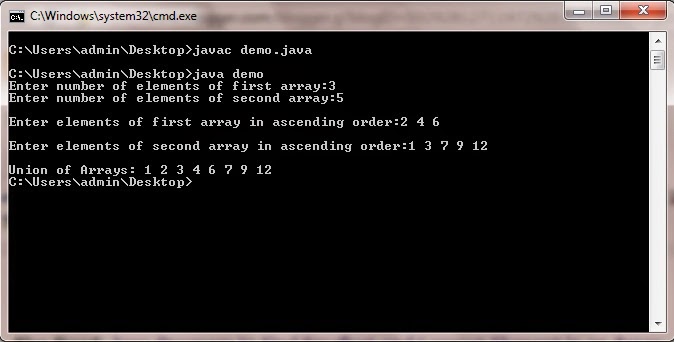
Also Read: Java Program to Find Smallest and Largest Element in an Array
Java Program to Find Union of two Arrays
import java.util.Scanner; //import Scanner class in our programclass demo
{
public static void main(String...s)
{
int i,j,n1,n2;
Scanner sc=new Scanner(System.in); //used to read from keyboard
System.out.print("Enter number of elements of first array:");
n1=sc.nextInt();
System.out.print("Enter number of elements of second array:");
n2=sc.nextInt();
int a1[]=new int[n1];
int a2[]=new int[n2];
System.out.print("
Enter elements of first array in ascending order:");
for(i=0;i<n1;++i)
a1[i]=sc.nextInt();
System.out.print("
Enter elements of second array in ascending order:");
for(i=0;i<n2;++i)
a2[i]=sc.nextInt();
i=j=0;
System.out.print("
Union of Arrays: ");
while(i<n1&&j<n2)
{
if(a1[i]<a2[j])
{
System.out.print(a1[i]+" ");
i++;
}
else
if(a2[j]<a1[i])
{
System.out.print(a2[j]+" ");
j++;
}
else
{
System.out.print(a1[i]+" ");
i++;
j++;
}
}
if(i<n1)
while(i<n1)
{
System.out.print(a1[i]+" ");
i++;
}
if(j<n2)
while(j<n2)
{
System.out.print(a2[j]+" ");
j++;
}
}
}
Saturday, February 14, 2015
C program to find factorial of any number using recursion

#include<stdio.h>
#include<conio.h>
void main()
{
int fac,n;
int factorial(int);
clrscr();
printf("Enter any number:");
scanf("%d",&n);
fac=factorial(n);
printf("Factorial=%d",fac);
getch();
}
int factorial(int x)
{
int f;
if(x==1||x==0)
return 1;
else
f=x*factorial(x-1);
return f;
}
Friday, February 13, 2015
Benefits of Email Archiving

It is an established fact that email archiving is beneficial to your business. Email archiving in the cloud allows preserving all your emails without having to worry about losing them ever. Limitless storage capacity of the cloud enables you to store all your emails efficiently. You can even archive your Lotus Notes in the cloud. This improves the performance of your computer and software.
Also Read: Top Reasons to Use Content Management Systems
Also Read: The 12 Best Tools To Protect Your Password
Not only you are able to store any messages you receive but also any messages you send. These emails are indexed in the cloud and can be easily accessed by any authorized person of your company. You need not worry about doing anything. Your input is not required for storing or indexing your emails. Everything is taken care of by the email archiving solution. All businesses, whether small or big can benefit from email archiving.
Features of Email Archiving
The most striking feature of email archiving is that your emails are automatically stored without requiring any input from you. The fact that all your emails are stored means that you have limitless Lotus Notes archive.
Why Invest in Email Archiving
Investing in email archiving can prove very beneficial for your business at it makes email management very easy. Email archiving in the cloud is a very reliable way of safely storing your emails. All your communications are stored automatically in the cloud and easily available. You can store gigabytes of data for a very minimal cost. All your emails are indexed in the cloud and you can even search through the content of the mails.
Your business can be prepared for any audits, legal inquiries or client inquiries, as all the emails are securely stored. You can easily look up any previous emails from clients. Email archiving improves your response time and allows you to react quicker to client requests. All in all there are too many benefits of email archiving in cloud to overlook the minimal cost incurred by it.
The benefits of email archiving are numerous. Not only does it indirectly save your expenditure on additional account space but provides you with better email management for your business. For freeing up account space you can also archive your Lotus Notes. With features like unlimited storage, indexing and automatic storage of emails, email archiving makes up for every penny spent. So, do not keep your clients waiting and improve your response time with email archiving in cloud.
Also Read: The 5 Best Softwares for Remote Assistance
Also Read: Green IT: When Computers Become Eco-Friendly
You no longer need to worry about your account space for keeping emails. You can delete emails from your account without any concern. There will always be a backup available in cloud, from where you can easily recover any lost file. Due to the indexing feature, it is really easy to look up any file in the cloud by keyword searches. You are able to respond quicker to any requests by your client. You can be ready for any audits in the future.
Easy email management is ensured with email archiving. All emails are readily available whenever you need then and you can access them from anywhere. You can allow your employees to access these emails as well. It enables for faster response to your client requests. There is no requirement of any additional hardware or software for archiving your emails in the cloud.
This article in written by Robert F., about Lotus Notes archive.
Thursday, February 12, 2015
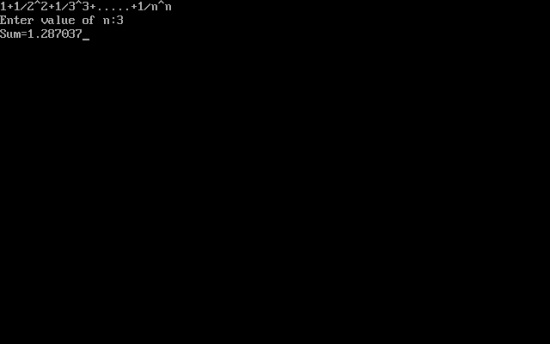
C program to find sum of series 1 1 2 2 1 3 3 1 n n
#include<iostream.h>
#include<conio.h>
#include<math.h>
void main()
{
clrscr();
double sum=0,a;
int n,i;
cout<<"1+1/2^2+1/3^3+.....+1/n^n";
cout<<"
Enter value of n:";
cin>>n;
for(i=1;i<=n;++i)
{
a=1/pow(i,i);
sum+=a;
}
cout<<"Sum="<<sum;
getch();
}
Top 10 Popular Programming Languages of All Time
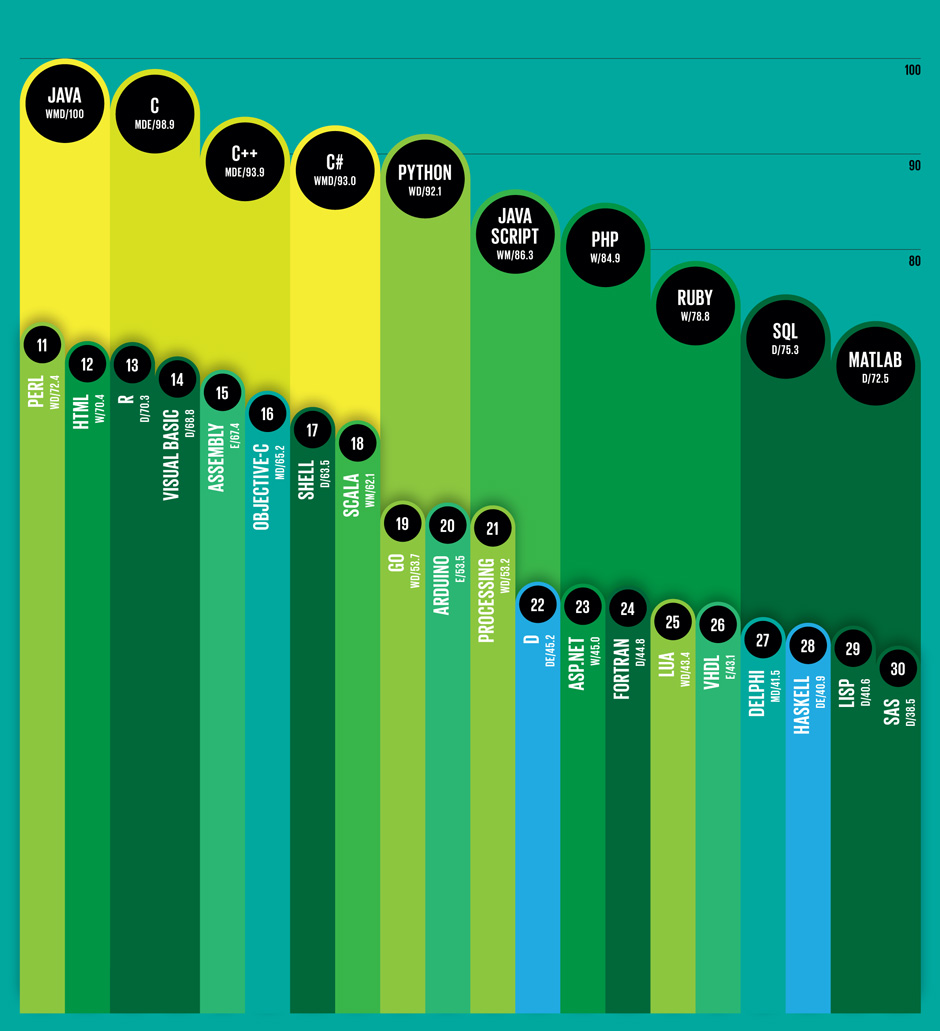
In this article I am giving the list of top 10 popular programming languages which was shared by IEEE Spectrum. The ranking of these languages are based on 12 metrics that are Google search, Stack Overflow, Hacker News, Reddit, Career Builder, Google trends, Github, Dice, Topsy, and IEEE Xplore. Java language is at first position while MATLAB at tenth. This list also contains popular programming languages that are ranked from 11th to 30th position. So if you are thinking to learn a programming language and start your career in programming then this list can help you to find the best.
Also Read: List of Biggest and Popular Programming Contests
Also Read: Top 5 Programming Languages That Are In Demand By Employers
Also Read: List of Biggest and Popular Programming Contests
Also Read: Top 5 Programming Languages That Are In Demand By Employers
List of Top 10 Popular Programming Languages
 |
| (Click on the image to enlarge) |
Source: http://spectrum.ieee.org/computing/software/top-10-programming-languages
Wednesday, February 11, 2015
C Program to find divisers of a number
#include<iostream.h>
#include<conio.h>
void main()
{
clrscr();
long int n,i;
cout<<"Enter the number: ";
cin>>n;
cout<<endl<<"Divisers of "<<n<<" are ";
for(i=1;i<=n;++i)
{
if(n%i==0)
cout<<" "<<i;
}
getch();
}
Tuesday, February 10, 2015
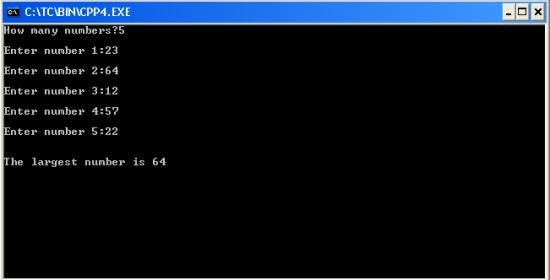
C program to find largest number of a list of numbers entered through keyboard
#include<iostream.h>
#include<conio.h>
void main()
{
clrscr(); //to clear the screen
int i,n,x,large=0;
cout<<"How many numbers?";
cin>>n;
for(i=0;i<n;++i)
{
cout<<"
Enter number "<<i+1<<":";
cin>>x;
if(x>large)
large=x;
}
cout<<"
The largest number is "<<large;
getch();
}
Sunday, February 1, 2015
3 web development tools youve probably never heard of
I got the chance to hang out with the fine folks at Twilio today and build a hackday project with their awesome APIs. Hackdays are all about getting things done quickly and as this is my ~14th hackday project, Ive come to rely on a set of high productivity tools. Depending on the project, there are a whole bunch I may use, so for this post, Ill just focus on 3 that most people are not aware of.
1. jQuerify Bookmarklet

Add jQuery to any page with this handy bookmarklet. Very useful if you want to mess around or experiment on a page using jQuery and Firebug, but the page doesnt have jQuery already.
2. jsFiddle

The perfect tool when you want to quickly test something out with HTML, CSS and/or JavaScript. Open jsFiddle in your browser, enter HTML in the top left, CSS in the top right, JavaScript in the bottom left and hit "run" to instantly see the result. Pull in popular JavaScript frameworks (e.g. jQuery, Mootools) by picking them in a drop down on the left. Finally, save and share your "fiddles" with others.
3. localtunnel

Provide a publicly accessible URL for any server running on localhost. Incredibly useful so you dont have to find hosting for a project while youre just hacking/testing. For example, if you have Rails server running at http://localhost:3000, all you have to do is run localtunnel 3000 in your terminal and youll get a URL (e.g. http://8bv2.localtunnel.com) that routes to your Rails app and can be accessed by anyone on the web. A big thanks to Jeff Lindsay for building localtunnel, Twilio for sponsoring it and Evan Cummack for telling me about it.
Read more »
1. jQuerify Bookmarklet
http://www.learningjquery.com/2009/04/better-stronger-safer-jquerify-bookmarklet
Add jQuery to any page with this handy bookmarklet. Very useful if you want to mess around or experiment on a page using jQuery and Firebug, but the page doesnt have jQuery already.
2. jsFiddle
http://jsfiddle.net/
The perfect tool when you want to quickly test something out with HTML, CSS and/or JavaScript. Open jsFiddle in your browser, enter HTML in the top left, CSS in the top right, JavaScript in the bottom left and hit "run" to instantly see the result. Pull in popular JavaScript frameworks (e.g. jQuery, Mootools) by picking them in a drop down on the left. Finally, save and share your "fiddles" with others.
3. localtunnel
http://progrium.com/localtunnel/
Provide a publicly accessible URL for any server running on localhost. Incredibly useful so you dont have to find hosting for a project while youre just hacking/testing. For example, if you have Rails server running at http://localhost:3000, all you have to do is run localtunnel 3000 in your terminal and youll get a URL (e.g. http://8bv2.localtunnel.com) that routes to your Rails app and can be accessed by anyone on the web. A big thanks to Jeff Lindsay for building localtunnel, Twilio for sponsoring it and Evan Cummack for telling me about it.
The New Features of Adobe Flash Professional CS6
The Adobe Creative Suite 6 was released last May 07, 2012, and with it comes Adobe Flash Professional CS6. Here are some of its new features:
If youre a beginner whos just purchased the Adobe Flash Professional CS6 program, check out the Adobe Flash Professional CS6 Essential Training course so that you can get the most out of this amazing program. You can get a free 7-day trial for complete access to this entire 8-hour online video training course by lynda.com.
Read more »
- the ability to create and export sprite sheets from symbols on the Stage and in the library
- a new SWF compression type based on LZMA (Lempel-Ziv-Markov chain algorithm), which can reduce the file size by up to 40%
- ability to export animations from Flash out to HTML5 through the Toolkit for CreateJS extension
- captive AIR runtime support for Android, OS X, and Windows
- the new Content Simulator, an AIR application that helps you simulate how your content will behave on a mobile device
- Flash Professional CS6 projects are now compatible with AIR native extensions for advanced users with the advent of AIR 3.2
- the ability to list additional languages that your application can be installed in
- iOS debugging via wi-fi now lets you add breakpoints, step in and out of functions, and watch variables
If youre a beginner whos just purchased the Adobe Flash Professional CS6 program, check out the Adobe Flash Professional CS6 Essential Training course so that you can get the most out of this amazing program. You can get a free 7-day trial for complete access to this entire 8-hour online video training course by lynda.com.
Monday, January 26, 2015
The AS3 this keyword and how to randomize the size of a MovieClip instance on the stage
In this lesson, well learn about the this keyword. But before I explain what the this keyword is, lets first recall that we can put some ActionScript code on keyframes in the main timeline. But we can also put some ActionScript code on the keyframes inside MovieClip symbols as well. If we place ActionScript code on the keyframes inside of MovieClip symbols, then it means that the code is inside the MovieClip symbols timeline, instead of being on the main timeline.
Its important to take note of this, because the this keyword references whichever object the this keyword is placed in. Is it within the code in the main timeline, or is it within the code nested inside a MovieClip symbol instead? If we placed the this keyword within the code inside one of the keyframes in the main timeline, then the this keyword will refer to the main timeline. If the this keyword was placed inside the timeline of a MovieClip symbol, then the this keyword will refer to the instance of the MovieClip symbol instead (or instances, if there are more than one). So what this is, depends on where this is.
To hopefully make things a little more clear, lets create an example.
Step 1
Create a new Flash ActionScript 3.0 document.
Step 2
Select the first keyframe of the main timeline, then open up the Actions Panel.
Step 3
In the script pane, type:
Lets try to trace this to see what it will output. Basically, when we create this trace statement, its like we are asking: what is this?
And in this example, the answer to that is: the main timeline. Since we selected the first keyframe of the main timeline when we added the code, this means that our code is on the main timeline. So in this example, this refers to the main timeline.
Step 4
Test the movie.
In the output window, you should see the message: [object MainTimeline]. So the message in the output window confirms that the this keyword in our example refers to the main timeline. It refers to the main timeline since the this keyword was placed in one of the frames of the main timeline. When using the this keyword, this refers to wherever this is.
Step 5
Now lets try placing the this keyword inside a MovieClip symbol instead. But first, go back to the actions panel and erase the trace statement that we placed on the main timeline so as not to make things confusing when were trying to trace the MovieClip objects were about to create.
Step 6
Next, lets create the symbol.
Using the oval tool, draw a circle on the stage and convert it into a MovieClip symbol named Circle.
Step 7
Then give the MovieClip instance an instance name.
Make sure that the instance on the stage is selected (do NOT double-click on it because that will bring you inside the MovieClip symbols timeline). Once its selected, go to the properties inspector and type circle1_mc in the instance name input field.
Step 8
Now, lets add some ActionScript inside the MovieClip symbols timeline.
This time, you can double-click on the MovieClip instance on the stage in order to go inside the MovieClip symbols timeline.
Step 9
Double-check that you are, in fact, inside the MovieClip symbols timeline by looking at the edit bar. The edit bar should say Scene 1 > Circle.
Step 10
Once youve confirmed that you are inside the MovieClip symbol, add another layer on the timeline, and name it Actions.
Remember: this timeline belongs to the MovieClip symbol. We are not on the main timeline.
Step 11
Then select the first keyframe of the Actions layer, then go to the actions panel and type:
Here, we are not simply referencing this, but specifically, we are tracing its name. You can use the this keyword to access properties and methods of objects as well. Basically, in this example, our trace statement is trying to ask: what is the name of this object?
Since the statement that contains the this keyword is inside the MovieClip symbols timeline, its going to output circle1_mc in the output window. The this keyword references objects or instances that contain it. So the this keyword is going to refer to the specific instance of the MovieClip symbol on the stage, and not the symbol in the library. This is why its going to output circle1_mc (which is the instance name), and not Circle (which is the symbols name).
Step 12
Now lets go back to the main timeline by clicking on the scene 1 link.
Step 13
Once we are back on the main timeline, go to the library and drag another instance of the Circle symbol onto the stage. Give this one circle2_mc for its instance name. Since this is also an instance of the Circle symbol, its also going to have the same trace statement inside it already. Whatever code you have inside the timeline of a MovieClip symbol will also be inside any of its instances that are on the stage. There is no need for us to add it again. So when we test the movie, Flash is also going to output the name of this second instance in the output window.
Step 14
Go ahead and test the movie.
You should see the names circle1_mc and circle2_mc displayed in the output window.
Why would we want to use the this keyword?
Sometimes, you might want to place some code inside a MovieClip symbols timeline. That way, every single instance of the MovieClip symbol will have the same code inside it when you place it on the stage. This saves you some time, because you wont have to repeatedly type the same code over and over. You just have to put it inside the MovieClip symbols timeline once, and then every instance of that MovieClip symbol will have the code already placed inside it. The this keyword lets us explicitly tell Flash that our code is meant for that specific instance that contains the this keyword.
Lets see this in action by adding more code to our example.
Step 15
Go back inside the Circle MovieClips timeline by double-clicking any of the instances on the stage. Then select the first keyframe of the Actions layer and open up the Actions Panel.
Step 16
Remove the trace statement, and add these lines of code in its place:
Here, weve added some lines of code that will increase the size of each instance of the MovieClip symbol that we place on the stage. Basically, the code is saying: scale this to 3 times its original size. So when the Flash movie runs, the MovieClip instances on the stage will be 3 times larger.
Step 17
Go back to the main timeline, by clicking on the scene 1 link.
Step 18
From the library, add more instances of the Circle MovieClip symbol until you have ten instances on the stage.
Step 19
Test the movie.
You should see that each circle is now three times larger than its original size. Since we placed the code inside the MovieClip symbols timeline, instead of the main timeline, then we only had to write those lines once, and each instance will have the same lines of code built-in. This is why every single instance of the Circle MovieClip became bigger.
Step 20
In this next step, well modify the code so that each instance of the Circle MovieClip will have a different, randomized size.
Go back to the Circle MovieClip symbols timeline by double-clicking any of the instances on the stage. Then select the first keyframe of the Actions layer and open up the Actions Panel.
Step 21
In the script pane, replace the current code with this:
The first line of code creates a variable named nScale. And then to this variable, we are assigning the expression Math.random() * 3. What this does is it generates a random number that can be anywhere between 0 and 3. If you want Flash to choose from a higher range of values, then simply replace 3 with a higher value (but dont make it too high since we are going to use it to scale the size of the objects). Then once that random number is generated, the number is assigned to the scaleX and scaleY properties. This is going to happen for each instance of the Circle MovieClip that we have on the stage. So chances are, theyll each generate a different value, thus making them all have different sizes once the Flash movie runs.
Step 22
Test the movie and you should see your circles all in different sizes. And since the values are generated randomly, youll see different sizes every time you test the movie.
Read more »
Its important to take note of this, because the this keyword references whichever object the this keyword is placed in. Is it within the code in the main timeline, or is it within the code nested inside a MovieClip symbol instead? If we placed the this keyword within the code inside one of the keyframes in the main timeline, then the this keyword will refer to the main timeline. If the this keyword was placed inside the timeline of a MovieClip symbol, then the this keyword will refer to the instance of the MovieClip symbol instead (or instances, if there are more than one). So what this is, depends on where this is.
To hopefully make things a little more clear, lets create an example.
Step 1
Create a new Flash ActionScript 3.0 document.
Step 2
Select the first keyframe of the main timeline, then open up the Actions Panel.
Step 3
In the script pane, type:
trace(this);
Lets try to trace this to see what it will output. Basically, when we create this trace statement, its like we are asking: what is this?
And in this example, the answer to that is: the main timeline. Since we selected the first keyframe of the main timeline when we added the code, this means that our code is on the main timeline. So in this example, this refers to the main timeline.
Step 4
Test the movie.
In the output window, you should see the message: [object MainTimeline]. So the message in the output window confirms that the this keyword in our example refers to the main timeline. It refers to the main timeline since the this keyword was placed in one of the frames of the main timeline. When using the this keyword, this refers to wherever this is.
Step 5
Now lets try placing the this keyword inside a MovieClip symbol instead. But first, go back to the actions panel and erase the trace statement that we placed on the main timeline so as not to make things confusing when were trying to trace the MovieClip objects were about to create.
Step 6
Next, lets create the symbol.
Using the oval tool, draw a circle on the stage and convert it into a MovieClip symbol named Circle.
Step 7
Then give the MovieClip instance an instance name.
Make sure that the instance on the stage is selected (do NOT double-click on it because that will bring you inside the MovieClip symbols timeline). Once its selected, go to the properties inspector and type circle1_mc in the instance name input field.
Step 8
Now, lets add some ActionScript inside the MovieClip symbols timeline.
This time, you can double-click on the MovieClip instance on the stage in order to go inside the MovieClip symbols timeline.
Step 9
Double-check that you are, in fact, inside the MovieClip symbols timeline by looking at the edit bar. The edit bar should say Scene 1 > Circle.
Step 10
Once youve confirmed that you are inside the MovieClip symbol, add another layer on the timeline, and name it Actions.
Remember: this timeline belongs to the MovieClip symbol. We are not on the main timeline.
Step 11
Then select the first keyframe of the Actions layer, then go to the actions panel and type:
trace(this.name);
Here, we are not simply referencing this, but specifically, we are tracing its name. You can use the this keyword to access properties and methods of objects as well. Basically, in this example, our trace statement is trying to ask: what is the name of this object?
Since the statement that contains the this keyword is inside the MovieClip symbols timeline, its going to output circle1_mc in the output window. The this keyword references objects or instances that contain it. So the this keyword is going to refer to the specific instance of the MovieClip symbol on the stage, and not the symbol in the library. This is why its going to output circle1_mc (which is the instance name), and not Circle (which is the symbols name).
Step 12
Now lets go back to the main timeline by clicking on the scene 1 link.
Step 13
Once we are back on the main timeline, go to the library and drag another instance of the Circle symbol onto the stage. Give this one circle2_mc for its instance name. Since this is also an instance of the Circle symbol, its also going to have the same trace statement inside it already. Whatever code you have inside the timeline of a MovieClip symbol will also be inside any of its instances that are on the stage. There is no need for us to add it again. So when we test the movie, Flash is also going to output the name of this second instance in the output window.
Step 14
Go ahead and test the movie.
You should see the names circle1_mc and circle2_mc displayed in the output window.
Why would we want to use the this keyword?
Sometimes, you might want to place some code inside a MovieClip symbols timeline. That way, every single instance of the MovieClip symbol will have the same code inside it when you place it on the stage. This saves you some time, because you wont have to repeatedly type the same code over and over. You just have to put it inside the MovieClip symbols timeline once, and then every instance of that MovieClip symbol will have the code already placed inside it. The this keyword lets us explicitly tell Flash that our code is meant for that specific instance that contains the this keyword.
Lets see this in action by adding more code to our example.
Step 15
Go back inside the Circle MovieClips timeline by double-clicking any of the instances on the stage. Then select the first keyframe of the Actions layer and open up the Actions Panel.
Step 16
Remove the trace statement, and add these lines of code in its place:
this.scaleX = 3;
this.scaleY = 3;
Here, weve added some lines of code that will increase the size of each instance of the MovieClip symbol that we place on the stage. Basically, the code is saying: scale this to 3 times its original size. So when the Flash movie runs, the MovieClip instances on the stage will be 3 times larger.
Step 17
Go back to the main timeline, by clicking on the scene 1 link.
Step 18
From the library, add more instances of the Circle MovieClip symbol until you have ten instances on the stage.
Step 19
Test the movie.
You should see that each circle is now three times larger than its original size. Since we placed the code inside the MovieClip symbols timeline, instead of the main timeline, then we only had to write those lines once, and each instance will have the same lines of code built-in. This is why every single instance of the Circle MovieClip became bigger.
Step 20
In this next step, well modify the code so that each instance of the Circle MovieClip will have a different, randomized size.
Go back to the Circle MovieClip symbols timeline by double-clicking any of the instances on the stage. Then select the first keyframe of the Actions layer and open up the Actions Panel.
Step 21
In the script pane, replace the current code with this:
var nScale:Number = Math.random() * 3;
this.scaleX = nScale;
this.scaleY = nScale;
The first line of code creates a variable named nScale. And then to this variable, we are assigning the expression Math.random() * 3. What this does is it generates a random number that can be anywhere between 0 and 3. If you want Flash to choose from a higher range of values, then simply replace 3 with a higher value (but dont make it too high since we are going to use it to scale the size of the objects). Then once that random number is generated, the number is assigned to the scaleX and scaleY properties. This is going to happen for each instance of the Circle MovieClip that we have on the stage. So chances are, theyll each generate a different value, thus making them all have different sizes once the Flash movie runs.
Step 22
Test the movie and you should see your circles all in different sizes. And since the values are generated randomly, youll see different sizes every time you test the movie.
Subscribe to:
Posts (Atom)