Wednesday, February 18, 2015
The all new iPhone6 and iPhone6

The iPhone 6 features you probably missed
Notice the power button

Phase detection
 These are the first phones in the world to be equipped with phase detection autofocusing, so youre going to get pro-quality automatic focusing while shooting videos or taking a picture. No other smartphone has this.
Focus Pixels
 Focus Pixel improves exposure control in the 8-megapixel camera twice as fast as the iPhone 5S. Optical (previously digital) image stabilization, the capacity to shoot Full HD video at up to 60fps, 240fps slow motion (with 3x zoom) and a larger f2.2 aperture allows in up to 81% more light for better quality snaps.
Dual-domain
Much faster LTE/4G
Wi-Fi wonder
 Wi-Fi support is far, far better. You can look forward to Wi-Fi speeds up to three times faster than was possible on the previous generation iPhone thanks to its support for 802.11ac. This report explains why this matters. Support for VoLTE is a big deal.
Siri is aware
 Apple has tweaked iPhones intelligent voice assistant, Siri; you no longer need to press the home button to call up the voice assistant, you only need to say "Hey Siri" and it activates for you.
Monday, February 16, 2015
Heard alot about the KOBO Here it is

The latest Good E-Reader news has the Kobo electronic reader going on sale in Canada this Sunday at Indigo book stores and has a follow up in Boarders stores later on in May, in the United States.
The main great thing about this e-reader is the cost $169.00, which is a cost effective alternative to more expensive electronic readers. The principle behind Kobo is allowing e-reading anytime on whatever device the consumer wants, as the platform is compatible with Research In Motion, BlackBerry, Apple Inc.’s iPhone, and others. When an e-book is downloaded onto an e-reader or Smartphone using the Kobo app, it remains in the user’s “online library,” meaning the e-book can be read on multitude of devices. The Kobo also takes home the prize for dedication of purpose. You can read books on it, and that’s it. No monochrome photo browsing, no music player, none of the extraneous features found on other devices that people end up never using. It’s for reading, plain and simple. The Kobo book store is compatible with most major Smartphone’s, computers, Netbooks and e-readers.
The device itself features four buttons on the left edge: one that takes you to the home screen, one that calls up a menu of options for the book you’re currently reading, another that brings up display preferences (typeface, magnification, and the like), and a “back” button that takes you to previous screens. An on/off switch is located on the top, and a big blue membrane navigation button found on the bottom right of the face lets you flip pages and surf menus. That’s all there is to the interface.
The process of transferring books from your computer to the Kobo is a breeze. You can either drag-and-drop (it supports PDF and ePub files) or use Adobe’s Digital Editions software to manage and sync your library. It also has built-in Bluetooth, allowing users to purchase books via smart phone and send them straight to their Kobo.
Kevin Restivo, analyst at IDC, sees Indigo “hedging its bets” with Kobo. On the one hand it has an e-reading operating system that works on multiple devices, and on the other it’s introducing a single-purpose device when the market is hot for e-readers.
The Kobo eReader is likely to go on sale in New Zealand next month at the same time as Whitcoulls and Borders launch the country’s first eBook store.
A spokesperson for REDgroup, which owns Whitcoulls and Borders, said more than a million eBooks would be available for purchase on the two retailers’ websites when the store launched in May.
Kobo will then be soon launched in Australia at the end of the month.R REDgroup had partnered with Canadian eBook firm Kobo to provide the service and it was likely that the company’s upcoming Kobo eReader would also go on sale locally when the stores launched, she said.
Managing director Dave Fenlon said the company had completed the integration of its three bookstore brands and was now looking for growth opportunities, with the Kobo electronic book platform to be launched next month in league with Canadian bookseller Indigo.
In addition to Kobo-branded readers to be sold in Redgroup’s stores, the company’s e-books will be accessible on other devices, including Smartphone’s, computers and iPad’s.
REDgroup was now Australia’s largest online bookstore, with more than 2.5 million titles available.
We have a comprehensive review of the KOBO in our latest MAY edition of the Good E-Reader Magazine! If you are interested in Kobo, E-Readers, or Slates this is the must buy for you! It is only $1.99 for the first issue.
http://goodereader.com/blog/electronic-readers/kobo-canadian-american-australian-and-new-zealand-launch-dates/
The Top 5 Sexiest Female Programmers in the World
So I thought that I should prepare a list of top female programmers all over the world and share it with others. Below I am listing out the top 5 sexiest female programmers who are a great combination of beauty with brains.
Also Read: List of Biggest and Popular Programming Contests
Also Read: The Top 10 Highest Earning Websites in the World
Jade Raymond
Jade Raymond completed her graduation from St. Georges School of Montreal and Marianopolis College. She received a Bachelor of Science degree from McGill University in 1998, where she majored in computer science. She started her career as a programmer for Sony. Jade is the producer of a famous game Assassins Creed. Currently she is working as a managing director of Ubisoft Publisher..JPG "The Top 5 Sexiest Female Programmers in the World (Jade Raymond)")
Sara Haider
Sara Haider is another sexy & famous female programmer. She completed her education from University of Waterloo. She worked for Google for a considerable amount of time. She was involved in the development of Vine app for android. Currently she is working as a software engineer at Twitter..jpg "The Top 5 Sexiest Female Programmers in the World (Sara Haider)")
Corrine Yu
Probably Corrine Yu comes at first position in world’s female game programmers list. She is a professional programmer and coder too. She has given her contribution in development of various famous games like Brothers in arms, Borderlands, Zombie, Unreal Engine 3. She made a great contribution in developing Halo 4, which became very popular video game of year 2012. Apart from game programming she won national award in 2009 for Nuclear Physics research.
Amanda Wixted
Amanda Wixted is known all over the world as one of the most effective and efficient mobile developers as well as a good game programmer. Amanda has given her contribution in the development of the popular game Farmville. Currently she is consulting and managing few companies and she started also a company Turf geography club.
Also Read: The Top 4 Websites to Create Android Apps Online for Free
Also Read: Top 5 Programming Languages That Are In Demand By Employers
Tracy Chou
Tracy Chou holds Bachelor’s degree in Electrical Engineering as well as Master’s degrees in Computer Science from the Stanford University. She worked for many big companies like Google, Facebook, Quora. Currently she is working as a software engineer for Pinterest.
If you feel anything missing or wrong in above article then you can mention it in the comment section. Please do share if you have liked the above article.
Source:
http://www.techtricksworld.com/2013/08/5-famous-female-programmers.html
http://www.trickslab.net/2013/07/Sexiest-Coders.html
C Program to reverse all the strings stored in an array

#include<iostream.h>
#include<conio.h>
#include<string.h>
#include<stdio.h>
void main()
{
clrscr();
char a[3][50];
int i,j,k,len;
cout<<"Enter 3 strings:
";
for(i=0;i<3;i++)
{
gets(a[i]);
}
cout<<"
The list of orignal strings:
" ;
for(i=0;i<3;i++)
{
cout<<a[i]<<"
";
}
cout<<"
The list of changed string:
";
for(i=0;i<3;i++)
{
len=strlen(a[i]);
for(j=0,k=len-1;k>=0;j++,k--)
{
cout<<a[i][k];
}
cout<<"
";
}
getch();
}
Sunday, February 15, 2015
No more mail attachment limits with the new Hotmail
 Microfts new Hotmail takes aim at Google.
by Ina Fried May 17, 2010 9:00 PM PDT
Like all parents, Microsoft likes to tout the accomplishments of its offspring. Any conversation about Hotmail is likely to start with the fact that, at least globally, the free Web mail service has more active accounts than any of its rivals.
Pressed, though, company officials also see Hotmails shortcomings. In recent years, rivals Google and Yahoo have been ahead of the game when it comes to adding things like conversation views, mobile synchronization and other features. And Yahoo has more U.S. accounts, while Google has been growing faster than Hotmail. Beyond any one feature, though, Hotmail has come to be perceived as a technology laggard, rather than a leader.
A look at the new Hotmail (images)


In attempting to turn things around, Microsoft is falling back on an important parenting lesson--teaching its child to be better at sharing.
A key feature in the coming update to Windows Live Hotmail is an improved ability to share photos and Office documents using a combination of Web-based editing tools and cloud file storage. The new version, which will begin being offered to most users in July or August, aims to offer a better alternative to the standard attachment. Instead, Hotmail will offer the option of uploading a file or photo to Microsofts SkyDrive service and e-mailing a link, as opposed to the file itself. The approach has several advantages, including avoiding issues related to file size limits that often make it hard to share videos, presentations, or large collections of photos. Recipients can then either download the files, or, in the case of photos, view an online slideshow.
The new version also allows users to view photos or videos from third-party services, such as Flickr, SmugMug, Hulu, and YouTube, all without having to leave Hotmail. The revamped Hotmail also adds a new "sweep" option that lets users easily divert mail from a particular sender into either a new folder or into the trash.
"This update I think is the most significant one weve ever done," Jones said. At a minimum, its at least the biggest move for Microsoft since it completely revamped Hotmail four years ago.
On the mobile side, Microsoft will start using Exchange ActiveSync to allow Windows Live e-mail, calendar, and contacts to be pushed onto cell phones. To use both Hotmail and a corporate Exchange account, users will need a phone that supports dual ActiveSync connections. Today, the Palm Pre is one of the few devices that does so, but Jones said that Windows Phone 7 supports the feature, as does iPhone OS 4.
Microsoft general manager Brian Hall had suggested that many of these features are coming in a recent CNET interview.
In addition to letting users create their own e-mail filters, the new Hotmail also creates some views of its own, such as creating a separate view for shipping notifications and another for social-network updates, which now make up a significant number of all e-mail messages.
The software maker will also add the option for users to send their e-mail using an encrypted HTTPS connection. In January, Google made a secure Net connection the default following a cyberattack on its mail service.
Two features that wont be part of the summer upgrade, but are also on the horizon, are the ability to have multiple e-mail aliases in a single account as well as an option to update a mail account with a new name. That latter feature is particularly useful if a user is hoping to move from, say "DaveDrinks21" to "Davethefuturegovernor," without having to start over with a new account, e-mail history, and contact list.
Heres a look at how Hotmail has evolved since its earliest days:
_________________________________________________________________

Opticom cares
To advertise here
email advert to: opticomsolns@gmail.com
Friday, February 13, 2015
C program to print the following pattern
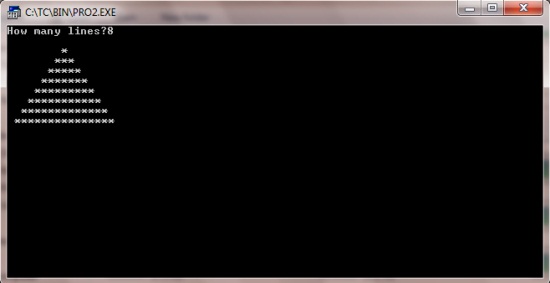
#include<iostream.h>
#include<conio.h>
void main()
{
clrscr(); //to clear the screen
int i,j,k,n;
cout<<"How many lines?";
cin>>n;
n*=2;
for(i=0;i<n;i+=2)
{
cout<<"
";
for(j=n;j>i;j-=2)
cout<<" ";
for(k=0;k<=i;++k)
cout<<"*";
}
getch(); //to stop the screen
}
Wednesday, February 11, 2015
How to Speed Up the Page Load Time in Blogger

Choosing the Right Template Design
Minifying JavaScript & CSS Files
Limiting the Number of Home Page Posts
Compressing and Optimizing Images
Avoiding Ads (Iframe, JavaScript)
Sunday, February 1, 2015
The New Features of Adobe Flash Professional CS6
- the ability to create and export sprite sheets from symbols on the Stage and in the library
- a new SWF compression type based on LZMA (Lempel-Ziv-Markov chain algorithm), which can reduce the file size by up to 40%
- ability to export animations from Flash out to HTML5 through the Toolkit for CreateJS extension
- captive AIR runtime support for Android, OS X, and Windows
- the new Content Simulator, an AIR application that helps you simulate how your content will behave on a mobile device
- Flash Professional CS6 projects are now compatible with AIR native extensions for advanced users with the advent of AIR 3.2
- the ability to list additional languages that your application can be installed in
- iOS debugging via wi-fi now lets you add breakpoints, step in and out of functions, and watch variables
If youre a beginner whos just purchased the Adobe Flash Professional CS6 program, check out the Adobe Flash Professional CS6 Essential Training course so that you can get the most out of this amazing program. You can get a free 7-day trial for complete access to this entire 8-hour online video training course by lynda.com.
Friday, January 30, 2015
The 30 day blog fitness challenge
When Adam Nash found out about the burpee challenge, he laughed at me. Im not sure if he was put off more by the word "burpee" or the sight of me jumping around like crazy next to my cubical. As a response, Adam, along with Mario Sundar, proposed a different challenge: a 30 day blog fitness challenge. The rules are, again, very simple: write one blog post, every day, for 30 days straight. If you miss a day, you have to make it up the next day. The purpose of this challenge is analogous: develop mental fitness (writing uses the entire brain), develop good habits, and learn the virtue of consistency.
It sounded nice until I realized that Im supposed to keep pace with:
- Adam, a VP of Product, who already has a very active personal blog (1.7M hits!) and is a regular on the LinkedIn Blog
- Mario, whose job title involves the phrase "Chief Blogger" and who isnt exactly a slouch on his personal blog
Im unquestionably the dark horse in the race, but I have a few tricks up my sleeve.
- The fact that almost no one reads my blog is a benefit: I can afford to write crap and no one will notice.
- I have a very high pain tolerance. See burpee video above.
- I fully intend on cheating. Meta-posts of this sort are just the beginning.

And so, dear reader(s), prepare yourselves for 29 more consecutive days of blog posts, featuring exciting topics ranging from Crossfit, to game mechanics, to open source software. Oh, and burpees.
Thursday, January 29, 2015
Understanding the difference between Object Drawing Mode vs Merge Drawing Mode in Flash PART 1 Flash CS5 Beginners Tutorial
- Part 1
- Part 2
- Part 3
- Part 4
- Part 5
When you use the drawing tools in Flash, you have the option to draw in two modes: object drawing mode vs merge drawing mode. This article will explain a few of the differences between the two.
Step 1
Create a new Flash document.
Step 2
Select the brush tool. You can use any brush size, color and shape that youd like. But I recommend that you choose a brush size thats not too small so that what you draw will be thicker and more visible. Also, make sure that the color you choose is different from the background color of your document.
Step 3
Once the brush tool is selected, take a look at the toolbar and look for the icon that shows a circle inside a square.

You can click on this button, and it allows you to activate or deactivate the object drawing mode. If the icon appears to look inset, it means that the object drawing mode is ON. If not, then it means that the object drawing mode is OFF, and you are therefore on merge drawing mode instead.

Clicking on this button lets you switch between object mode and merge mode. Check the object drawing mode button in your toolbar to see whether its ON or OFF. If its ON, then click on it to turn it OFF. If not, then leave it as is.
Step 4
The best way to explain the differences between the two drawing modes is to create examples. So make sure that the object drawing mode is OFF. Then draw a line on the left side of the stage using the brush tool.

Now remember, since the object drawing mode is OFF, this means that this line was drawn in merge mode.
Step 5
Now lets switch to the object drawing mode. So this time, make sure that the object drawing mode is ON. And then draw another line on the right side of the stage using the brush tool.

Immediately, youll notice a difference. Youll see that this new line that you drew while you were in the object drawing mode is enclosed in a box. When its enclosed in this box, it means that the artwork is currently selected. And when its selected, this means that you can edit it (e.g. move it, change the color, modify the size). However, when you select something that was drawn in merge mode, it will NOT show a box or a border around it. In the next step, well see what happens instead.
Step 6
Now lets select the other line to see how artwork drawn in merge mode will look like when its selected.
In the toolbar, choose the selection tool (its the black arrow).

Then click on the line that you drew on the left side of the stage in order to select it.

Here, youll see that the selection looks different (click on the image above to enlarge). Instead of being enclosed in a box, youll see dots all over the artwork. So when you see this, this means that you currently have a merge type of drawing selected.
So here we see that object drawings and merge drawings look different from each other when they are selected. This easily lets us know whether something is an object drawing or a merge drawing.
But aside from this, what other differences do they have?
Another difference between a merge drawing and an object drawing is this:
Merge drawing - you have the ability to directly select just a portion of the drawing
Object drawing - if you try to select even just a small portion of the object drawing, the entire object drawing automatically gets selected
To better understand this, lets practice it using our examples on the stage.
Step 7
Make sure youre still using the selection tool. Lets first try to select a portion of the merge drawing on the left side of the stage. To select a portion, use the selection tool, then just click and drag a selection area that covers a small part of the artwork. Refer to the image below as a guide:

Once you release the mouse and youve selected the portion, youll see the dots appear only on top of the part that was selected. So this means that the parts that are not covered with dots are not included in the selection.
Step 8
Now lets edit the currently selected portion.
Go to the toolbar, and select a new color for the selected portion by picking one from the fill color box.

Just click on the color box and select a different color. Youll then see that the new color only applies to the selected portion.

So with merge drawings, you see that we can easily select just a portion of it. The selected portion can then be edited without affecting the rest of the drawing. You can change the selected portions color, modify its shape, move it to a different location, or you can even delete it if youd like.
In the next step, well see if we can do the same thing with the object drawing on the right.
Step 9
So now, while still using the selection tool, well try to select just a portion of the drawing on the right.
Go ahead and click and drag a selection area that just covers a portion of the shape, similar to what we did in step 7.

Once you release the mouse, youll see that even though you selected only a portion of the drawing, the entire shape still gets selected. That is what happens with object drawings. As long as you select even the tiniest portion of the drawing, the entire thing gets selected.
But what can you do if youve got an object drawing, but youd still like to be able to select only a portion of it? The next step will show you how.
Step 10
With object drawings, its still possible to select just a portion of the shape. Theres just an extra step that you have to do.
First, take note of the edit bar, which can be found above the stage. It should say Scene 1.

The edit bar tells you where you are. Right now, you are on scene 1.
Now go ahead and double-click on the object drawing on the right side of the stage.
After you double-click on it, look at the edit bar again. It should now say Scene 1 followed by Drawing Object.

What this means is that you are now inside the drawing object. You should see that you no longer have the box around your drawing. So in a way, its as if you opened the box to get direct access to the artwork inside it. And now that youre inside the box, youll be able to treat the artwork as a merge drawing. So youll now have the ability to select just portions of it instead of the entire shape.
Step 11
Once youre finished editing an object drawing, its important that you go back to the main scene. Otherwise, you might end up inadvertently adding unwanted elements to the object drawing that youre currently editing.
To go back to scene 1, just click on the Scene 1 link in the edit bar.

NOTE: Always be mindful of the edit bar. Its a common mistake for many to accidentally double-click on an object drawing, and then they fail to notice that they are no longer in the main scene, but continue to work as if they are.
In part 2 of this series, well create some object and merge drawing examples using the oval tool.
Up in the mountains

Our tour started by taking an enclosed gondola up a mountain. From up top, we got a gorgeous view of the rolling green hills all around.

We wandered around the mountain a bit and found a small path that cut through the forest.

We passed through some fields of purple flowers.

And came upon a field that overlooked a gorgeous farm on the side of a mountain. It looked peaceful and serene. We simply sat in the tall grass and relaxed.

After our the brief respite, we caught an open air gondola back down the mountain.

The view on the way down was stunning.

When we got back down, we got the chance to appreciate the Zakopane architecture style. Wooden cabins with large, very angled roofs.

These people were very serious about their roofs.

Some of the houses seemed to consist entirely or roof.

Gaudi style roofs.

Terraces with roofs.

Benches with roofs.

Fences with roofs.

Bus stops that were 90% roof.

And even a cemetery where each gravestone had a roof.

Each one was unique and intricate.

Including the gravestone of Stanislaw Witkiewicz, who is credited with creating the Zakopane style of architure.