Showing posts with label two. Show all posts
Showing posts with label two. Show all posts
Monday, February 16, 2015
Java Program to Find Union of two Arrays
For example we have two sorted arrays a1[]={2,3,5,11} and a2[]={4,7,9} then union of a1 and a2 will be {2,3,4,5,7,9,11}. A Java program for finding union of two arrays is given below.
Also Read: Java Program to Find Smallest and Largest Element in an Array
class demo
{
public static void main(String...s)
{
int i,j,n1,n2;
Scanner sc=new Scanner(System.in); //used to read from keyboard
System.out.print("Enter number of elements of first array:");
n1=sc.nextInt();
System.out.print("Enter number of elements of second array:");
n2=sc.nextInt();
int a1[]=new int[n1];
int a2[]=new int[n2];
System.out.print("
Enter elements of first array in ascending order:");
for(i=0;i<n1;++i)
a1[i]=sc.nextInt();
System.out.print("
Enter elements of second array in ascending order:");
for(i=0;i<n2;++i)
a2[i]=sc.nextInt();
i=j=0;
System.out.print("
Union of Arrays: ");
while(i<n1&&j<n2)
{
if(a1[i]<a2[j])
{
System.out.print(a1[i]+" ");
i++;
}
else
if(a2[j]<a1[i])
{
System.out.print(a2[j]+" ");
j++;
}
else
{
System.out.print(a1[i]+" ");
i++;
j++;
}
}
if(i<n1)
while(i<n1)
{
System.out.print(a1[i]+" ");
i++;
}
if(j<n2)
while(j<n2)
{
System.out.print(a2[j]+" ");
j++;
}
}
}
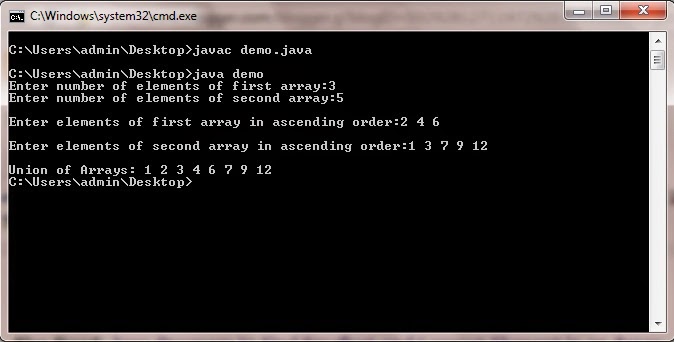
Also Read: Java Program to Find Smallest and Largest Element in an Array
Java Program to Find Union of two Arrays
import java.util.Scanner; //import Scanner class in our programclass demo
{
public static void main(String...s)
{
int i,j,n1,n2;
Scanner sc=new Scanner(System.in); //used to read from keyboard
System.out.print("Enter number of elements of first array:");
n1=sc.nextInt();
System.out.print("Enter number of elements of second array:");
n2=sc.nextInt();
int a1[]=new int[n1];
int a2[]=new int[n2];
System.out.print("
Enter elements of first array in ascending order:");
for(i=0;i<n1;++i)
a1[i]=sc.nextInt();
System.out.print("
Enter elements of second array in ascending order:");
for(i=0;i<n2;++i)
a2[i]=sc.nextInt();
i=j=0;
System.out.print("
Union of Arrays: ");
while(i<n1&&j<n2)
{
if(a1[i]<a2[j])
{
System.out.print(a1[i]+" ");
i++;
}
else
if(a2[j]<a1[i])
{
System.out.print(a2[j]+" ");
j++;
}
else
{
System.out.print(a1[i]+" ");
i++;
j++;
}
}
if(i<n1)
while(i<n1)
{
System.out.print(a1[i]+" ");
i++;
}
if(j<n2)
while(j<n2)
{
System.out.print(a2[j]+" ");
j++;
}
}
}

Sunday, February 15, 2015
C program to swap two numbers using macros

#include<iostream.h>
#include<conio.h>
#define SWAP(a,b) {int temp; temp=a; a=b; b=temp;}
void main()
{
clrscr();
int x,y;
cout<<"Enter two numbers:";
cin>>x>>y;
cout<<"x="<<x<<" y="<<y;
SWAP(x,y);
cout<<"
x="<<x<<" y="<<y;
getch();
}
Thursday, February 12, 2015
C program to add two numbers using structure

#include<stdio.h>
#include<conio.h>
struct sum
{
int a;
int b;
};
void main()
{
int sum1;
struct sum s;
clrscr();
printf("Enter two numbers:");
scanf("%d%d",&s.a,&s.b);
sum1=s.a+s.b;
printf("
Sum=%d",sum1);
getch();
}
C program to swap two numbers using pointers

#include<iostream.h>
#include<conio.h>
void main()
{
clrscr();
int *a,*b,*temp;
cout<<"Enter value of a and b:";
cin>>*a>>*b;
temp=a;
a=b;
b=temp;
cout<<"
After swaping
a="<<*a<<"
b="<<*b;
getch();
}
Monday, February 2, 2015
Data sharing between two Android applications
In this tutorial Im going to illustrate how we can share data between two Android applications using Shared Preference.
To implement this I used two Android applications. One is "Datawriter" and the other one is "Datareader".
"Datawriter" is to update shared data. Its package name is com.writer.data class name is DataWriterActivity . Here is the code for DataWriterActivity class.
dataWriter method will write the string Hello! this is shared data to a shared memory.
Next application is to read shared data. The application name is Datareader and its package name is com.datareader class name is DataReaderActivity. Here is the code for DataReaderActivity class.
"com.writer.data" in the highlighted line is the package name of the first application which we used to share data.
Following is the out put of second application :

Read more »
To implement this I used two Android applications. One is "Datawriter" and the other one is "Datareader".
"Datawriter" is to update shared data. Its package name is com.writer.data class name is DataWriterActivity . Here is the code for DataWriterActivity class.
package com.writer.data;

import android.app.Activity;
import android.content.Context;
import android.content.SharedPreferences;
import android.os.Bundle;

public class DataWriterActivity extends Activity {
    /** Called when the activity is first created. */
    @Override
    public void onCreate(Bundle savedInstanceState) {
        super.onCreate(savedInstanceState);
        setContentView(R.layout.main);
        dataWriter();
    }

    public void dataWriter(){
        String strShareValue = "Hello! this is shared data";
        SharedPreferences prefs = getSharedPreferences("demopref",Context.MODE_WORLD_READABLE);
        SharedPreferences.Editor editor = prefs.edit();
        editor.putString("demostring", strShareValue);
        editor.commit();
    }
}
dataWriter method will write the string Hello! this is shared data to a shared memory.
Next application is to read shared data. The application name is Datareader and its package name is com.datareader class name is DataReaderActivity. Here is the code for DataReaderActivity class.
package com.datareader;

import android.app.Activity;
import android.content.Context;
import android.content.SharedPreferences;
import android.content.pm.PackageManager.NameNotFoundException;
import android.os.Bundle;
import android.util.Log;
import android.widget.TextView;

public class DataReaderActivity extends Activity {
 String dataShared;
    /** Called when the activity is first created. */
    @Override
    public void onCreate(Bundle savedInstanceState) {
        super.onCreate(savedInstanceState);
        setContentView(R.layout.main);
         dataRead();
         TextView tv = (TextView)findViewById(R.id.textView1);
         tv.setText(dataShared);

    }

    public void dataRead(){
      Context con;
         try {
             con = createPackageContext("com.writer.data", 0);
             SharedPreferences pref = con.getSharedPreferences("demopref", Context.MODE_PRIVATE);
             dataShared = pref.getString("demostring", "No Value");
         }
         catch (NameNotFoundException e) {
             Log.e("Not data shared", e.toString());
         }
    }
}
"com.writer.data" in the highlighted line is the package name of the first application which we used to share data.
Following is the out put of second application :
Subscribe to:
Posts (Atom)