Showing posts with label fedora. Show all posts
Showing posts with label fedora. Show all posts
Friday, February 13, 2015
HowTo Logout in Fedora 18
Step 1:
Read more »
open terminal
Step 2:
type the following and press enter
gnome-session-quit

Thursday, February 12, 2015
HowTo Install Google Chrome in Fedora 18
This is for fresh installed Fedora 18 64bit using Live CD
1. go to https://www.google.com/chrome
2. click on the download chrome button

3. select the correct architecture for your installation (mine is 64 bit .rpm (For Fedora/openSUSE))
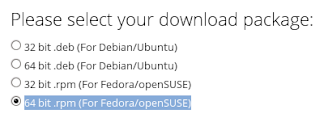
4. click on the accept and install button and wait for download to finish
5. open terminal
6. su -
7. yum install -y /home/**user**/Downloads/google-chrome-stable_current_x86_64.rpm
8. wait for download to complete and install itself (35mb+ download)
Wednesday, February 11, 2015
HowTo Delete files in Fedora 18
Method 1:
- right click on a file / folder and select Move to Trash
- right click on the trash and select Empty Trash
Method 2:
- click on a file / folder and press ctrl+delete
- right click on the trash and select Empty Trash
Method 3:
- click on a file / folder and press shift+delete
Read more »
- right click on a file / folder and select Move to Trash
- right click on the trash and select Empty Trash
Method 2:
- click on a file / folder and press ctrl+delete
- right click on the trash and select Empty Trash
Method 3:
- click on a file / folder and press shift+delete
Tuesday, February 10, 2015
Fedora 18 and mount cifs not mounting windows share
If you are having problem mounting a window share in Fedora 18, saying "Permission Denied" just like the one below:
[root@localhost ~]# mount.cifs //192.168.0.50/customer /ian -o user=administrator
Password for administrator@//192.168.0.50/customer: ***
mount error(13): Permission denied
Refer to the mount.cifs(8) manual page (e.g. man mount.cifs)
Try this solution: (add sec=ntlm on the option)
Read more »
[root@localhost ~]# mount.cifs //192.168.0.50/customer /ian -o user=administrator
Password for administrator@//192.168.0.50/customer: ***
mount error(13): Permission denied
Refer to the mount.cifs(8) manual page (e.g. man mount.cifs)
Try this solution: (add sec=ntlm on the option)
Subscribe to:
Posts (Atom)