Showing posts with label howto. Show all posts
Showing posts with label howto. Show all posts
Friday, February 13, 2015
HowTo Fix Pango WARNING failed to create cairo scaled font
Problem:
I encountered this problem on newly installed and updated Fedora 20

Pango-WARNING **: failed to create cairo scaled font, expect ugly output. the offending font is Arial Bold 19.53125 at /usr/lib64/perl5/vendor_perl/dpm/canvas_module.pm line 253.
Pango-WARNING **: font_face status is: out of memory at /usr/lib64/perl5/vendor_perl/dpm/canvas_module.pm line 253.
Pango-WARNING **: scaled_font status is: out of memory at /usr/lib64/perl5/vendor_perl/dpm/canvas_module.pm line 253.
Pango-WARNING **: shaping failure, expect ugly output. shape-engine=BasicEngineFc, font=Arial Bold 19.53125, text= 3R at /usr/lib64/perl5/vendor_perl/dpm/canvas_module.pm line 253.
Solution:
1. open terminal
2. su -
3. chmod -Rf 777 /usr/share/fonts/*
4. Tada! Everything should be fixed now!
Read more »
I encountered this problem on newly installed and updated Fedora 20
Pango-WARNING **: font_face status is: out of memory at /usr/lib64/perl5/vendor_perl/dpm/canvas_module.pm line 253.
Pango-WARNING **: scaled_font status is: out of memory at /usr/lib64/perl5/vendor_perl/dpm/canvas_module.pm line 253.
Pango-WARNING **: shaping failure, expect ugly output. shape-engine=BasicEngineFc, font=Arial Bold 19.53125, text= 3R at /usr/lib64/perl5/vendor_perl/dpm/canvas_module.pm line 253.
Solution:
1. open terminal
2. su -
3. chmod -Rf 777 /usr/share/fonts/*
4. Tada! Everything should be fixed now!

HowTo Logout in Fedora 18
Step 1:
Read more »
open terminal
Step 2:
type the following and press enter
gnome-session-quit
Thursday, February 12, 2015
HowTo Install Google Chrome in Fedora 18
This is for fresh installed Fedora 18 64bit using Live CD
1. go to https://www.google.com/chrome
2. click on the download chrome button

3. select the correct architecture for your installation (mine is 64 bit .rpm (For Fedora/openSUSE))
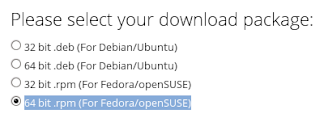
4. click on the accept and install button and wait for download to finish
5. open terminal
6. su -
7. yum install -y /home/**user**/Downloads/google-chrome-stable_current_x86_64.rpm
8. wait for download to complete and install itself (35mb+ download)
Wednesday, February 11, 2015
HowTo Delete files in Fedora 18
Method 1:
- right click on a file / folder and select Move to Trash
- right click on the trash and select Empty Trash
Method 2:
- click on a file / folder and press ctrl+delete
- right click on the trash and select Empty Trash
Method 3:
- click on a file / folder and press shift+delete
Read more »
- right click on a file / folder and select Move to Trash
- right click on the trash and select Empty Trash
Method 2:
- click on a file / folder and press ctrl+delete
- right click on the trash and select Empty Trash
Method 3:
- click on a file / folder and press shift+delete
Subscribe to:
Posts (Atom)