Showing posts with label install. Show all posts
Showing posts with label install. Show all posts
Monday, February 16, 2015
Turbo C for Windows XP How to Download and Install
Hello friends, after enjoying the festival of diwali I am back again to write something for you. Many visitors asked me that from where they can download turbo c++ for windows xp. So i thought that i should do something to help them. In this post i am giving you the link to download the compiler and step by step guide to install it.
- Click Here to Download Turbo C++ for Windows XP -
Also Read: Download Turbo C++ for Windows 8 for Free
Also Read: Download Borland C++ Compiler For Free
Also Read: Download Borland C++ Compiler For Free
How to Install Turbo C++ for Windows Xp
1. First of all download the compiler from the link given above.
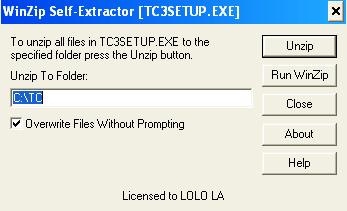
2. Now extract the zip file and than open TC3SETUP.
3. After that click on Unzip. You can also change the path where you want to install it.
4. By default it is installed in C:TC.
5. You have done!! Please share and like it.

Thursday, February 12, 2015
HowTo Install Google Chrome in Fedora 18
This is for fresh installed Fedora 18 64bit using Live CD
1. go to https://www.google.com/chrome
2. click on the download chrome button

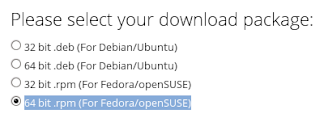
3. select the correct architecture for your installation (mine is 64 bit .rpm (For Fedora/openSUSE))
4. click on the accept and install button and wait for download to finish
5. open terminal
6. su -
7. yum install -y /home/**user**/Downloads/google-chrome-stable_current_x86_64.rpm
8. wait for download to complete and install itself (35mb+ download)
Subscribe to:
Posts (Atom)