Showing posts with label tutorials. Show all posts
Showing posts with label tutorials. Show all posts
Thursday, February 5, 2015
Advance HTML5 CSS3 Tutorials in Urdu Hindi

HTML5 & CSS3 Techniques Start The New Standard With Endless Possibilities And With a Responsive Design It is Easily Usable With Any Device {Desktop, Tablet, Mobile Phone} Without Removing Any Content. Mostly Professional Business or Portfolio Websites are Know Using The Latest "HTML5 & CSS3" Trends 4 Develoment...
HTML5 & CSS3 is Popular Language Amongst Web Designers Because It is Being Supported By The Most Of The Modern Browsers. The Popularity of "HTML5" is Going Higher and Higher, So We Are Presenting Big List of "HTML5 & CSS3" Web Design Examples in this Tutorials. This Is a Collection of Beatiful and Inspiring WEB DESIGNS That Featured Only HTML5 & CSS3 Wabsites For Your Inspiration.
Here is the Complete Video Course of HTML & CSS3 in Urdu and Hindi. This is a Playlist of Videos Straight From Youtube, So You Can Watch All The Videos By Playing only the First one!!!

How to Create an Account on Facebook Instructions Guides Tips and Training Video Tutorials
If you want to learn how to create an account on Facebook and youre looking for resources about Facebook - instructions, guides, tips, and training - check out these free Facebook video tutorials below. These are from the Facebook Essential Training Course by lynda.com. It will teach you the basics of creating an account on Facebook and managing it. It has topics on: finding and adding friends, liking pages, reading the News Feed, writing on a friend’s wall, updating your status, posting videos and links, creating a page for a business, protecting privacy and staying secure, deactivating an account, and more. Check out the free videos below to see start learning. To view the entire course, become a lynda.com member or sign up for a FREE 7-day trial.

 or
or 
or
or
Read more »
Facebook Essential Training by 
START LEARNING TODAY!
or WATCH THESE 5 FREE VIDEOS FROM THE COURSE
Facebook Essential Training - Welcome
Facebook Instructions - Changing your profile photo
Facebook Instructions - Understanding your News Feed
Facebook Instructions - Uploading videos
Facebook Instructions - Adding, removing, and blocking friends from your Chat list
Facebook Instructions - Changing your profile photo
Facebook Instructions - Understanding your News Feed
Facebook Instructions - Uploading videos
Facebook Instructions - Adding, removing, and blocking friends from your Chat list
START LEARNING TODAY!
or Course Information
Training Provider: Lynda.com
Title: Facebook Essential Training
Author: Garrick Chow
Duration: 3hrs 10mins
Date of release: 10 May 2011
Chapter 1: What Is Facebook?
Understanding Facebook and social networking
Chapter 2: Signing Up and Creating a Profile
Signing up with Facebook
Editing your profile
Changing your profile photo
Configuring your notifications
Chapter 3: Finding and Adding Friends
Understanding Facebook friends
Finding friends, family, and coworkers
Managing friend requests
Organizing friends into lists
Removing and blocking friends
Liking pages
Whats "poking"?
Chapter 4: Your Home Page and Your Wall
Understanding the home page
Understanding your News Feed
Understanding your Wall
Writing on a friends Wall
Chapter 5. Updating Your Status and Sharing
Content
Updating your status
Posting photos, videos, and links
Writing Notes
Tagging friends
Chapter 6: Managing Photos and Videos
Uploading photos and creating albums
Uploading videos
Tagging, editing, and deleting photos
Chapter 7: Sending and Receiving Private Messages
Sending private messages
Reading, replying to, and deleting private messages
Setting privacy for private messages
Chapter 8: Chatting
Displaying the Chat list and chatting with friends
Adding, removing, and blocking friends from your Chat list
Disabling Chat
Chapter 9: Searching Facebook
Searching for people
Searching for content
Editing your public search listing
Chapter 10: Facebook Groups
Searching for and joining groups
Creating and administering a group
Posting content to a group
Chapter 11: Facebook Applications
Understanding applications
Accepting, ignoring, and removing application requests
Installing and using applications
Viewing application settings and uninstalling applications
Chapter 12: Creating a Page for Your Business
Creating a page for your business, band, or organization
Assigning other people as administrators for your page
Using your page identity to post and comment on other peoples pages
Setting up a user name for your page
Chapter 13: Protecting Your Privacy and
Staying Secure
Choosing what to share publicly
Configuring sharing
Using https to log in
Using one-time passwords
Signing out remotely
Recognizing new devices accessing your account
Chapter 14: Taking a Break from Facebook
Downloading your information
Deactivating your account
Deleting your account
Training Provider: Lynda.com
Title: Facebook Essential Training
Author: Garrick Chow
Duration: 3hrs 10mins
Date of release: 10 May 2011
Chapter 1: What Is Facebook?
Understanding Facebook and social networking
Chapter 2: Signing Up and Creating a Profile
Signing up with Facebook
Editing your profile
Changing your profile photo
Configuring your notifications
Chapter 3: Finding and Adding Friends
Understanding Facebook friends
Finding friends, family, and coworkers
Managing friend requests
Organizing friends into lists
Removing and blocking friends
Liking pages
Whats "poking"?
Chapter 4: Your Home Page and Your Wall
Understanding the home page
Understanding your News Feed
Understanding your Wall
Writing on a friends Wall
Chapter 5. Updating Your Status and Sharing
Content
Updating your status
Posting photos, videos, and links
Writing Notes
Tagging friends
Chapter 6: Managing Photos and Videos
Uploading photos and creating albums
Uploading videos
Tagging, editing, and deleting photos
Chapter 7: Sending and Receiving Private Messages
Sending private messages
Reading, replying to, and deleting private messages
Setting privacy for private messages
Chapter 8: Chatting
Displaying the Chat list and chatting with friends
Adding, removing, and blocking friends from your Chat list
Disabling Chat
Chapter 9: Searching Facebook
Searching for people
Searching for content
Editing your public search listing
Chapter 10: Facebook Groups
Searching for and joining groups
Creating and administering a group
Posting content to a group
Chapter 11: Facebook Applications
Understanding applications
Accepting, ignoring, and removing application requests
Installing and using applications
Viewing application settings and uninstalling applications
Chapter 12: Creating a Page for Your Business
Creating a page for your business, band, or organization
Assigning other people as administrators for your page
Using your page identity to post and comment on other peoples pages
Setting up a user name for your page
Chapter 13: Protecting Your Privacy and
Staying Secure
Choosing what to share publicly
Configuring sharing
Using https to log in
Using one-time passwords
Signing out remotely
Recognizing new devices accessing your account
Chapter 14: Taking a Break from Facebook
Downloading your information
Deactivating your account
Deleting your account
About Lynda.com
Lynda.com is an online video training provider with over 1000 courses covering a wide array of topics - 3D, video, business, the web, graphic design, programming, animation, photography, and more. They produce top quality video tutorials with the best industry experts as your instructors. With a subscription, you can log-in at any time, and learn at your own pace. New courses are added each week, and you will receive a certificate of completion for each course that you finish.
Start learning today!
If you enjoyed the sample videos above and want to access the entire Facebook Essential Training course, you can sign up for a lynda.com membership. Your membership will allow you to access not only this course, but also the entire lynda.com library for as low as $25 for 1-month. Their training library has over 1000 courses with 50,000+ video tutorials. No long-term commitment required. You can cancel your membership at any time.
Not yet convinced? Try a FREE 7-day trial.
As a special promotion, visitors of this site can get a FREE 7-day trial to lynda.com. This free trial gives you access to their entire training library of over 1000 courses.
Sign-up for a lynda.com membership today to learn how to how to create an account on Facebook and to view all the Facebook instructions, guides, and Tips from this excellent video training course.Lynda.com is an online video training provider with over 1000 courses covering a wide array of topics - 3D, video, business, the web, graphic design, programming, animation, photography, and more. They produce top quality video tutorials with the best industry experts as your instructors. With a subscription, you can log-in at any time, and learn at your own pace. New courses are added each week, and you will receive a certificate of completion for each course that you finish.
Start learning today!
If you enjoyed the sample videos above and want to access the entire Facebook Essential Training course, you can sign up for a lynda.com membership. Your membership will allow you to access not only this course, but also the entire lynda.com library for as low as $25 for 1-month. Their training library has over 1000 courses with 50,000+ video tutorials. No long-term commitment required. You can cancel your membership at any time.
Not yet convinced? Try a FREE 7-day trial.
As a special promotion, visitors of this site can get a FREE 7-day trial to lynda.com. This free trial gives you access to their entire training library of over 1000 courses.
START LEARNING TODAY!
or Tuesday, February 3, 2015
Downgrade iPhone or iPad with Shsh blobs Tutorials
How to Downgrade or Restore iPhone ,iPad via saved Shsh Blobs .
Step by Step Tutorial for newbies.
First of all keep it in mind, that you cannot downgrade or restore your iPhone and iPad on previous version while new IOS versions are available This method is not applicable on IOS 7 .If you have not update your iphone or iPad on IOS 7 until , you can use this method of restoration . Officially 4.1 and 6.3 IOS version are available to restore your devices by Apple. If you want to restore between theses version then you have to be lucky enough to saved SHSH blobs on Cydia server. Otherwise there is no chance to install any IOS between 4.1 & 6.3(like 4.3.5, 5.0,5.0.1,5.1.1).The benefit of staying on these IOS is, Jailbreaking. Before installation you must have Latest version of iTunes installed in your Computer to do the following procedure .Step by Step Tutorial for newbies.
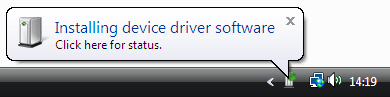
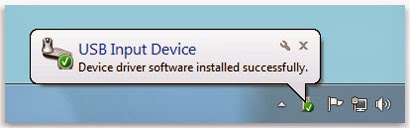
Connect iphone with computer and wait for drivers to install.
Download TinyUmbrella latest version .
Download latest version of TU

Open TinyUmbrella and find your device as connected device

Now click on save SHSH and then click on LOG

You will see list of saved Shsh blobs like pointing in Image. Does in green means blobs saved. When you Click on Save Shsh available blogs automatically save in .shsh folder located in

This process is called locally saved blobs .Now this is time to play .
Open SnowBreeze
Download Latest version if you dont have it


Click Next


At the end, snowbreeze automatically open iReb and guide you to put your device in DFU mode. see the instruction and put your iPhone or iPad in DFU mode. If you succeeded to follow the DFU procedure you device should be turn black . The other method to put your iphone or iPad in DFU mode you can use latest version of Redsnow as well .
Open iTunes a message will appear Found device in Recovery mode. Press and hold shift button and click on Restore . A pop up window will open , select IOS which you have stitched recently on desktop . iTunes will verify restore from Apple server , a bar will be start running on iTunes and your iPhone or iPad as well. Wait for both bar to complete . Restore done. Now your iPhone will show activation screen. If you have factory unlock iPhone , iTunes will automatically activate your iPhone but if not then you have to Jailbreak your iPhone with the help of Redsnow. (iPad, iPod does not stuck on activation screen beside of IOS 7)Open Redsnow and jailbreak and unlock your iPhone by updating ultrasn0w.
Author : Ahtisham Zaheer
Monday, February 2, 2015
Complete JavaScript Video Tutorials in Urdu Hindi Free


JavaScript is very awesome scripting language which is used to add interactivity in HTML pages, we can use it with two different common methods, Internally & Externally. Internally we Use JavaScript in HTML with <script> tag. and also we can use it as by external source. If we are using it as external source then we create a separate file for JavaScript codes and its extension is JavaScript is specifically used to validate data in HTML elements. It can be used anywhere in the HTML document. but if you use it in Head tag then the browser will read it first and will display the coding of JavaScript earlier than HTML elements. JavaScript is supported by all major browsers. As JavaScript is a client side scripting language, but with JQuery it can be connected with a server to execute PHP data or perform similar operations.
How to Learn Basic JavaScript in Urdu Video Tutorial?
As Tahir Khan Dawar is struggling hard to present courses Online in Urdu & Hindi and with high quality videos, you can see my efforts which are improving day by day. I deeply check the courses I have been publishing on this blog and I try to find the mistakes and errors I made. But Inshallah in the future this blog will be the largest place of computer courses in Urdu an Hindi... So JavaScript basic Video Training can be watched in below videos which is a Playlist and you just need to play it once, other videos will be started automatically. Stay Connected!
JavaScript Complete Tutorial (19 Videos)
Note: All videos are hosted on YouTube.com, so if you are in Pakistan then first open YouTube and then watch these videos.
Saturday, January 31, 2015
Dreamweaver Complete Tutorials in Urdu Hindi

Dreamweaver has become one of the industrys leading Web site design editing and management tool. This course is designed for students who wish to evaluate the Dreamweaver Web design tool or who would like to learn to use it. The emphasis is on learning to use Dreamweaver as a tool to create a Web site, rather than on learning the basic concepts of Web design and we move very quickly. However, all questions about basic Web design concepts will be answered.
Important First Considerations:
If you are new to Dreamweaver it is important to understand the use of the term site. Dreamweaver makes reference to two sites:
1: Remote Site - This is the folder or directory which contains all of your web pages and other files on the web server. It is the place to which you upload. If you school does not yet have a web page the folder or directory will be empty. However, as soon as you are given a username and password by the site webmaster, you have a remote site - your empty folder or directory.
2: Local Folder - This is the folder or directory which contains all of your web pages and other files on your computer. Dreamweaver also refers to this folder as a site.
Plan your Local Site:
1: Your first step in using Dreamweaver to build your site is to create a directory or folder. Plan to store all documents related to your site in the same directory; images, web pages, and any other documents that will be posted on your remote site.
2: Before going any further, create a directory or folder on the computer you will be using most often to update your web site. Create a sub-directory for your images. Now you are ready to " define your site ."
Video Tutorials for learning Dreamweaver:-
Here is the complete course of Dreamweaver. This is a playlist of videos straight from my YouTube channel, so you can watch all the videos by playing only the first one. This course is with full sorting, so you can watch the videos in order.
Dreamweaver CS3 (60 Videos)
Dreamweaver CS5 (62 Videos)
Dreamweaver CS6 (64 Videos)
Note: all videos are hosted on YouTube.com, so if you are in Pakistan then first open YouTube and then watch these videos, however, I’m trying to upload the videos to any other site so you’ll be able to watch all of them here.
How to Recover Data in Urdu Hindi Tutorials

 DATA RECOVERY
 The history of DATARECOVERY dates from 1991, when we first applied our experience with data processing toward the recovery of digital data. Subsequently, the growing demand for such ability led to the commitment of our services to data analysis, processing and recovery.
 Data Recovery is not an easy task. Recovering critical data is a dedicated process that requires the right software, hardware and advanced methods in the hands of right recovery engineers. In order to save yourself from the problem of data lost, you must keep a backup of your important data. Backing up is the process of making and keeping copies of data at a desired destination, which may be used to restore the original in case of mishap of data loss. You should always keep multiple copies of files in data storage, so that if your original copy gets lost or damaged then you can easily get back your important file from backup.
Data loss may occur due to various reasons:
Accidentally deletion of files and folders
Human error
Physical damage of hard drive
Virus attack
System failure
Data is stored in Hard disk, an essential part of a computer system, which is also called HDD, Disk Drive, Hard Drive etc. If your hard disk is damaged, you will lose your data and you are left with one choice, that is, to repair the hard drive by de-fragmenting the operating system. It is possible that due to de-fragmentation some files gets overwritten and your problem may get higher. So, you need to be very careful. Data recovery software is an incomparable option in such a case. Hard drive recovery software can be used to perform recovery of data from any type of failure of hard drive such as crashed, damaged, corrupted, deleted, formatted and many more complex failures.
The experts of Hard drive data recovery will decide whether the problem is physical, logical or both. Physical problem occur in the hardware and logical problem occur on software configuration. Once it is decided that problem is physical then the accessibility of solution will be determined. If the hard drive data recovery experts obtain access to the drive, then they will create a sector by sector mirror image of the hard disk to their equipment where the process will continue. An assessment of the condition of the data structure will follow, as well as the identification of how much of the information is retrievable. When the hard drive data recovery assessment process is done, the results of the hard drive data recovery will be given.

Monday, January 26, 2015
Complete C Video Tutorials in Urdu Hindi


C++ is a high-level programming language that was developed in the mid-1970s. It was originally used for writing Unix programs, but is now used to write applications for nearly every available platform. Compared to most previous languages, C is easier to read, more flexible (can be used for a wide variety of purposes), and more efficient at using memory.
C++, pronounced "C plus plus," is a programming language that was built off the C language. The syntax of C++ is nearly identical to C, but it has object-oriented features, which allow the programmer to create objects within the code. This makes programming easier, more efficient, and some would even say, more fun. Because of the power and flexibility of the language, most software programs today are written in C++.
Here is the Two Different Complete Courses of C++ which contains more than 30 videos and more videos will be added in coming days. This is a playlist of videos straight from my YouTube channel, so you can watch all the videos by playing only the first one. This course is with full sorting, so you can watch the videos in order.
Complete Tutorial (11 Videos)
Complete Tutorial (36 Videos)
Note: All videos are hosted on YouTube.com, so if you are in Pakistan then first open YouTube and then watch these videos.
New JavaScript jQuery Complete Tutorials in Urdu Hindi

JavaScript is one of the greatest and powerful client side scripting language which is used massively these days in web applications. Whether you want to create an HTML+CSS site or you want to create a dynamic site using PHP, all you’ll need to use JavaScript in some or many parts of your projects. JavaScript does many jobs which other languages including PHP & ASP even can’t do. This language changes your static site to a dynamic site within seconds using few line of codes.
I earlier published a basic course of JavaScript in Urdu and that includes only the basic concepts. However, today I’ve a complete new improved JS course for you, in which you’ll learn many more things. Along with JS I’ve also including its library jQuery and the DOM (Document Object Model). So you’ll come to know about the most important working components of JS. You’ll also come to know about other similar languages to JS. The BOM (Browser Object Model) is also included into his course.
What does Really JavaScript & jQuery do?
javascript can validate HTML forms before they are submitted to a web server(it saves extra server requests), JavaScript can be used to react on a page when a visitor clicks an HTML element, when a visitor enters to a page, when a visitor leaves a page and so on. JavaScript can also be used to save visitors’ information in your server, it can detect the visitor’s information such as the IP address, the browser, the location etc. In JS we can create pop up boxes and pop up windows. There are many things more we can do using JS.
While jQuery is very beautiful library of JS, which is used to do the big tasks with less codes, you can create image sliders using jQuery, you can create image galleries in jquery, you can make video galleries in jQuery and there are many things you can do using jQuery.
Video Tutorials for learning JavaScript & jQuery:-
Here is the complete course of JavaScript which contains more than 30 videos and more videos will be added in coming days. This is a playlist of videos straight from my YouTube channel, so you can watch all the videos by playing only the first one. This course is with full sorting, so you can watch the videos in order.
Note: All videos are hosted on YouTube.com, so if you are in Pakistan then first open YouTube and then watch these videos.
Subscribe to:
Posts (Atom)