Showing posts with label iphone. Show all posts
Showing posts with label iphone. Show all posts
Sunday, February 15, 2015
iPhone 5s Minimal Gold PSD
.jpg "iPhone 5s Minimal Gold PSD")
Free Download iPhone 5s Minimal Gold PSD. Feel free to use this iPhone 5s Minimal psd. Enjoy!
Type : PSD
Category : Mockups
License : Free
Author : Dribbble
Download

iPhone 5C Flat Mockup PSD
.jpg "iPhone 5C Flat Mockup PSD")
Free Download iPhone 5C Flat PSD Mockup. We have included both horizontal and vertical variation to help you showcase your next project with a flat looking iPhone 5C mobile device. Enjoy!
Type : PSD
Category : Mockups
License : Free
Author : Pixeden
Download
Thursday, February 12, 2015
iPhone 5 PSD Mockup
.jpg "iPhone 5 PSD Mockup")
Free Download iPhone 5 Mockup PSD. Our iPhone 5 vector mockup template is a fully-scalable vector shape iPhone 5 psd. Enjoy!
Type : PSD
Category : Mockups
License : Free
Author : Pixeden
Download
Tuesday, February 3, 2015
Downgrade iPhone or iPad with Shsh blobs Tutorials
How to Downgrade or Restore iPhone ,iPad via saved Shsh Blobs .
Step by Step Tutorial for newbies.
First of all keep it in mind, that you cannot downgrade or restore your iPhone and iPad on previous version while new IOS versions are available This method is not applicable on IOS 7 .If you have not update your iphone or iPad on IOS 7 until , you can use this method of restoration . Officially 4.1 and 6.3 IOS version are available to restore your devices by Apple. If you want to restore between theses version then you have to be lucky enough to saved SHSH blobs on Cydia server. Otherwise there is no chance to install any IOS between 4.1 & 6.3(like 4.3.5, 5.0,5.0.1,5.1.1).The benefit of staying on these IOS is, Jailbreaking. Before installation you must have Latest version of iTunes installed in your Computer to do the following procedure .Step by Step Tutorial for newbies.
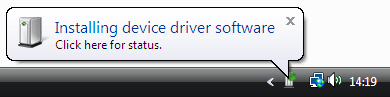
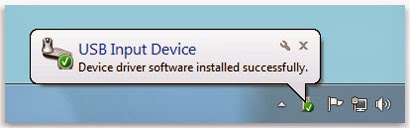
Connect iphone with computer and wait for drivers to install.
Download TinyUmbrella latest version .
Download latest version of TU

Open TinyUmbrella and find your device as connected device

Now click on save SHSH and then click on LOG

You will see list of saved Shsh blobs like pointing in Image. Does in green means blobs saved. When you Click on Save Shsh available blogs automatically save in .shsh folder located in

This process is called locally saved blobs .Now this is time to play .
Open SnowBreeze
Download Latest version if you dont have it


Click Next


At the end, snowbreeze automatically open iReb and guide you to put your device in DFU mode. see the instruction and put your iPhone or iPad in DFU mode. If you succeeded to follow the DFU procedure you device should be turn black . The other method to put your iphone or iPad in DFU mode you can use latest version of Redsnow as well .
Open iTunes a message will appear Found device in Recovery mode. Press and hold shift button and click on Restore . A pop up window will open , select IOS which you have stitched recently on desktop . iTunes will verify restore from Apple server , a bar will be start running on iTunes and your iPhone or iPad as well. Wait for both bar to complete . Restore done. Now your iPhone will show activation screen. If you have factory unlock iPhone , iTunes will automatically activate your iPhone but if not then you have to Jailbreak your iPhone with the help of Redsnow. (iPad, iPod does not stuck on activation screen beside of IOS 7)Open Redsnow and jailbreak and unlock your iPhone by updating ultrasn0w.
Author : Ahtisham Zaheer
Thursday, January 29, 2015
Developing iPhone Games Using Flash CS5 iPhone Game Development Course
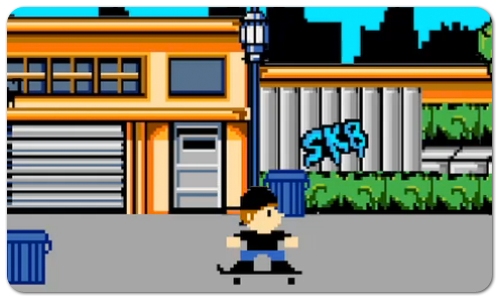
Interested in developing iPhone games using Flash CS5? Then check out this iPhone game development course from lynda.com. The course is entitled Flash Professional CS5: Creating a Simple Game for iOS Devices, and you will find some sample videos below. The course covers the game development from start to finish, including planning and preparation, character and background animation, creating interactions and scoring mechanism, and finally testing and publishing the app. If you like the free video tutorials below and would like to view the entire course, then you can sign up for a lynda.com membership or get a free 7-day trial.
 or
or 
or
or
Read more »
Flash Professional CS5: Creating a Simple Game for iOS Devices by 
START LEARNING TODAY!
or WATCH THESE FREE VIDEOS FROM THE COURSE
Flash Professional CS5: Creating a Simple Game for iOS Devices - Welcome
Reviewing the finished game - Developing iPhone Games using Flash CS5 | iPhone Game Development Course
Making the character move - Developing iPhone Games using Flash CS5 | iPhone Game Development Course
Reviewing the finished game - Developing iPhone Games using Flash CS5 | iPhone Game Development Course
Making the character move - Developing iPhone Games using Flash CS5 | iPhone Game Development Course
START LEARNING TODAY!
or Course Information
Training Provider: Lynda.com
Title: Flash Professional CS5: Creating a Simple Game for iOS Devices
Author: Todd Perkins
Duration: 2hrs 8mins
Date of release: 25 Feb 2011
Chapter 1: Planning and Preparing the Game
Reviewing the finished game
Optimizing assets
Planning gameplay and viewing class structure
Viewing the FLA file
Chapter 2: Controlling Character Movement
Making the character move
Adding accelerometer support
Making the character jump
Simulating a finger swipe
Adding sound effects
Chapter 3: Creating Animated Background Elements
Creating a reusable Mover class
Linking the Mover class to the parallax elements
Looping background animations
Chapter 4: Adding Obstacles and Scoring
Creating a reusable Obstacle class
Detecting collisions with the player
Ending the game when the player bails
Using a timer to create trash cans
Calculating points and deleting unused objects
Using a shared object to save a high score
Increasing scrolling speed as gameplay progresses
Chapter 5: Testing, Debugging, and Publishing Your Game
Acquiring testing certificates and provisioning profiles
Troubleshooting performance issues
Finalizing code, adding an icon graphic, and setting a loading graphic
Publishing the final version of the app
Testing on your iOS device
Submitting the app to Apple for release in the App Store
Training Provider: Lynda.com
Title: Flash Professional CS5: Creating a Simple Game for iOS Devices
Author: Todd Perkins
Duration: 2hrs 8mins
Date of release: 25 Feb 2011
Chapter 1: Planning and Preparing the Game
Reviewing the finished game
Optimizing assets
Planning gameplay and viewing class structure
Viewing the FLA file
Chapter 2: Controlling Character Movement
Making the character move
Adding accelerometer support
Making the character jump
Simulating a finger swipe
Adding sound effects
Chapter 3: Creating Animated Background Elements
Creating a reusable Mover class
Linking the Mover class to the parallax elements
Looping background animations
Chapter 4: Adding Obstacles and Scoring
Creating a reusable Obstacle class
Detecting collisions with the player
Ending the game when the player bails
Using a timer to create trash cans
Calculating points and deleting unused objects
Using a shared object to save a high score
Increasing scrolling speed as gameplay progresses
Chapter 5: Testing, Debugging, and Publishing Your Game
Acquiring testing certificates and provisioning profiles
Troubleshooting performance issues
Finalizing code, adding an icon graphic, and setting a loading graphic
Publishing the final version of the app
Testing on your iOS device
Submitting the app to Apple for release in the App Store
About Lynda.com
Lynda.com is an online video training provider with over 1000 courses covering a wide array of topics - 3D, video, business, the web, graphic design, programming, animation, photography, and more. They produce top quality video tutorials with the best industry experts as your instructors. With a subscription, you can log-in at any time, and learn at your own pace. New courses are added each week, and you will receive a certificate of completion for each course that you finish.
Start learning today!
If you enjoyed the sample videos above and want to access the entire Flash Professional CS5: Creating a Simple Game for iOS Devices course, you can sign up for a lynda.com membership. Your membership will allow you to access not only this course, but also the entire lynda.com library for as low as $25 for 1-month. Their training library has over 1000 courses with 50,000+ video tutorials. No long-term commitment required. You can cancel your membership at any time.
Not yet convinced? Try a FREE 7-day trial.
As a special promotion, visitors of this site can get a FREE 7-day trial to lynda.com. This free trial gives you access to their entire training library of over 1000 courses.
Cant wait to start developing iPhone games using Flash CS5? Then become a lynda.com member today to watch this entire Flash CS5 iPhone game development course. Your membership also gives you access to the entire lynda.com library of over 1000 courses.Lynda.com is an online video training provider with over 1000 courses covering a wide array of topics - 3D, video, business, the web, graphic design, programming, animation, photography, and more. They produce top quality video tutorials with the best industry experts as your instructors. With a subscription, you can log-in at any time, and learn at your own pace. New courses are added each week, and you will receive a certificate of completion for each course that you finish.
Start learning today!
If you enjoyed the sample videos above and want to access the entire Flash Professional CS5: Creating a Simple Game for iOS Devices course, you can sign up for a lynda.com membership. Your membership will allow you to access not only this course, but also the entire lynda.com library for as low as $25 for 1-month. Their training library has over 1000 courses with 50,000+ video tutorials. No long-term commitment required. You can cancel your membership at any time.
Not yet convinced? Try a FREE 7-day trial.
As a special promotion, visitors of this site can get a FREE 7-day trial to lynda.com. This free trial gives you access to their entire training library of over 1000 courses.
START LEARNING TODAY!
or
Subscribe to:
Posts (Atom)